A tiny Tcl server
Richard Suchenwirth 2008-09-10 - The following is a very simple webserver that provides a HTML page with an entry field and a "Go" button. When you type a Tcl command into the entry and hit <Return> or the "Go" button, the command is evaluated in the server, and its result reported back to the client.
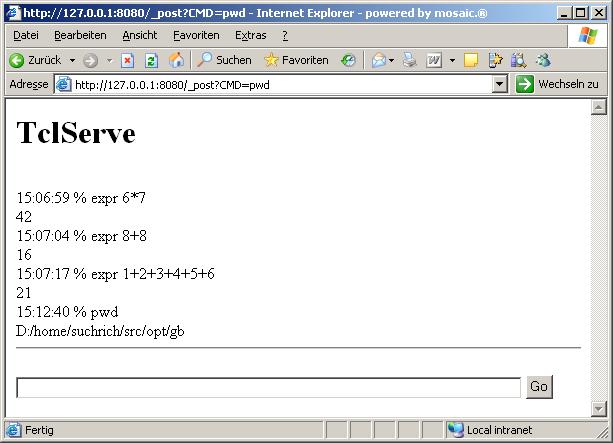
Very simple, no safety precautions taken at all, so handle with care. But it might for instance be a starting point to interact with Tcl on a cell phone which has a browser...
 proc main argv {
    set port 8080
    set ::buffer ""
    socket -server accept $port
    puts waiting...$port
    vwait forever
 }
 proc accept {socket adr port} {
    fileevent $socket readable [list webui_go $socket]
 }
 proc webui_go sock {
    global buffer
    set now [clock format [clock sec] -format %H:%M:%S]
    set query ""
    while 1 {
        gets $sock line
        lappend query $line
        if {$line eq ""} break
    }
    set cmd ""
    regexp {GET /_post\?CMD=(.+) HTTP} [lindex $query 0] -> cmd
    set cmd [unescape [string map {+ " "} $cmd]]
    catch {uplevel \#0 $cmd} res
    lappend ::buffer "$now % $cmd" $res
    puts $sock "HTTP/1.0 200 OK"
    puts $sock "Content-Type: text/html\n"
    puts $sock "<html><head><h1>TclServe</h1>"
    foreach line $::buffer {
        puts $sock <br>$line
    }
    puts $sock "<hr/><form id='cpost' action='/_post' method='get'>
    <input id='cmsg' name='CMD' size='80' value='' />
    <input type='submit' value='Go' /></form>"
    close $sock
 }
 proc unescape str {
    regsub -all {%(..)} [string map {+ " "} $str] {\u00\1} str
    subst $str
 }
 main $argv
RS 2008-09-23: Tested to work with eTcl Windows Mobile 2003 cellphone too, locally, with Pocket IE pointed at http://127.0.0.1:8080/ . But I couldn't reach that URL from desktop at work.
Lectus It's amazing how Tcl can make complex things so simple!