Gnocl Icon Catalogue
WJG (18/10/18) Any Linux distro will contain a wide range of icons installed not only by default, but also the applications which may have been installed by a user. This simple Gnocl script shows how to display the various categories of icon in a tabbed notebook. Here's what it looks like running.
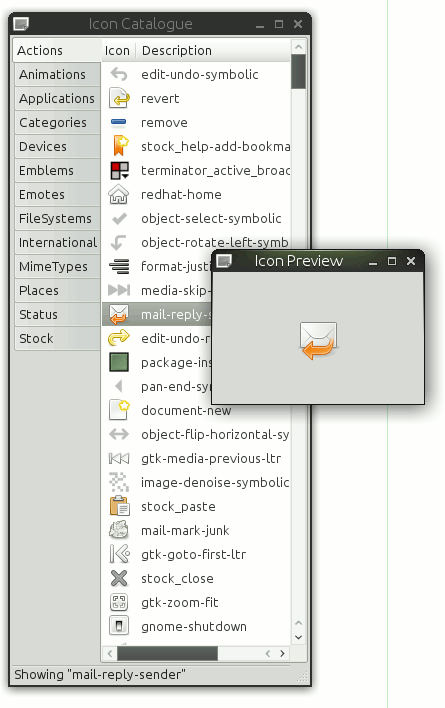
Anyone familiar with Gnocl will notice that in this script widgets are accessed via their names rather than registred widget-ids. This removes the need for global variables or accessing widgets in the global namespace. It does mean, that unique names have to be defined.
#!/bin/sh
# the next line restarts using tclsh \
exec tclsh "$0" "$@"

package require Gnocl


proc stock {lst } {

  set stockItems [lsort [gnocl::info allStockItems] ]
  foreach item $stockItems {
    # trap non-existing icons
    if { [catch { $lst add [list [list %#$item $item ]] }] } {
        $lst cellConfigure end 1 -value $item -visible 1
    }
  }

}

proc main {} {
  gnocl::vBox -name container
  gnocl::statusBar -name status
  gnocl::notebook -name nb -tabPosition left -tabAlign left

  [container] add [nb] -fill 1 -expand 1
  [container] add [status]

  gnocl::window -child [container] -title "Icon Catalogue" -width 300 -height 650 -name win -visible 0
  win centre
  win configure -visible 1

  [status] push "Searching for installed icons..."
  gnocl::update

  set i 0

  foreach context [lsort [gnocl::iconTheme contexts]] {

        [status] push "Searching $context"

        gnocl::update

        gnocl::list -name lst($i) \
                -titles {"Icon" "Description"} \
                -types {image string} \
                -onSelectionChanged {
                        [status] push "Showing \"[%w get [%w getSelection] 1 ]\""
                        preview-icon [%w get [%w getSelection] 1 ]
                        }

        nb addPage [lst($i)] $context

        if { $context == "Stock" }  { stock [lst($i)] ; continue }

        foreach item [gnocl::iconTheme icons -context $context] {

                if { [catch { [lst($i)] add [list [list %&$item $item ]] }] } {
                        [lst($i)] cellConfigure end 1 -value $item -visible 1
                }

        }
        incr i
 }

 [status] push "Click icon to display."

 gnocl::window -title "Icon Preview" -child [gnocl::image -name preview -image %&emblem-web -scale 2] -setSize 0.125

}

proc preview-icon {item} {
        set pb [gnocl::pixBuf load -icon $item -size 200]
        preview configure -image %?$pb
}

main