How to manage windows in TCL-TK
- Index for Manage Windows ...
- Trial Run Editor with Multiple Windows
- Why No Freeze?
- Extensions
- Screenshots
Index for Manage Windows ...
Discussion
Sydney 2026-01-11 3h 56 pm
Thanks my friend!
Aloha! Please change the name of this page to How to manage windows in TCL-TK
What happened sequentially is this:
1) I created a yellow window. The open file got copied in it and the variables were executed. No problem. (My editor auto-saves so I can't fool around with the original page)
2) When I wanted to add code that would post edit the results, nothing happened, complete freeze. We tried for 2 or 3 days non-stop Chaatbot and I! This is the reason I refer to the window as being unitask (it performs one task)
Chatbot GPT kept saying as usual: I know what happened and here's the fix. However the 50th time it tried and it didn't work, I gave up. I am patient but not maniacally patient!
And so I had a pretty good idea a few days ago: How about I copy the contents of the yellow window into a pink window, I destroy the yellow window et voilà!
Well this did not work the first day. The second it worked like a charm and the post editing was totally successful.
How to explain that all was not possible on one window except by saying that a TCL window is UNITASKABLE.
It seems to me my partner the Chat and I didn't do anything wrong. This is the way things work on TCL-TK.
It also seems to me this is the reason why there are 3 native functions for windows: We have to move from a window to another. The functions are: Select all, Copy and Exit. In fact Copy comes first. I believe Select all should come first. This is a message to the coders of TCL version 10.0.
So finally we did with two windows what we needed to do: On the yellow window the execution of variables and on the second one,the pink one, post-editing.
Let me say this in closing: I have the very same program with the same functions in C# and let me tell you one thing: You can't compare TCL-TK with C#. The TCL-TK editor is a jewel: It works great, it is fast, it holds lots of pages while C# is multi-garbage! :-) Totally the opposite.
There is only one programming language faster than TCL-TK and that's C. But then again I am not too sure about that!
Bottomline is this: Despite the non-help I got here, I persevered and ChatbotGPT and I combined our brains to code a great function! WOW, I am thrilled!
Thanks for your help!
Trial Run Editor with Multiple Windows
#!/usr/bin/wish
# TCL
# Trial Run Editor with Multiple Windows
# Compatible with Tcl/Tk 8.6+
# TCL source code follows
# Written for Windows 11 on ActiveState Tcl
# Working on Playground V9 and Windows 11
# Optimized for collegiate IT lab environments
# Working under TCL version 8.6
# Complex calculations up to 3 units computer time
# Wait for complete calculations before saving long files.
# TCL club, 01/15/2025

# Initialize sample data for demonstration
set initialValue 10
set calculatedValue [expr {$initialValue + 5}]
set displayData "Original data: $initialValue; Calculated: $calculatedValue"

# Window 1: Execution Window (yellow background)
toplevel .executionWindow -bg yellow
wm title .executionWindow "Execution Window"

text .executionWindow.displayText -width 30 -height 8 \
    -bg #FFF9C4 -fg black -insertbackground black
.executionWindow.displayText insert end "Executing:\n$displayData"
pack .executionWindow.displayText

# Window 2: Editing Window (pink background)
toplevel .editingWindow -bg pink
wm title .editingWindow "Edit Window"

text .editingWindow.editableText -width 30 -height 8 \
    -bg #FFE0F0 -fg black -insertbackground black
pack .editingWindow.editableText

# Copy button: Transfer content from execution to editing window
button .executionWindow.copyToEditButton -text "Copy to Edit" -command {
    .editingWindow.editableText delete 1.0 end
    .editingWindow.editableText insert end [.executionWindow.displayText get 1.0 end]
}
pack .executionWindow.copyToEditButton

# Window 3: Results Window (green background)
toplevel .resultsWindow -bg lightgreen
wm title .resultsWindow "Results Window"

text .resultsWindow.outputText -width 30 -height 8 \
    -bg #E8F5E9 -fg black -insertbackground black
pack .resultsWindow.outputText

# Post-edit button: Process edited content and display in results window
button .editingWindow.postEditButton -text "Post-Edit & Send to Results" -command {
    set editedContent [.editingWindow.editableText get 1.0 end]
    set postProcessedValue [expr {$calculatedValue * 2}]
    append editedContent "\nPost-edited value: $postProcessedValue"

    .resultsWindow.outputText delete 1.0 end
    .resultsWindow.outputText insert end $editedContent
    update  ;# Ensures UI responsiveness during heavy operations
}
pack .editingWindow.postEditButton

# Custom menu for editing window with standard operations
menu .editingWindow.contextMenu -tearoff 0
.editingWindow.contextMenu add command -label "Select All" \
    -command {.editingWindow.editableText tag add sel 1.0 end}
.editingWindow.contextMenu add command -label "Copy" \
    -command {
        clipboard clear
        clipboard append [.editingWindow.editableText get sel.first sel.last]
    }
.editingWindow.contextMenu add command -label "Exit" -command {exit}
.editingWindow configure -menu .editingWindow.contextMenu
# End of file
Each text widget now has:
-bg for the pastel background color
-fg black for black text (good contrast)
-insertbackground black for a visible cursor
Why No Freeze?
gold 01/15/2026. How to Run: Save as multi_windows.tcl, then wish multi_windows.tcl. The window appears with initial content. Click "Post-Edit Content" to modify it dynamically. Click "Open Window" to spawn the other one with copied content. Edit (type anything), and it updates other live via the binding. I have applied the naming conventions below.
Why No Freeze?: Commands are event-driven (button clicks, key releases). If you had a long computation or extra large files, add update idletasks inside loops.
Extensions
: Load from a file with
set fd [open yourfile.txt]; set sharedContent [read $fd]; close $fd.
For "executing variables," use uplevel or eval safely.
gold 01/15/2026. No Need for Destruction: But if wanted, add
button .exec.destroy -text "Destroy This" -command {destroy .exec}Screenshots
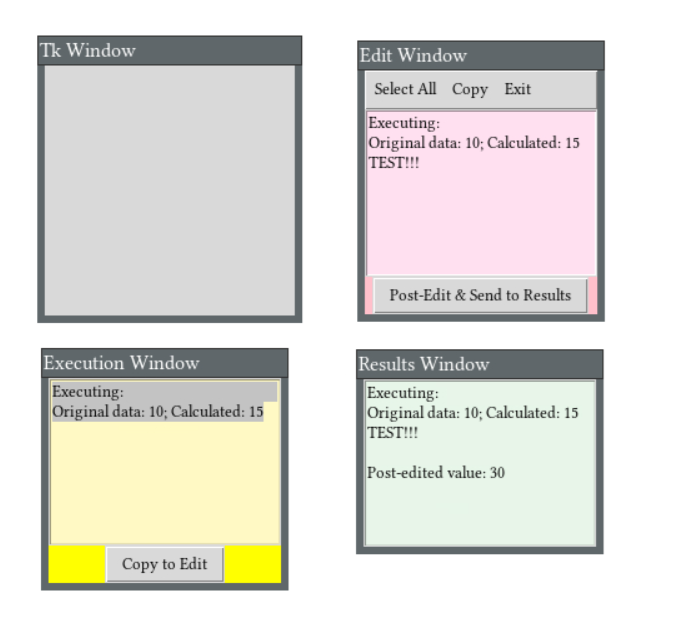
Three windows from Playground
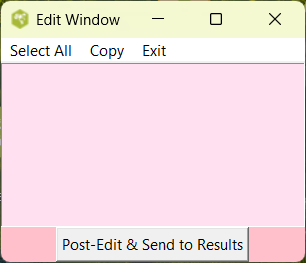
Edit window from Windows 11 Activestate
gold 01/15/2026. Added categories, so can find message in Wiki.
| Category Numerical Analysis | Category Toys | Category Calculator | Category Mathematics | Category Example | Toys and Games | Category Games | Category Application | Category GUI |