Kinetic scrolling
ABU 1-oct-2011
This is a small experiment trying to add a kinetic behavior to some dragged objects.
You can click and drag one of the boxes in the main window and then, when you release the mouse button, the dragged object will continue its path with a progressively decreasing speed.
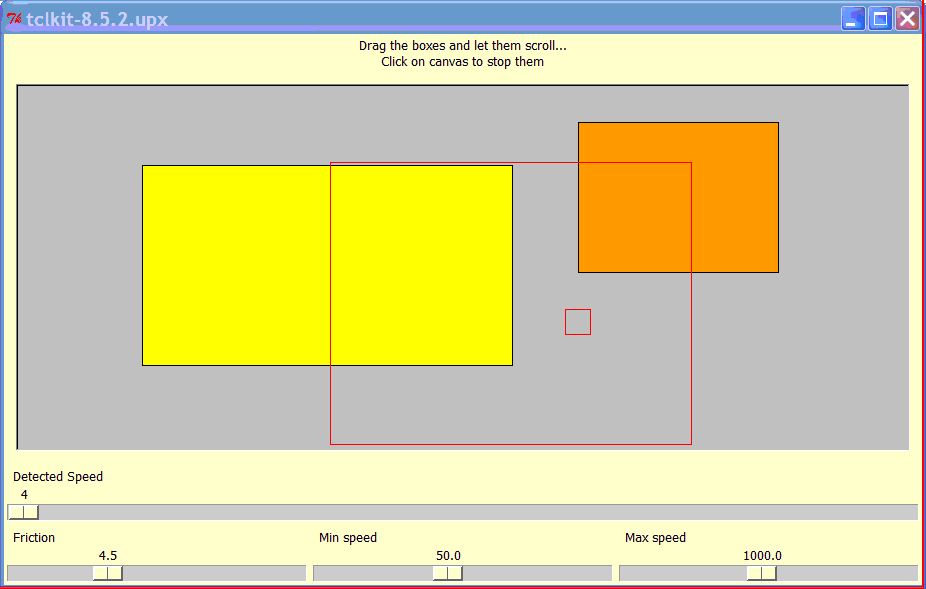
You can experiment this kinetic scrolling by changing the friction coefficient.
Note that, though it's trivial to get the mouse position, it's very hard to get the instantaneous mouse speed (this is a key factor for setting a 'good' motion equation). For this reason, there are two sliders controlling the min and max speeed.
When you release the mouse button after dragging, the instantaneous mouse speed is recorded and used for setting the kinetic effect.
No scrolling is performed if speed is too low (it will be unnoticeable) and, since mouse movements can be very fast (>4000pixel/sec), speed is limited to a speed-limit.
Code is really simplified in order to highlight the basic principle. Objects are here implemented as rectangle-items in a canvas widget but it's not difficult to abstract and implement them with other kinds of widgets. Note that the scrolling is performed as a chain of async callbacks, without blocking the main processing thread
For those interested with math, when you release the mouse button after dragging an object, an opposite force proportional to the speed is applied.
   a(t) = -k*v(t)
      a(t) acceleration  (t=0 is when you relase the mouse-button)
      k is a friction coefficient (k=0 means no friction at all)
By integrating this equation you can get a formula for the speed v(t) and for the position p(t) ( or better the displacement after t=0 )
   v(t) = v(0)*exp(-k*t)
   p(t)=v(0)/k*(1-exp(k*t))  ( we assume p(0)=0 )
Note that speed never reaches zero and position (displacement) tends to v(0)/k.
here is the code:
 # Inertial Scrolling

 # A small experiment on inertial movement
 # Drag the box and let it scroll ..

  # --------------------------------------------------------------------------
  # parameters; fell free to change them (or use slide controls)
  # WARNING: must be real numbers, not integers
  # --------------------------------------------------------------------------
 set ANIM(K)    4.5    ; # friction
 set ANIM(VMIN) 50.0   ; # Velocity min - (pixel/sec)
 set ANIM(VMAX) 1000.0 ; # Velocity max - (pixel/sec)

  # --------------------------------------------------------------------------
  # prepare a canvas with two boxes
  # plus some parameters' controls
  # --------------------------------------------------------------------------
 label .msg -text "Drag the boxes and let them scroll...\nClick on canvas to stop them"
 pack .msg
 canvas .c -bg gray -bd 2 -relief sunken
 pack .c -expand 1 -fill both -padx 10 -pady 10

 # a probe for dragging speed
 scale .speed -orient horizontal -variable V -label "Detected Speed" \
    -from 0 -to 4000 -state disabled -relief flat
 pack .speed -fill x


  # note max and min values are just a suggestion
 frame .s
 scale .s.s1 -orient horizontal -variable ANIM(K) -label "Friction" \
    -from 1.0 -to 12.0  -resolution 0.1
 scale .s.s2 -orient horizontal -variable ANIM(VMIN) -label "Min speed" \
    -from 10  -to 100  -resolution 0.1
 scale .s.s3 -orient horizontal -variable ANIM(VMAX) -label "Max speed" \
    -from 100 -to 2000  -resolution 0.1
 pack {*}[winfo children .s] -side left -fill x -expand 1
 pack .s -fill x

 .c create rectangle 0 0 200 150 -fill orange -tags slidingBox
 .c create rectangle 130 100 500 300 -fill yellow -tags slidingBox

 # =============================================================================

  # return current time in *seconds* as a decimal number
  # with the highest precision (microseconds)
 proc now {} { expr [clock microseconds]/1E6 }


 .c bind slidingBox <ButtonPress-1> {
    global MOUSE
    set w %W
    set MOUSE(X) %x
    set MOUSE(Y) %y
    set MOUSE(T) [now]
    set MOUSE(VX) 0.0
    set MOUSE(VY) 0.0

    $w raise current
 }


 .c bind slidingBox <B1-Motion> {
    global MOUSE

    set w %W
    set x %x
    set y %y
    set t [now]

    set dx [expr {$x-$MOUSE(X)}]
    set dy [expr {$y-$MOUSE(Y)}]
    set dt [expr {$t-$MOUSE(T)}]

    set MOUSE(X) $x
    set MOUSE(Y) $y
    set MOUSE(T) $t
    set MOUSE(VX) [expr double($dx)/$dt]
    set MOUSE(VY) [expr double($dy)/$dt]
     set ::V [expr {hypot($MOUSE(VX),$MOUSE(VY))}] ; # just a probe for display

    $w move current $dx $dy
 }


    # when you release mouse button, target should keep on moving,
    # with an initial speed depending on the 'last' speed and the time spent
    # from the last movement
 .c bind slidingBox <ButtonRelease-1> {
    global MOUSE
    global ANIM

    set w %W

    set dt [expr {[now]-$MOUSE(T)}]
    set DECEL [expr {exp(-$ANIM(K)*$dt)}]
    set vx [expr {$MOUSE(VX) * $DECEL}]
    set vy [expr {$MOUSE(VY) * $DECEL}]

     # if speed magnitude is too low, it's useless to continue !
    set vLen [expr {hypot($vx,$vy)}]
     set ::V $vLen ; # just a probe for display
    if { $vLen < $ANIM(VMIN) } return

     # if speed is too high, limit it
    if { $vLen > $ANIM(VMAX) } {
         # reduce vLen to ANIM(VMAX)
        set a [expr {$vLen / $ANIM(VMAX)}]
        set vx [expr {$vx/$a}]
        set vy [expr {$vy/$a}]

        set vLen [expr double($ANIM(VMAX))]
    }

     # since speed zero won't be never reached,
     #  compute time to reach speed VMIN
    set a [expr {$ANIM(VMIN) / $vLen}]
    set duration [expr {log(1/$a)/$ANIM(K)}]
     # then compute the position (displacement) we will reach in $duration
    set DX [expr {$vx/$ANIM(K)*( 1-$a )}]
    set DY [expr {$vy/$ANIM(K)*( 1-$a )}]


    set id  [$w find withtag current]
    lassign [$w coords $id] X0 Y0
     # move object from (X0,Y0) to (X0+DX,Y0+DY)  within time-interval (now, now+duration)
    _KEEPONMOVING [list $w $id] $X0 $Y0 $DX $DY [now] $duration
 }


  # when you click, stop all moving objects
 bind .c <ButtonPress-1> {
    global ANIM
    foreach {key val} [array get ANIM ID,*] {
        after cancel $val
        array unset ANIM $key
    }
 }


 proc _KEEPONMOVING {objID X0 Y0 DX DY T0 DT} {
    global ANIM
    lassign $objID w id

    set t [expr ([now]-$T0)/$DT]
    if { $t > 1.0 } { set t 1.0 }
    # ---- easing transformation -----
     # set tt [expr {1-exp(-$ANIM(K)*$t)}]
    set tt [expr {1-exp(-$ANIM(K)*$t*$DT)}]
    # - - - - - -
    set px [expr {$X0+$tt*$DX}]
    set py [expr {$Y0+$tt*$DY}]

    _MOVE_TO $w $id $px $py
    if { $t < 1.0 } {
        set ANIM(ID,$objID) [after 40  [list _KEEPONMOVING $objID $X0 $Y0 $DX $DY $T0 $DT]]
    } else {
        # end of animation, unset unused memory
        array unset ANIM ID,$objID
    }
 }


 proc _MOVE_TO {w id x y} {
  lassign [$w coords $id] x0 y0
  $w move $id [expr $x-$x0] [expr $y-$y0]
}Ro: Very cool. Enjoyable!
APE : inserted in a namespace, and modified binding function so it can be used in an application using the "_moveTo" function
namespace eval kinetic {
  variable param
  set param(K)    2.0    ; # friction
  set param(VMIN) 50.0   ; # Velocity min - (pixel/sec)
  set param(VMAX) 4000.0 ; # Velocity max - (pixel/sec)
}
# return current time in *seconds* as a decimal number
# with the highest precision (microseconds)
proc kinetic::now {} { expr [clock microseconds]/1E6 }

proc kinetic::init {c tag} {
   $c bind $tag <ButtonPress-1> {
      global MOUSE
      set w %W
      set MOUSE(X) %x
      set MOUSE(Y) %y
      set MOUSE(T) [kinetic::now]
      set MOUSE(VX) 0.0
      set MOUSE(VY) 0.0

      $w raise current
   }
   $c bind $tag <B1-Motion> {
      global MOUSE

      set w %W
      set x %x
      set y %y
      set t [kinetic::now]

      set dx [expr {$x-$MOUSE(X)}]
      set dy [expr {$y-$MOUSE(Y)}]
      set dt [expr {$t-$MOUSE(T)}]

      set MOUSE(X) $x
      set MOUSE(Y) $y
      set MOUSE(T) $t
      set MOUSE(VX) [expr double($dx)/$dt]
      set MOUSE(VY) [expr double($dy)/$dt]
       set ::V [expr {hypot($MOUSE(VX),$MOUSE(VY))}] ; # just a probe for display

      # $w move current $dx $dy
   }

      # when you release mouse button, target should keep on moving,
      # with an initial speed depending on the 'last' speed and the time spent
      # from the last movement
   $c bind  $tag <ButtonRelease-1> {
      global MOUSE
      upvar #0 kinetic::param ANIM

      set w %W

      set dt [expr {[kinetic::now]-$MOUSE(T)}]
      set DECEL [expr {exp(-$ANIM(K)*$dt)}]
      set vx [expr {$MOUSE(VX) * $DECEL}]
      set vy [expr {$MOUSE(VY) * $DECEL}]

       # if speed magnitude is too low, it's useless to continue !
      set vLen [expr {hypot($vx,$vy)}]
       set ::V $vLen ; # just a probe for display
      if { $vLen < $ANIM(VMIN) } return

       # if speed is too high, limit it
      if { $vLen > $ANIM(VMAX) } {
           # reduce vLen to ANIM(VMAX)
          set a [expr {$vLen / $ANIM(VMAX)}]
          set vx [expr {$vx/$a}]
          set vy [expr {$vy/$a}]

          set vLen [expr double($ANIM(VMAX))]
      }

       # since speed zero won't be never reached,
       #  compute time to reach speed VMIN
      set a [expr {$ANIM(VMIN) / $vLen}]
      set duration [expr {log(1/$a)/$ANIM(K)}]
       # then compute the position (displacement) we will reach in $duration
      set DX [expr {$vx/$ANIM(K)*( 1-$a )}]
      set DY [expr {$vy/$ANIM(K)*( 1-$a )}]


      set id  [$w find withtag current]
      lassign [$w coords $id] X0 Y0
       # move object from (X0,Y0) to (X0+DX,Y0+DY)  within time-interval (now, now+duration)
      kinetic::_keepMoving [list $w $id] $X0 $Y0 $DX $DY [kinetic::now] $duration
   }

    # when you click, stop all moving objects
   bind $c <ButtonPress-1> "+ kinetic::but1"
}
proc kinetic::but1 {} {
  upvar #0 ::kinetic::param ANIM
    foreach {key val} [array get ANIM ID,*] {
      after cancel $val
      array unset ANIM $key
  }
}
proc kinetic::_keepMoving {objID X0 Y0 DX DY T0 DT} {
    variable param
    lassign $objID w id

    set t [expr ([kinetic::now]-$T0)/$DT]
    if { $t > 1.0 } { set t 1.0 }
    # ---- easing transformation -----
     # set tt [expr {1-exp(-$ANIM(K)*$t)}]
    set tt [expr {1-exp(-$param(K)*$t*$DT)}]
    # - - - - - -
    set px [expr {$X0+$tt*$DX}]
    set py [expr {$Y0+$tt*$DY}]

    _moveTo $w $id $px $py
    if { $t < 1.0 } {
        set param(ID,$objID) [after 40  [list kinetic::_keepMoving $objID $X0 $Y0 $DX $DY $T0 $DT]]
    } else {
        # end of animation, unset unused memory
        array unset param ID,$objID
    }
 }
proc kinetic::_moveTo {w id x y} {
  lassign [$w coords $id] x0 y0
  # $w move $id [expr $x-$x0] [expr $y-$y0]
  # move script here ...
 }