SciLab

Scilab is a free program for numerical computation. It is used for numerical computations in engineering, statistics and for plotting graphs and such.
It has connection to Tcl via these functions:
- ScilabEval
- Tcl instruction: Evaluate a string with scilab interpreter
- TK_EvalFile (obsolete, replaced by TCL_EvalFile)
- Reads and evaluate a tcl/tk file
- TK_EvalStr (obsolete, replaced by TCL_EvalStr)
- Evaluate a string whithin the tcl/tk interpreter
- TK_GetVar (obsolete, replaced by TCL_GetVar)
- Get a tcl/tk variable value
- TK_SetVar (obsolete, replaced by TCL_SetVar)
- Set a tcl/tk variable value
- close
- close a figure
- figure
- create a figure
- findobj
- find an object with specified property
- gcf
- gets the current active tksci figure
- uicontrol
- create a Graphic User Interface object
- uimenu
- Create a menu or a submenu in a figure
Scilab's help system is implemented using Tk.
GS 2012-06-11: Here is a simple example for using Tcl-Tk with Scilab. There is no tclsh or wish in Scilab. Scilab evals commands with the ScilabEval function.
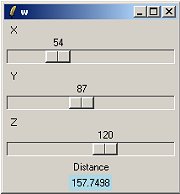
There are 3 files (run.sce, distance.sci, gui.tcl).
The Scilab function TCL_EvalFile is used to display the GUI, which calls a Scilab function to recompute the distance (function distance()) each time sliders are moved.
To make a test, put these 3 files in the same directory, run Scilab and change the working directory:
cd <your Scilab directory>
Enter the command:
exec ('run.sce')and the GUI will display.
The file run.sce:
// run.sce
exec distance.sci;
TCL_EvalFile('gui.tcl');
the file distance.sci:
// distance.sci
function dist = distance(x,y,z)
  dist = sqrt(x*x + y*y + z*z)
endfunction
And the Tcl-Tk code:
# gui.tcl
global x y z dist

set x 10
set y 10
set z 10
set dist { }

toplevel .w
scale .w.scx -from 0 -to 200 -length 200 -resolution 1 -label X \
             -orient horiz -bd 1 -showvalue true -variable x \
             -command ComputeDistance
scale .w.scy -from 0 -to 200 -length 200 -resolution 1 -label Y \
             -orient horiz -bd 1 -showvalue true -variable y \
             -command ComputeDistance
scale .w.scz -from 0 -to 200 -length 200 -resolution 1 -label Z \
             -orient horiz -bd 1 -showvalue true -variable z \
             -command ComputeDistance

label .w.lt -text Distance
label .w.ldist -textvariable dist -bg lightblue
eval pack [winfo children .w]

proc ComputeDistance w {
    global x y z dist
    ScilabEval "dist = distance($x,$y,$z);TK_SetVar('dist',string(dist));"
}
Scipad%|%Scipad is a powerful editor and graphical debugger for programs written in the Scilab language. It is a mature and highly configurable editor, almost entirely written in Tcl/Tk.

