Snippets Concepts iShow_RS Follow-on
This page is under development. Comments are welcome, but please load any comments in the comments section at the bottom of the page. Please include your wiki MONIKER and date in your comment with the same courtesy that I will give you. Aside from your courtesy, your wiki MONIKER and date as a signature and minimal good faith of any internet post are the rules of this TCL-WIKI. Its very hard to reply reasonably without some background of the correspondent on his WIKI bio page. Thanks, gold 6/9/2026
- Screenshots
- Experimenting Draft
- Trial Test Program
- Testing Extended deck
- Credits
- Results in from Active State
- Draft Figures for Article
- Draft Migration Guide, TCL 8.6 to TCL V9, not official here
- Hidden Comments Section
Title: Snippets Concepts iShow_RS Follow-on and reference to Pseudocode Developments
Preface
gold Update 6/9/2026. Here are some calculations for the Snippets Concepts iShow_RS Follow-on. Intended to supplement the TCL Wiki pages iShow and Playing with Recursion by RS. The iShow program was written by Richard Suchenwirth in 2002, German edition. Appears that 2002 was Tcl V8.0 to V8.3 era. This supplemental code following RS is intended for study of McCarthy theorems on computer arithmetic into one-line programs. Fun idea was The Gallows game from Richard Suchenwirth. Interesting letter game was Word Chain from Keith Vetter. Useful error test on foreach {input expected} from Playing Cobol from RS etc. Error testing procedures were useful in Simple Test from EKB & RLE & RS.
gold Update 6/9/2026. The author is retired engineer on Windows 11 and no longer has proofing access to Unix machines. Unix is respected after use of so many decades in engineering, but my wings are lost. I did find a useful online IDE, jdoodle. I can paste from a text file, edit, and run an output using this online IDE.
Introduction
This a revamp of iShow by Richard Suchenwirth, circa 2002. Upgraded to TCL V8.6, best as possible. Some translations from German into English, but G. is not my forte. Press little "d" to dump slides onto local file, 7-bit ASCII code.
The iShow_RS project and its related experiments. The Follow-on code and supplemental Tcl examples extend earlier work by Richard Suchenwirth. However, this is a retro code Display adapted from Pocket PC. Pocket PC screens were typically 240 × 320 pixels in portrait mode, or 320 × 240 in landscape mode. We are experimenting with ASCII diagrams on Windows laptop, but probably will learn more from keeping near the original RS code and principles.
Not a Replacement for TCL Core
This page on developing pseudocode examples and one line procedures is not a replacement for the current Tcl core and Tcllib, which is much improved since Tcl version 4, and other <faster> language constructs. math ops, Tcllib routines, and other compiled routines can reduce the cost of big-data tasks by about 1/3. The time savings of the core are not always obvious on small quantities of data, like 4 or 5 numbers. Performance of one-line programs may suffer degradation due to lengthy recursion calls, and may be limited by constraints on recursion. Dependence on math operator notation, helper procedures, math check examples, degradation due to lengthy recursion calls, and special library functions should be noted in the comment lines.
Wiki Table: Tcl/Tk Timeline – Key Milestones
| Index | Year | Event / Version | Description | Quibble Notes |
|---|---|---|---|---|
| 1 | 1988 | Tcl created | John Ousterhout starts development at UC Berkeley | Born as a simple embedding / glue language |
| 2 | 1989 | First external releases | Tcl distributed outside Berkeley | Early interest from other researchers |
| 3 | 1991 | Tk first released | Tk toolkit introduced | Immediate success; made Tcl famous for GUIs |
| 4 | 1994 | Ousterhout joins Sun Microsystems | Tcl/Tk gains corporate backing | Major boost in visibility and development |
| 5 | 1997 | Tcl/Tk 8.0 | Major release – bytecode compiler, Windows/Mac support | First unified Tcl/Tk versioning |
| 6 | 1999 | Tcl/Tk 8.1 | Full Unicode support | Huge step for internationalization |
| 7 | 2000 | Tcl Core Team formed | Development becomes community-driven | Shift from single maintainer model |
| 8 | 2002 | Tcl/Tk 8.4 | 64-bit support, many performance improvements | Very stable long-term release |
| 9 | 2007 | Tcl/Tk 8.5 | TclOO foundation, lambdas, new datatypes | Major modernization |
| 10 | 2012 | Tcl/Tk 8.6 | TclOO becomes core, stackless evaluation | Longest supported major version |
| 11 | 2013–2023 | 8.6 series continues | Many patch releases, strong production use | Remarkable stability (over 10 years) |
| 12 | 2024 | Tcl/Tk 9.0 released | 64-bit internals, full Unicode, ZIPFS, breaking changes | First major release in 27 years |
| 13 | 2025 | Tcl/Tk 9.0.3 | Current stable version | Active development continues |
| — | Ongoing | Tcl/Tk Ecosystem | Extensions, Starkits, ActiveState, community | Still widely used in embedded, testing, GUIs |
References:
- GoDuck search engine < Functional Programming >
- GoDuck search engine < Imperative Programming >
- GoDuck search engine < Programming Examples >
- Google search engine < vaporware >
- Tcllib math::special Special mathematical functions
- Tcllib math::figurate Evaluate figurate numbers
- Tcllib simulation::random Pseudo-random number generators
- Tcllib simulation::montecarlo Monte Carlo simulations
- Wikipedia search engine < Lehmer random number generator >
- Professor Frisby's Mostly Adequate Guide to Functional Programming on internet archive
- Writing code using the Pseudocode Programming Process, article by David Zych
- Mathematical Methods in Large-scale Computing Units
- by Derrick H. Lehmer
- L’Ecuyer, Pierre (January 1999). "Tables of linear congruential generators of different sizes and good lattice structure"
- Mathematics of Computation. 68
- A Comprehensive Review of Quantum Random Number PDF
- Good Pedagogical Random Number Generators
- from J. Stanley Warford
- Coding the Lehmer Pseudo random Number Generator
- from W. H. PAYNE
- The most commonly used version of the Mersenne Twister algorithm
- is based on the Mersenne prime expr { 2**19937-1 }
- TWISTER = 431542479738816264805523551633791983905393504322.....
- GoDuck search engine < TCL version >
- One Liners Programs Pie in the Sky
- One Liners
- One Liners Programs Compendium [L1 ]
- WIKI BOOKS, Programming_Examples pdf
- WIKI BOOKS, Tcl_Programming_Introduction pdf
- Note. I did find a useful online IDE, jdoodle
- Note. I can paste, edit, and run an output using this online IDE.
- How Do I Write Pseudocode? video by Mr. Brown CS
- Refers to rand, RandMT, Mersenne Twister, & random
- RS on Horseracing in Tcl.
- Random Number Generators: Good Ones Are Hard to Find, Keith Willam Miller, pdf online
- Throwing Two Dice GWM and Dice by Keith Vetter.
- int from RLE has dice expression expr {1 + int(rand()*6)} RLE.
- Several Dr. Math emails may reduce some dice issues to simple paths, internet archive.
- Counting Elements in a List from RWT.
Extra Credit on One Line Procedures
- Little L Programming Language
- Let's assign with let
- let
- let2
- Easy Eye Calculator [L2 ]
- Tcl the Misunderstood
- Maximum nummeric value from max
- L-Language pdf L , by Larry McVoy:
- One liners Programs Pie in the Sky
- Counting characters in a string
- Playing with recursion
- recursive functions
- If we had no expr
- expr
- little language
- string is
- Wikipedia search engine < random >
- Wikipedia search engine < dice >
- Wikipedia search engine < Programming Examples >
- Google search engine < vaporware >
- One Liners Programs Pie in the Sky
- One Liners
- One Liners Programs Compendium [L3 ]
- WIKI BOOKS, Programming_Examples pdf
- WIKI BOOKS, Tcl_Programming_Introduction pdf
- google search engine < HgA1c to Average Blood Glucose>
- Tcllib math::numtheory::numberPrimesGauss N
- math::numtheory::numberPrimesLegendre N
- math::numtheory::numberPrimesLegendreModified N
- math::numtheory::differenceNumberPrimesLegendreModified lower upper
- math::numtheory::listPrimePairs lower upper step
- math::numtheory::listPrimeProgressions lower upper step
- A Philosophy of Software Design, John Ousterhout, 2019
- Paper: Tcl: An Embeddable Command Language by John K. Ousterhout
- (USENIX Winter Conference, 1989),
- Diagram credit, John K. Ousterhout
- see page ~6 for the diagram.
- Medusa: A Distributed Operating System (Computer Science Distributed Database Systems)
- by John K. Ousterhout, thesis
- Ann Arbor, Mich : UMI Research Press, c1981,
Screenshots
figure. Test Configuration
The classic Tcl architecture diagram showing Parser, Built-In Commands, Init, Command Loop, and Application-Specific Commands. Diagram credit, John K. Ousterhout, see refs.
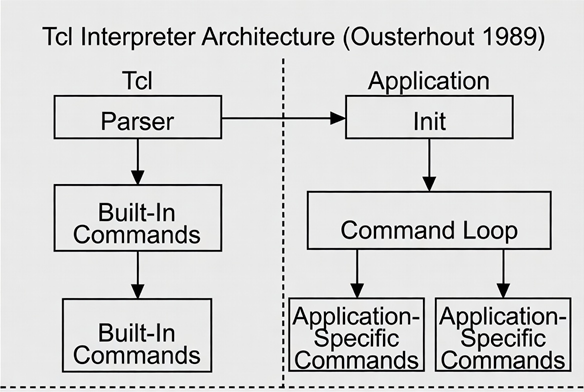
Figure. Second Guess here, Alternate architecture diagram for Dual
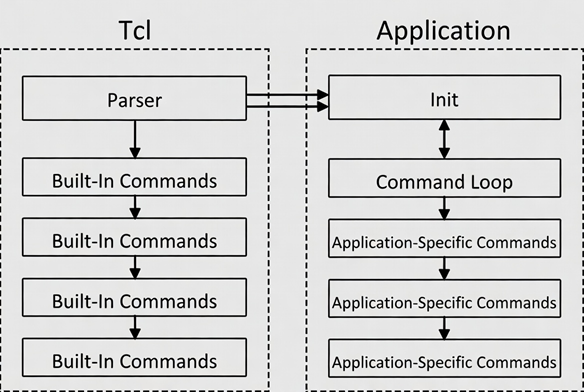
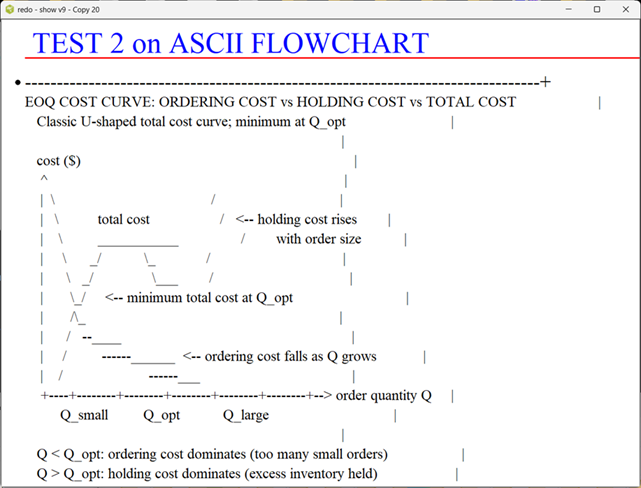
figure. Test 2, Configuration for ASCII Diagram
Note. This extra-large ASCII Diagram looked a little squashed on laptop with ActiveState. However, this is retro code for Display adapted from Pocket PC, not sure of changes. Pocket PC screens were typically 240 × 320 pixels in portrait mode, or 320 × 240 in landscape mode.
Experimenting Draft
This is a draft.
Trial Test Program
Testing Extended deck
Due to the space on wiki page, I am omitting some wordy explanatory comments inside the deck, while debugging. The credits are normally included inside code comments, but some extras are listed below deck.
# =============================================================================
# FILE: iShow_ Revamp V2.tcl
# This a revamp of iShow by Richard Suchenworth, circa 2002
# Upgraded to TCL V8.6, best as possible.
# Some translations from German into English,
# but G. is not my forte.
# Tcl 8.6 or greater required
# Naming convention: all proc and variable names are 12-15
# characters, descriptive, and domain-neutral so the engine
# can serve any subject area without modification.
# Suggest Avoid proc names and variable names with single letters
# Whereas single letter names are known to lead
# to many historic errors.
#
# ----
# Compatible with Tcl/Tk (Tool Control Language / Toolkit) 8.6+
# Written for Windows 11 on ActiveState Tcl.
# Use Pure 7-bit ASCII code, no Unicode characters used anywhere.
# ----
# Program deck may contain multiple estimation procs.
# Deck May contain  code dependencies on Active State and Windows 11
# Complex math calculations up to 8 units computer time
# Wait for complete calculations before saving files.
# Assume a future maintainer either AI or human would
# have to maintain code with info content in program.
#
# This is a hacker's patch, not rigorously derived.
# appears correct solutions for autotests.
# Output is savable to local ASCII file.
# TCL Club 6/08/2026

console show

set pages {
    {{Tcl/Tk in Practice} {
        .
        . Richard Suchenwirth, Siemens
        . 2002-04-30
    }}
    {{Tcl/Tk in Practice} {
        + Tcl: "Tool Command Language"
        . Open Source: free software (BSD license)
        + Scripting with Tcl: platform-independent Mac/Unix/Windows..
        + Programming in Tcl
        . Building complex applications possible
        + UI programming in Tk ("ToolKit")
    }}
    {{Scripting with Tcl} {
        + typically limited to a single source file
        . call arguments in argv, script name in argv0
        + Directly executable scripts (executable file)
        + Calling external programs with exec/open
        + Environment mapped in array ::env
        + Many external programs (sed, awk) replaceable internally
        + Control structures: if, while, foreach, for
    }}
    {{Small Tcl Examples} {
        + Filter (reads stdin, writes stdout)
        > while {[gets stdin line]>=0} {
        >    # some processing of the input, e.g.
        >    set line [string toupper $line]
        >    puts stdout $line
        > }
        + Iteration over files: size sum in bytes
        > set sum 0
        > foreach i [glob *] {incr sum [file size $i]}
        > puts "Total size: $sum Bytes"
    }}
    {{Programming with Tcl} {
        + not opposed to scripting, rather a gradual transition
        + code typically organized in procedures
        + Libraries: code distributed across multiple files (autoload, package)
        . Libraries with self-test code (recommended)
        + Structuring variable and procedure names with namespaces
        + Extensibility with C/C++ libraries
    }}
    {{GUI Programming with Tk} {
        + Widgets: label, *button, menu, listbox, text, canvas ...
        + Geometry managers: pack, grid, place
        + Bindings: events (mouse, keyboard) to widgets
        + Event model
    }}
    {{Example: Editor with Scrollbars} {
        > #---------------------------------- Create widgets
        > text .t -xscrollcommand ".x set" -yscrollcommand ".y set"
        > scrollbar .x -command ".t xview" -orient horizontal
        > scrollbar .y -command ".t yview" -orient vertical
        > #---------------------------------- Manage widgets
        > grid .t .y -sticky news
        > grid .x    -sticky ew
        > #------------------- Weights for resizing
        > grid rowconfigure    . 0 -weight 1
        > grid columnconfigure . 0 -weight 1
    }}
    {{Example: this Presentation} {
        + This presentation is a Tcl/Tk script.
        + Canvas widget
        . Items of types 'text', 'line' and 'oval'
    }}
}

namespace eval present {
    set version 0.2
    variable pages {}
    variable npage 0
    variable fonts
}

proc present::go {w Pages} {
    variable pages
    variable npage
    variable fonts
    set pages $Pages
    set npage 0
    array set fonts {
        h1   {Times   36}
        h2   {Times   24}
        body {Times   18}
        pre  {Courier 18}
    }
    focus -force $w
    bind $w <1>     {incr present::npage;    present::page %W}
    bind $w <3>     {incr present::npage -1; present::page %W}
    bind $w <space> {incr present::npage;    present::page %W}
    bind $w p       {%W postscript -file p$present::npage.ps -rotate 1}
    bind $w d       {present::dump}
    present::page $w
}

proc present::bullet {w x y} {
    $w create oval [expr {$x-20}] [expr {$y-5}] [expr {$x-10}] [expr {$y+5}] -fill black
}

proc present::page w {
    variable pages
    variable npage
    variable fonts
    set maxpages [llength $pages]
    set npage [expr {$npage < 0 ? 0 : $npage >= $maxpages ? $maxpages-1 : $npage}]
    wm title . "$::script $npage"
    $w delete all
    lassign [lindex $pages $npage] title body
    set x 50; set y 50
    $w create text $x $y -anchor w -text $title -font $fonts(h1) -fill blue
    $w create line $x [expr {$y+30}] 32000 [expr {$y+30}] -width 3 -fill red
    incr y 40
    foreach line [split $body \n] {
        set line [string trim $line]
        switch -- [string index $line 0] {
            >       {set font $fonts(pre)}
            +       {set font $fonts(h2); bullet $w $x $y}
            default {set font $fonts(body)}
        }
        $w create text $x $y -anchor w -text [string range $line 2 end] -font $font
        incr y 40
    }
}

proc present::dump {} {
    variable pages
    # derive filename from script name, same folder
    set outfile [file rootname $::argv0].txt
    set sep [string repeat = 60]
    set fh [open $outfile w]
    fconfigure $fh -encoding ascii -translation crlf
    set n 0
    foreach slide $pages {
        lassign $slide title body
        puts $fh $sep
        puts $fh "Slide [incr n]: $title"
        puts $fh $sep
        foreach line [split $body \n] {
            set line [string trim $line]
            if {$line eq ""} continue
            set marker [string index $line 0]
            set text   [string range  $line 2 end]
            switch -- $marker {
                + { puts $fh "  * $text" }
                > { puts $fh "    $text" }
                . { puts $fh "    $text" }
                default { puts $fh "  $text" }
            }
        }
        puts $fh ""
    }
    close $fh
    tk_messageBox -title "Dump saved" \
                  -message "All slides written to:\n$outfile" \
                  -type ok -icon info
}

if {[file tail [info script]] eq [file tail $argv0]} {
    pack [canvas .c -bg white -width 800 -height 600] -fill both -expand 1
    set ::script [wm title .]
    present::go .c $pages
}

# end of file
Credits
# This a revamp of iShow by Richard Suchenworth, circa 2002
# Upgraded to TCL V8.6, best as possible.
# Some translations from German into English,
# but G. is not my forte.
# Tcl 8.6 or greater required
Results in from Active State
Draft Figures for Article
Add water and stir in program, slang.
    {{iShow_RS Follow-on} {
        + Update 6/9/2026
        . Supplement to TCL Wiki pages
        + iShow by Richard Suchenwirth, 2002
        + Playing with Recursion by RS
        + Purpose: study McCarthy theorems on computer arithmetic
        + Fun extras: Gallows game (RS), Word Chain (Keith Vetter)
    }}

    {{NAMING CONVENTION RULES} {
        + Rule 1: Proc and variable names 12-15 characters
        . descriptive and domain-neutral
        + Rule 2: Avoid single-letter proc/variable names
        + Rule 3: Pure 7-bit ASCII only
        + Rule 4: Comment lines must document dependencies
        + Rule 5: Future maintainer assumption (AI or human)
        + Rule 6: Platform and timing notes
    }}

    {{SLIDE DATA FORMAT} {
        + Three line-type markers retained from RS
        + +   h2 / Times 24 / bullet (black oval)
        + >   pre / Courier 18 / code block
        + .   body / Times 18 / plain text
        . Blank lines consume 40 px vertical space
    }}

    {{PRESENT NAMESPACE} {
        + version        0.2
        + pages          list of all slides
        + npage          current slide index
        + fonts(h1)      {Times 36}
        + fonts(h2)      {Times 24}
        + fonts(body)    {Times 18}
        + fonts(pre)     {Courier 18}
    }}

    {{KEYBOARD & MOUSE BINDINGS} {
        + Left click / Space   -> next slide
        + Right click          -> previous slide
        + Key d                -> dump all slides to .txt
    }}

    {{PRESENT::PAGE PROC} {
        + Clamp npage to valid range
        + Delete all canvas items
        + Draw blue title + red rule
        + Iterate body lines and render according to marker
    }}

    {{PRESENT::BULLET PROC} {
        + Draws small filled black oval left of + lines
        + Geometry: x-20 to x-10, y-5 to y+5
    }}

    {{PRESENT::DUMP PROC} {
        + Writes all slides to [file rootname $argv0].txt
        + Converts markers to readable text format
        + Shows confirmation dialog
    }}

    {{ALL 8 ORIGINAL SLIDES} {
        + 0-7: Tcl/Tk in Practice through Example presentation
        . Navigation: left-click/space = next, right-click = previous
    }}

    {{NOT A REPLACEMENT FOR TCL CORE} {
        + This presentation is NOT a replacement for Tcl core or Tcllib
        + Use math::ops / compiled routines for performance
        + Document math operators, helper procs, recursion limits
    }}

    {{RANDOM NUMBER GENERATORS & PRIMES} {
        + Lehmer PRNG, Mersenne Twister
        + Tcllib math::numtheory prime functions
        + Mersenne prime: 2**19937-1
    }}

    {{ONE-LINE PROCEDURE REFERENCES} {
        + Playing with recursion (RS)
        + One-liners collections
        + Little languages, expr alternatives
        + max, let, counting utilities, etc.
    }}

    {{GALLOWS GAME & WORD CHAIN} {
        + Gallows (Hangman variant) by RS
        + Word Chain by Keith Vetter
        + foreach {input expected} test pattern
        + Simple test framework (EKB, RLE, RS)
    }}
}
Draft Migration Guide, TCL 8.6 to TCL V9, not official here
gold 6/30/2026. Experimental draft to present ASCII diagrams inside this deck.
{{TCL 8.6 TO 9.0 MIGRATION GUIDE} {
        + Update 6/30/2026
        . Slide set for engineering students and maintainers
        + Purpose: identify Tcl 8.6 compatibility risks before Tcl 9.0 deployment
        + Focus: numbers, encoding, packages, and regression testing
    }}

    {{MIGRATION PATH} {
        + Tcl 8.6 script
        . Compatibility scan
        + Find version-sensitive code
        . Apply minimal fix
        + Run regression tests
        . Tcl 9.0-ready script
        + Migration tools are useful for finding required changes early
    }}

    {{WHAT TO CHECK} {
        + Numbers: leading zeros, underscore digits, large values
        . Text and encoding: UTF-8 source, file reads, non-ASCII data
        + Packages and input/output: load paths, extensions, platform behavior
        . Tests: compare Tcl 8.6 and Tcl 9.0 output
    }}

    {{NUMBERS RISK ZONE} {
        + Review numeric literals carefully
        . Leading-zero values may change meaning
        + Underscores in digits may be accepted differently
        . Large values should be checked for correct parsing
        + Use explicit forms when the intent must be unambiguous
    }}

    {{TEXT AND ENCODING RISK ZONE} {
        + Review source files that contain text outside plain ASCII
        . Verify how files are opened and decoded
        + Tcl 9.0 uses more explicit Unicode and UTF-8 behavior
        . Migration notes show that encoding defaults can differ across systems
        + A script that reads text must be tested with real data
    }}

    {{PACKAGE AND I/O RISK ZONE} {
        + Review package loading and dependency paths
        . Check extensions for Tcl 9.0 compatibility
        + Verify any platform-specific I/O assumptions
        . Confirm that installed libraries are found correctly
        + Keep package requirements explicit in the script
    }}

    {{TEMPLATE FOR CODE REVIEW} {
        + Task: check this Tcl 8.6 code for Tcl 9.0 migration
        . Context: state the current behavior and the target behavior
        + Code: paste the script here
        . Rules: find compatibility risks and suggest the smallest safe fix
        + Output: risk list, corrected code, short explanation, one test case
    }}

    {{REGRESSION TEST WORKFLOW} {
        + Old code
        . Risk found
        + Fix applied
        . Test run
        + Compare Tcl 8.6 and Tcl 9.0 output
        . Confirm stable behavior
        + A migration is not complete until tests still pass
    }}

    {{QUICK REVIEW CHECKLIST} {
        + Numeric literals reviewed
        . File encoding reviewed
        + Unicode text reviewed
        . Package loading reviewed
        + Extension compatibility reviewed
        . Regression tests added
    }}

    {{COMMON RISK ZONES} {
        + Numbers
        . Check integer forms, leading zeros, and large values
        + Text
        . Check UTF-8 source files and non-ASCII data
        + Packages
        . Check package names, load paths, and extensions
        + Tests
        . Compare Tcl 8.6 and Tcl 9.0 outputs
    }}

    {{TEST WORKSHEET} {
        + Script name:
        . Current Tcl 8.6 behavior:
        + Target Tcl 9.0 behavior:
        . Risk found:
        + Proposed fix:
        . Regression test:
        + Result:
    }}

    {{ASCII FLOWCHART} {
        + Before fix
        .   |
        .   v
        + After fix
        .   |
        .   v
        + Compare output
        .   |
        .   v
        + Confirm stability
    }}


    {{ TEST 2 on ASCII FLOWCHART} {
    +----------------------------------------------------------------------------------+
    | EOQ COST CURVE: ORDERING COST vs HOLDING COST vs TOTAL COST                     |
    |    Classic U-shaped total cost curve; minimum at Q_opt                           |
    |                                                                                  |
    |    cost ($)                                                                      |
    |     ^                                                                            |
    |     |  \                                        /                                |
    |     |   \          total cost                  /   <-- holding cost rises        |
    |     |    \         ___________                /        with order size           |
    |     |     \      _/           \_             /                                  |
    |     |      \   _/               \___        /                                   |
    |     |       \_/     <-- minimum total cost at Q_opt                             |
    |     |       /\_                                                                 |
    |     |      /   --____                                                           |
    |     |     /         ------______  <-- ordering cost falls as Q grows            |
    |     |    /                      ------___                                       |
    |     +----+--------+--------+--------+--------+--------+--> order quantity Q     |
    |          Q_small         Q_opt           Q_large                                |
    |                                                                                  |
    |    Q < Q_opt: ordering cost dominates (too many small orders)                   |
    |    Q > Q_opt: holding cost dominates (excess inventory held)                    |
    |    Q = Q_opt: ordering cost = holding cost (minimum total cost)                 |
    +----------------------------------------------------------------------------------+

        + Before fix
        .   |
        .   v
        + After fix
        .   |
        .   v
        + Compare output
        .   |
        .   v
        + Confirm stability
    }}

    {{GLOSSARY} {
        + Compatibility: whether the Tcl 8.6 script still behaves correctly in Tcl 9.0
        . Encoding: the rule used to read text bytes as characters
        + Regression test: a test that confirms old behavior still works after changes
        . Version target: the specific Tcl release being supported
    }}
}
# Experimental draft to present ASCII diagrams
gold 6/30/2026. ASCII diagram Works on ActiveState. Window is clipping slides here.
Hidden Comments Section
Please include your wiki MONIKER and date in your comment with the same courtesy that I will give you. Thanks, gold 6/9/2026
| Category Numerical Analysis | Category Toys | Category Calculator | Category Mathematics | Category Example | Toys and Games | Category Games | Category Application | Category GUI |