Snippets Concepts Nassi Shneiderman Flowcharts
- Index for Snippets Concepts Nassi Shneiderman Flowcharts
- Preface
- Limitations on Tool and Disclaimer
- Extra Significant Figures, If Any in Debugging
- Introduction
- Wiki Table Approximations for NSD's as Experimental Notation
- Table Definition from Wiki Markup Help Page
- Info on NDS Levy of Changes on Wiki Table Variables
- Probability Audit Notes
- Collatz Probabilistic Variants in AI multi-outcome, Probabilistic Token Choices
- Summary
- Simple Nested If (Two Levels) Example
- Wiki Table. Classic Positive / Even-Odd Example
- Wiki Table. NSD Example, Add 2 Numbers A & B
- Wiki Table. NSD Example, Positive or Negative?
- Wiki Table. NSD Example, Count Down with a Loop
- Wiki Table. Three-Level Deep Nesting Example
- Wiki Table. Multi-Branch Approximation (If / Else-If Chain ) Example
- Wiki Table. NSD Example, Find the Largest of Three Numbers
- Wiki Table. NSD Example, Simple Menu Choice
- Wiki Table. Tcl-Specific Example from Quantum Walk SlideRule
- Wiki Table. Complex Nesting Example for NDS
- Wiki Table. Combined Nesting Example for NDS Solution Diagram
- Adding Probabilistic Elements, Inferences, and Implications in the Following NSD Examples.
- Wiki Table. NSD Example, Definition and Uses of "Probabilistic Logic Element" in Columns
- Wiki Table. Probabilistic Logic Example, Alternative Compact Version
- Wiki Table. Probabilistic Logic in NDS Example / Wiki Table Format
- Wiki Table. Adaptation for Technical Writing, NDS Definition Diagram
- Wiki Table. Adaptation for Technical Writing, NDS Solution Diagram
- Wiki Table. Technical Writing Master Table, NDS Diagram Example
- Wiki Table. Example Adaptations for Poetry, Allusions, NDS Example for Defining Diagram
- Wiki Table. Example Adaptation for AI Model Poetry, Allusions, NDS Example for Defining Diagram
- Wiki Table. Example Adaptation for AI Model Poetry, Allusions, NDS Example for Solution Diagram
- Test of NDS format
- Types of Computer Windows and Interfaces, includes System Prompts
- Example System Prompt as Text List
- Wiki Table. Proposed Tasking for System Prompt
- Table in CVS, Proposed Tasking for System Prompt, edit 3
- Wiki-Table. Adapting Nassi-Schneiderman Flowchart, Defining Diagram for Quantum SlideRule
- Wiki-Table. Adapting Nassi-Schneiderman Flowchart, Solution Diagram for Quantum SlideRule
- Time Line of N-S Charts
- References
- Screenshots
- Figure 1. Snippets Concepts Quantume SlideRule, prototype V4
- Figure. Snippets Concepts Quantum SlideRule V5
- Figure. Snippets Concepts Quantum SlideRule V5, dat_file on console
- Figure. Snippets Concepts Quantum SlideRule V6
- Figure. Snippets Concepts First 700 Collatz Pts.
- Figure. Classic Nassi Shneiderman Examples from Other Languages, Python
- Figure. Classic Nassi Shneiderman Examples from Other Languages, Python
- Figure. Classic Nassi Shneiderman Examples from Other Languages, Qbasix
- Appendix Code
- 1. Expanded Toy for Demo
- Experimenting with a iterative quantized and multivalued solution in McCarthy Function style
- Hidden Comments Section
- Program Change Log
Index for Snippets Concepts Nassi Shneiderman Flowcharts
Preface
gold 3/29/2026. Advisor requests similar to previous snippets, but on topic of better organizing snippets into modular snippets inside modular structured programs. Particularly if an example is needed for the Workspace, the Wiki page on Snippets Concepts SlideRule to Quantum could use some of NSD polishing and theory. The Nassi Shneiderman Flowcharts can be used for hammering out the high-level Nassi-Schneiderman overview of an entire TCL program structure, low level logics on TCL procs, pseudocode, and technical report flow.
I do not have all the answers. The Ideas Seemed to work, but maybe drawbacks? When measured by the Tcl timing statements, completion times and solutions of parameters will differ on different computer set-ups. Assume a future maintainer, either AI Model or human programmer, would have to maintain code with info content and explanatory variable name in program, ref "Snippets Concepts Effects". The Nassi Shneiderman Diagrams NSD or Flowcharts pertain to the Tool Control Language TCL computer language as well as other computer languages like Python 3, pseudocode, word logic problems, and technical reports. An NSD page and structural programming would be interesting on the Wiki, since flowcharting and teaching flowcharts is a perennial issue for TCL'ers. I understand that the Nassi Shneiderman Flowcharts are notably popular in German textbooks and original German standards. Hence, some of the effort, examples, and references may be autotranslated to/from rusty German, Python quibbles, etc. The preliminary discussion will favor the developing of NDS features for modular procs and subroutines for brevity over a lengthy list of lines. For each logic condition selecting a path or calculation task, we might have one, two, or multiple deterministic branches. Attempting to adapt NDS as Wiki table format to multiple probabilistic branches used in Artificial Intelligence AI Models.
Particularly, the Collatz Conjecture offers a variety of situations where the NDS diagrams are useful in studying the low level logic of sequence calculations. Examines the iterative sequence for the question of how many steps, or iterations, each number requires before reaching 1 remains central. Since the Collatz Sequences are infinite, we will be modeling core concepts as flowcharts, but will simplify to ideal behavior in models/code and probably truncate after the interesting portions.
Limitations on Tool and Disclaimer
The TCL Snippets illustrate ideal mathematical behavior only and do not perform full simulation, actual measurements, or state vector evolution. The tool only visualizes ideal math structure, whereas no state vector simulation, probabilities, or actual measurement outcomes are derived. This tool for visualization does not simulate actual measurement outcomes or state vector evolution during operations. These are idealized protocols for tutorial purposes. Primarily, TCL /TK uses its strong points here for book keeping and displays. The example tool is not a full emulator. Meaning, limited scope for tutorial purposes.
Disclaimer. None of the computer programs, numerical experiments, power-law fits, or physical analogies described here give a strict, formal proof of the Collatz Conjecture, either individually or in combination. The tools and analogies are heuristic models and visualization tools that follow engineering “rules of thumb.” Whereas, pure mathematics has its own shop rules for what counts as a rigorous proof. Any opinions on the difficulty or plausibility reflect current understanding here and programming of the Collatz Conjecture as a very hard open problem, not a completed exact math proof, and are offered with full respect for the standards of professional mathematicians.
Extra Significant Figures, If Any in Debugging
In debugging the calculations, some of the printout values reflect roughly 17-digit precision output from a typical double-precision computation. It's not "true exact" beyond 5 significant figures. Extra significant figures are used to check the calculations from other computer set-ups, not necessarily to infer accuracy of data measurements here. Typically, the slight differences in decimal places on far right of decimal point are normal floating-point behavior in Tcl's expr.
Introduction
Here are several wiki ready examples of nested if statements adapted to the Wiki Tables format. In classic Nassi Shneiderman diagrams (NSD/structograms), nesting is shown by placing one decision block (condition at top, true-branch left, false-branch right) inside another branch. The tabular version below approximates this with columns:
- Condition (outer or current level)
- True / Then branch (left side in NSD)
- False / Else branch (right side in NSD)
Wiki Table Approximations for NSD's as Experimental Notation
The Wiki Table format as (%| header + &| rows) is one of the alternate ways to represent NSDs in MediaWiki without images. Columns for Condition, True/Then (Left), False/Else (Right), and Quibble/Notes mimic the left-true / right-false convention of real NSDs.
Table Definition from Wiki Markup Help Page
From the Wiki Markup Help Page. A table row is specified as a line starting and ending with a pipe (|) sign. Each row element is separated with a pipe sign too. A header row start with %| and end with |%. To color even and odd rows differently, start rows with &| and end them with |&. An example:
%| Row 1 | Row 2 | Row 3 |%
&| a | b | c |&
&| d | e | f |&
&| a | b | c |&
&| d | e | f |&
Info on NDS Levy of Changes on Wiki Table Variables
The NDS content contains two tables with extra information on logic and statements from a computer program. Column 1 should be index number and column should be Quibble Notes. Normally the user is dumping two tables for Defining Diagram ... and Solution Diagram from the NDS protocol. Columns for Condition, True/Then (Left), False/Else (Right), and Quibble/Notes mimic the left-true / right-false convention of real NSDs.
Adapting format of wiki table to Nassi-Schneiderman Flowcharts. Mostly subroutines for brevity over lengthy list of lines. For each condition, we might have one, two, or multiple branches. So now for the simplest branch choices (say, 2 for T/F), we add the T/F columns after the condition. But with multiple choices, the diagram gets visually complicated to human eye, and the goal here would be no ambiguity in the logic paths that follow, same as regular flowcharts and deterministic programs. For example from Fortran code, the multiple branch sometimes might be Condition ( -1,0,+1 ). Trying to look ahead, I think the multiple choices from probabilistic binary logic might be Condition ( 1*S_Rand, 2*S_Rand, 3*S_Rand, 4*S_Rand, 5*S_Rand, ... ) . In potential, the AI Model is weighing thousands of these probabilistic variables on each branch, so a brief table format is unlikely to cover all cases.
Alternate text. Suggest Use a single condition column, then add logic or splitting branch columns only when needed. Keep the last column for Quibble / Notes.
For deterministic binary choices, use T and F as the branch labels.
For probabilistic or multibranch choices, use indexed outcome labels such as B1, B2, B3, or R1, R2, R3 for random outcomes.
For probability weights, place the actual weights in the branch cell.
But not in a separate column,
unless the wiki table is still narrow enough to stay readable.
%|Index No. | Row 2 |Quibble Notes |%
&| a | b | c |&
&| d | e | f |&
&| a | b | c |&
&| Sum / Audit | e | f |&
Test Mode from Adaptations from More Member Suggestions.
Loading 3 branches, not much room for more.
%|Index No. # | NDS Condition  | True / Then (Left Branch 1)|Probability | Normalized prob. /Factored |False / Else (Right Branch 2)|Probability| Normalized prob. /Factored  |Branch 3|Probability | Normalized prob. /Factored | NDS Elements Type | Probabilistic Logic Element |    Risk / Confidence Level |   Safety Margin     |Quibbles and Notes |%
&| a | b | c ||||||||||||||&
&| d | e | f ||||||||||||||&
&| a | b | c ||||||||||||||&
&| Sum / Audit | e | f ||||||||||||||&
| Index No. # | NDS Condition | True / Then (Left Branch 1) | Probability | Normalized prob. /Factored | False / Else (Right Branch 2) | Probability | Normalized prob. /Factored | Branch 3 | Probability | Normalized prob. /Factored Branch 4 | Probability | Normalized prob. /Factored | NDS Elements Typre | Probabilistic Logic Element | Risk / Confidence Level | Safety Margin | Quibbles and Notes |
|---|---|---|---|---|---|---|---|---|---|---|---|---|---|---|---|---|---|
| a | b | c | |||||||||||||||
| d | e | f | |||||||||||||||
| a | b | c | |||||||||||||||
| Sum / Audit | e | f |
This experimental version for mostly AI engineering now includes "Probabilistic Logic Element," Risk / Confidence Level, and Safety Margin. Intended for use in technical procedures in engineering, utilities, software, or safety-critical documentation. The discussion here bridges the Nassi-Shneiderman Diagram NSD structures with probabilistic logic elements. Probabilistic logic measures are very useful for technical writing in engineering, software, or city utility contexts like the spare parts and transformer models.
Note. Some data sets as probabilistic logic do not have true T/F picks, as defined here, but zip marks --- may be loaded for emphasis. The Sum/Audit Row has been suggested.
Note. Some results from Artificial Intelligence AI LLM branches may not conserve Probability. Meaning, Conservation as defined in the simple Rule: sum of all probabilities equals one 1. The LLM branches may not be mutually exclusive Probability values. For example, an AI system is diagnosing power transformer failure in a City Utility. In a decision nodes and branches context, the AI Model might simultaneously assign 0.60 probability to "overheating," 0.45 probability to "insulation degradation," and 0.30 probability to "overload." These three probabilities sum to 1.35, which exceeds 1.0. Meaning, a power transformer in the City Utility can fail from multiple overlapping causes.
Probability Audit Notes
I almost hate to ask this, but are there logic checks that could be added as columns? Do all your probabilities add up to one? I’m not sure my .. checks ever reaches one in retirement! Joking!
- All probabilities should be ≥ 0 (non-negative).
- The branches should be exhaustive and cover all possible cases.
- The branches should sum to 1.0 (normalized).
- If branches don’t sum to 1, you can normalize
- by dividing each probability by the current total.
Collatz Probabilistic Variants in AI multi-outcome, Probabilistic Token Choices
The classic Collatz conjecture applies deterministic rules based on parity. Probabilistic variants relax this determinism by modeling steps as random choices with assigned weights.
1) One widely studied heuristic treats the sequence as a random walk on the logarithms of the numbers.
2) A second key variant appears in stochastic Collatz maps analyzed in papers by Kontorovich and others. Here the process no longer checks parity strictly. Instead each iteration independently selects the divide-by-two branch with probability two thirds or the multiply-by-three-plus-one branch with probability one third. These probabilities arise from the long-run parity statistics observed in Collatz sequences. The resulting Markov chain converges almost surely to the trivial cycle at one because the negative drift dominates. This model directly supports probabilistic documentation because each branch now carries explicit probability weights rather than fixed true-false outcomes.
3) A third adaptation treats Collatz as a multi-outcome decision node suitable for artificial intelligence AI decision trees.
These probabilistic variants do not prove the original conjecture. The probabilistic variants do supply strong heuristic evidence that divergence or non-trivial cycles have probability zero.
Summary
Simple Nested If (Two Levels) Example
| Index | Outer Condition | True / Then (Left Branch) | False / Else (Right Branch) | Quibble / Notes |
|---|---|---|---|---|
| 1 | if (recording == 1) | if (replayList length > 0) → recordStep() | stopRecording; set status "IDLE" | Player-piano record toggle; inner if only runs on true path |
| 2 | if (n > 1000) | clamp n=1000; log "oversize" | proceed with n | Safety clamp; nested inside tree-depth check in Section 1 |
Wiki Table. Classic Positive / Even-Odd Example
Common Teaching Case on TCL wiki.
| Index | Outer Condition | True / Then | False / Else | Quibble / Notes |
|---|---|---|---|---|
| 1 | if (num > 0) | if (num % 2 == 0) → "positive even" | "positive odd" | Nested decision for sign + parity; left=true, right=false per NSD style |
| 2 | (else of outer) | "non-positive" | (none) | Outer false branch ends the structure |
Wiki Table. NSD Example, Add 2 Numbers A & B
| Index | N-S Element | Step | Action | Quibble / Notes |
|---|---|---|---|---|
| 1 | Sequence | Start | Begin program | Entry point |
| 2 | Sequence | Input | Read A | Get first number |
| 3 | Sequence | Input | Read B | Get second number |
| 4 | Sequence | Computation | Sum = A + B | Perform addition |
| 5 | Sequence | Output | Display Sum | Show result |
| 6 | Sequence | End | Terminate program | Clean exit |
Wiki Table. NSD Example, Positive or Negative?
Basic Two-Way Decision
| Index | N-S Element | Condition | True / Then (Left Branch) | False / Else (Right Branch) | Quibble / Notes |
|---|---|---|---|---|---|
| 1 | Sequence | Start | Begin program | — | Entry point |
| 2 | Sequence | Input | Read N | — | Get number from user |
| 3 | Selection | if N > 0 | Display "Positive" | Display "Zero or Negative" | True left, False right per classic N-S style |
| 4 | Sequence | End | Terminate program | — | Clean exit |
Wiki Table. NSD Example, Count Down with a Loop
Repetition or Iteration Steps
| Index | N-S Element | Step | Condition / Action | Quibble / Notes |
|---|---|---|---|---|
| 1 | Sequence | Start | Begin program | Entry point |
| 2 | Sequence | Initialization | Set I = 5 | Prepare counter |
| 3 | Iteration | While I > 0 | Display I; Set I = I - 1 | Repeat until counter reaches zero |
| 4 | Sequence | End | Terminate program | Clean exit after loop |
Wiki Table. Three-Level Deep Nesting Example
Levels here are Safety + Recording + Replay.
| Index | Level 1 Condition | Level 2 Condition | True / Then (Inner Most) | False / Else | Quibble / Notes |
|---|---|---|---|---|---|
| 1 | if (recording == 1) | if (step count < 2000) | if (all 6 items valid) → append to replayList | skip or log "invalid snapshot" | Deep nesting in recordStep proc; safety cap prevents infinite loops (Collatz-style) |
| 2 | (Level 1 false) | (skipped) | stopRecording | set status "STOPPED" | Outer else re-joins at bottom |
Wiki Table. Multi-Branch Approximation (If / Else-If Chain ) Example
For chains that feel like nested if-else-if, widen the Wiki table.
| Index | Condition Chain | Branch 1 (True) | Branch 2 | Branch 3 | Default / Else | Quibble / Notes |
|---|---|---|---|---|---|---|
| 1 | if status == "IDLE" | show "ready"; allow Record | (next check) | (next check) | (next check) | Player-piano status label; sequential top-to-bottom evaluation |
| 2 | else if status == "REC" | recordStep(); update count | (next) | (next) | (next) | Nested feel; each true branch can contain further actions or sub-if |
| 3 | else if status == "PLAY" | replayStep(current i) | (next) | (next) | (next) | After-play re-joins |
| 4 | else | set "LOADED/SAVED" or error | (none) | (none) | (none) | Final default branch |
Wiki Table. NSD Example, Find the Largest of Three Numbers
Example of Nested Branching
| Index | N-S Element | Condition | True / Then (Left Branch) | False / Else (Right Branch) | Quibble / Notes |
|---|---|---|---|---|---|
| 1 | Sequence | Start | Begin program | — | Entry point |
| 2 | Sequence | Input | Read A, B, C | — | Get three numbers |
| 3 | Selection | if A >= B and A >= C | Max = A | (next condition) | Outer decision |
| 4 | Selection | else if B >= C | Max = B | Max = C | Nested decision (True left, False right) |
| 5 | Sequence | Output | Display Max | — | Show result |
| 6 | Sequence | End | Terminate program | — | Clean exit |
Wiki Table. NSD Example, Simple Menu Choice
Multi-Branch Selection
| Index | N-S Element | Condition | Branch 1 | Branch 2 | Branch 3 | Default / Else | Quibble / Notes |
|---|---|---|---|---|---|---|---|
| 1 | Sequence | Start | Begin program | — | — | — | Entry point |
| 2 | Sequence | Input | Read Choice | — | — | — | Get user selection |
| 3 | Selection | if Choice = 1 | Display "Add" | — | — | — | First option |
| 4 | Selection | else if Choice = 2 | — | Display "Delete" | — | — | Second option |
| 5 | Selection | else if Choice = 3 | — | — | Display "Quit" | — | Third option |
| 6 | Selection | else | — | — | — | Display "Invalid selection" | Default case |
| 7 | Sequence | End | Terminate program | — | — | — | Clean exit |
Wiki Table. Tcl-Specific Example from Quantum Walk SlideRule
| Index | Outer Condition | True / Then | False / Else | Quibble / Notes |
|---|---|---|---|---|
| 1 | if ($::recording) | recordStep (capture 6 items + log STEP line) | do nothing (or warning) | recordStep proc; explicit user action only |
| 2 | if (px < left_limit | px > right_limit) | snapMark to nearest limit | to allow free drag, Mouse helper in buildSection*; defensive clamp style |
| 3 | if (lam < 1e-6) | log "practically zero"; use fallback 0 | use computed λ=(3/4)^k | Eigenvalue ladder (Section 2); very small λ at high k |
Wiki Table. Complex Nesting Example for NDS
Works for both N_S Defining Diagram ( high level) and Solution diagram { proc / line logic level }
| Index | N-S Decision Block | True / Then (Left Branch) | False / Else (Right Branch) | Quibble / Notes |
|---|---|---|---|---|
| 1 | Outer: if ($::recording == 1) | → recordStep (capture 6 items + log STEP) | stopRecording; set status "IDLE" | True left, False right per classic NSD; player-piano toggle |
| 2 | Level 2 (nested inside True): if (step count < 2000) | → append to ::replayList; update status | skip; log "safety cap reached" | Prevents Collatz-style infinite loops; McCarthy-style safety |
| 3 | Level 3 (nested inside Level 2 True): if (all 6 px valid) | → lappend 6 entries to replayList | log "invalid snapshot"; abort step | Deep nesting in recordStep; defensive NASA/JPL style |
| 4 | Outer False (else of recording check) | (none - rejoin) | set ::recStatus "STOPPED" | Structure rejoins at bottom; no further nesting |
Wiki Table. Combined Nesting Example for NDS Solution Diagram
| Index | N-S Decision Block | True / Then (Left Branch) | False / Else (Right Branch) | Quibble / Notes |
|---|---|---|---|---|
| 1 | Outer: if (lam < 1e-6) | → log "practically zero"; use fallback 0 | use computed λ=(3/4)^k | From eigenvalue ladder (Section 2); True left, False right |
| 2 | Level 2 (inside True): if (k > 20) | → set ξ=1; mark as "very small" | (none) | Quantized handling of tiny lambda values in your debug table |
Adding Probabilistic Elements, Inferences, and Implications in the Following NSD Examples.
The following NSD examples make use of "Probabilistic Logic Elements". Or else, some NSD Examples are the more complex diagrams that have probabilistic inferences and implications.
The discussion here bridges the Nassi-Shneiderman Diagram NSD structures with probabilistic logic elements. Probabilistic logic measures are very useful for technical writing in engineering, software, or city utility contexts like the spare parts and transformer models.
Wiki Table. NSD Example, Definition and Uses of "Probabilistic Logic Element" in Columns
Guidance for the "Probabilistic Logic Element" column
| Index | Column Name | Definition | Primary Uses in Technical Writing | When to Include It | Risk / Confidence Level | Safety Margin | Quibble / Notes |
|---|---|---|---|---|---|---|---|
| 1 | Probabilistic Logic Element | The statistical or uncertainty aspect of a step, decision, or process. It describes how probability, risk, or randomness affects the outcome. | To highlight where uncertainty exists, where failure is possible, or where confidence levels matter. | When the procedure involves risk, retries, safety checks, error handling, or real-world variability. | Medium to High | 1.65–2.0 sigma (95% confidence) | Makes technical writing more honest about real-world uncertainty instead of pretending everything is deterministic. |
| 2 | Probabilistic Logic Element | Examples: expected failures (mu), standard deviation (sigma), confidence level (95%), safety buffer (k×sigma), retry probability, failure rate (AFR). | To connect Nassi-Shneiderman structure with probabilistic thinking. | In engineering procedures, utility planning, software error handling, maintenance schedules, or spare-parts calculations. | Medium | 2.0 sigma | Especially useful when adapting the TCL wiki spare-parts logic to technical documentation. |
| 3 | Probabilistic Logic Element | It answers: “What is the chance this step fails or behaves differently?” | To help readers understand risk and prepare for edge cases. | When writing safety-critical procedures, troubleshooting guides, or planning documents (e.g., spare poles/transformers in winter storms). | High | 2.5 sigma (99% confidence) | Prevents overconfidence in technical docs by explicitly showing probabilistic nature. |
| 4 | Probabilistic Logic Element | Not needed for purely deterministic steps (e.g., “Click Save”). | Optional for simple linear procedures. | Only add when probability or uncertainty actually matters to the reader or outcome. | Low | None | Keep the column clean — don’t force it into every row. |
Wiki Table. Probabilistic Logic Example, Alternative Compact Version
8 columns – easier to read
| Index | Condition | Branch | Probability | Outcome Action | Normalized | Logic Check | Quibble / Notes |
|---|---|---|---|---|---|---|---|
| 1 | if (u < 0.2) | B1 (Small) | 0.20 | recordStep low weight | Yes | Non-negative | Small branch – typical for rare quantum events |
| 2 | if (0.2 ≤ u < 0.7) | B2 (Medium) | 0.50 | standard lambda path | Yes | Non-negative | Most likely path in your slide rule logic |
| 3 | else (u ≥ 0.7) | B3 (Large) | 0.30 | fallback / clamp | Yes | Non-negative | Safety default when probability is high |
| 4 | Total / Audit | — | 1.00 | — | Yes | Complete + Normalized | Probability audit: nonnegative, exhaustive, sums to 1 |
Note. This format as probabilistic logic does not have true T/F picks, as defined here, but zip marks --- may be loaded for emphasis. The Sum/Audit Row has been suggested.
Wiki Table. Probabilistic Logic in NDS Example / Wiki Table Format
| Index | Condition | Branch Code | True / Then (Left) | False / Else (Right) | Probability | Outcome Action | Normalized | Logic Check | Quibble / Notes |
|---|---|---|---|---|---|---|---|---|---|
| 1 | if (u < 0.2) | B1 | Small probability path | — | 0.20 | recordStep with low weight | Yes | Non-negative + Partial | Simple weighted split; common in quantum walk hit probability |
| 2 | if (0.2 ≤ u < 0.7) | B2 | Medium probability path | — | 0.50 | normal lambda calculation | Yes | Non-negative + Partial | Middle branch – most common case in your eigenvalue ladder |
| 3 | else (u ≥ 0.7) | B3 | Large / default path | — | 0.30 | use fallback or clamp | Yes | Non-negative + Exhaustive | Default safety path; prevents missing probability mass |
| 4 | Sum / Audit Row | — | — | — | — | 1.00 | — | Yes | Complete + Normalized, All probabilities sum to 1.000 — audit passed |
Note. This format as probabilistic logic does not have true T/F picks, as defined here, but zip marks --- loaded for emphasis. The Sum/Audit Row has been suggested.
Wiki Table. Adaptation for Technical Writing, NDS Definition Diagram
Used in Structured Procedure / Step-by-Step Guides. The most common use in prose. High level diagram for breaking down into paragraphs, and technical sections.
| Index | N-S Element | Step / Paragraph | Condition / Decision | Action / Outcome | Quibble / Notes |
|---|---|---|---|---|---|
| 1 | Sequence | Start procedure | — | Open log file and initialize console | Standard NASA/JPL defensive start |
| 2 | Selection | Check recording flag | if ($::recording == 1) | recordStep (capture positions) | True left branch per NSD |
| 3 | Selection (nested) | Safety check inside recording | if (step count < 2000) | append to replayList | Level 2 nested if |
| 4 | Iteration | Replay loop | while steps remain | replayStep i with delay | After loop re-joins |
| 5 | Sequence | End procedure | — | closeLogFile and exit | Clean shutdown |
Wiki Table. Adaptation for Technical Writing, NDS Solution Diagram
Used in Paragraph Analysis / Technical Explanations. Low level Diagram for breaking down prose, paragraphs, and technical sections.
| Index | N-S Element | Original Paragraph / Sentence | Logic Type | Structured Meaning | Quibble / Notes |
|---|---|---|---|---|---|
| 1 | Sequence | The slide rule has three sections. | Sequence | Section 1 = CFG propagation, Section 2 = Eigenvalue ladder, Section 3 = Walk arithmetic | Straight linear description |
| 2 | Selection | If the user presses F5, recording starts. | Selection | True: startRecording; False: do nothing | Decision point clearly marked |
| 3 | Iteration | The replay system repeats each stored step with a 400 ms delay. | Iteration | Loop over ::replayList until end | Repeated action made obvious |
| 4 | Selection | If λ < 1e-6, log “practically zero”. | Selection | True: use fallback 0; False: use computed λ | Safety rule in technical spec |
| 5 | Sequence | The final status label shows IDLE, REC, STOP, etc. | Sequence | Display current state to user | Summary line |
Wiki Table. Technical Writing Master Table, NDS Diagram Example
This experimental version now includes "Probabilistic Logic Element," Risk / Confidence Level, and Safety Margin. Intended for use in technical procedures in engineering, utilities, software, or safety-critical documentation.
| Index | N-S Element | Probabilistic Logic Element | Purpose in Technical Writing | When to Use | Typical Structure | Example Use Case | Risk / Confidence Level | Safety Margin | Quibble / Notes |
|---|---|---|---|---|---|---|---|---|---|
| 1 | Sequence | Deterministic linear flow | Clear ordered steps with no uncertainty | Installation guides, standard procedures, tutorials | Simple ordered list of actions | "How to launch the Quantum Walk Slide Rule" | Low risk | None (deterministic) | Safest and most common pattern; minimal probabilistic risk |
| 2 | Selection | Binary decision with success/failure probability | Conditional logic where outcomes have different likelihoods | Error handling, configuration, troubleshooting | If-Then-Else branches | "If recording flag is true then capture positions, else show warning" | Medium risk | 1.65 sigma (95% confidence) | True left, False right per N-S convention; highlights probabilistic branch risk |
| 3 | Iteration | Repeating process with cumulative failure probability | Loops that may succeed or fail over multiple cycles | Monitoring, retry logic, maintenance routines | While / For / Repeat loops | "Retry connection up to 5 times or until success" | Medium-High risk | 2.0 sigma or retry limit | Probability of early exit or total failure increases with each iteration |
| 4 | Nested Selection | Multi-level conditional probability | Complex decisions with layered risk | Advanced troubleshooting, validation rules, safety checks | Multiple nested if/else | "Safety cap check inside recordStep with nested validation" | High risk | 2.0–2.5 sigma | Depth increases probabilistic complexity; use carefully in technical docs |
| 5 | Multi-Branch Selection | Multi-outcome probability distribution | Menu-style or categorized choices with varying likelihoods | Configuration menus, command references, option lists | Switch / Case style | "Player-piano menu: Record, Replay, Save, Load, Invalid" | Medium risk | 1.65 sigma (95% confidence) | Good when different branches have different success probabilities |
| 6 | Sequence + Selection | Combined flow with embedded decision probability | Most real-world technical procedures | Procedures that mix steps and conditional logic | Mix of sequence and branches | "Backup procedure with error detection and retry logic" | Medium risk | 1.65–2.0 sigma | Most practical pattern for engineering and software documentation |
| 7 | Sequence + Iteration | Repeating sequence with cumulative risk | Automated or monitoring processes | Batch jobs, health checks, safety loops | Loop containing ordered steps | "Daily server health check with probabilistic retry" | Medium-High risk | 2.0 sigma or max retry count | Cumulative probability of failure grows with each cycle |
| 8 | Audit / Summary Row | Overall probabilistic completeness check | Final review of technical content | Verify coverage of normal cases and edge probabilities | Check logical flow and risk | "Does the procedure cover 95% of expected scenarios with safety margin?" | Overall risk assessment | 95% confidence target | Ensures the technical writing is logically complete and probabilistically sound |
Wiki Table. Example Adaptations for Poetry, Allusions, NDS Example for Defining Diagram
| Index | N-S Element | Muse | Domain | True / Then (Left Branch) | False / Else (Right Branch) | Quibble / Notes |
|---|---|---|---|---|---|---|
| 1 | Sequence | Calliope | Epic Poetry & Eloquence | Invoke heroic verse and grand narrative | Turn to lighter forms | Chief Muse – leads the structured flow of long works |
| 2 | Selection | Clio | History | Record true events with accuracy | Embellish with myth | Memory and truthful documentation branch |
| 3 | Selection | Erato | Lyric & Love Poetry | Write tender, passionate verses | Shift to solemn tone | Erotic and romantic inspiration path |
| 4 | Iteration | Euterpe | Music & Lyric Poetry | Repeat melodic phrases and rhythms | Break into new harmony | Flute and musical repetition loop |
| 5 | Selection | Melpomene | Tragedy | Embrace sorrow, downfall, and catharsis | Choose joyful resolution | Mask of tragedy – serious dramatic branch |
| 6 | Selection | Polyhymnia | Sacred Poetry & Hymn | Compose hymns and religious praise | Turn to secular themes | Veiled Muse of sacred song |
| 7 | Selection | Terpsichore | Dance & Choral Song | Move with graceful rhythm and choreography | Stand still in contemplation | Dancing Muse – physical iteration |
| 8 | Selection | Thalia | Comedy | Spark wit, humor, and happy endings | Descend into satire or irony | Laughing mask – light-hearted branch |
| 9 | Sequence | Urania | Astronomy & Science | Contemplate stars, cosmos, and natural laws | Focus on earthly matters | Heavenly Muse – final structured contemplation |
| 10 | Audit Row | All Nine Muses | Collective Inspiration | Balance all branches under Calliope’s lead | Neglect any Muse | Complete set – the Nine Muses form a normalized whole |
Note. There are 9 muses, but the Audit Row counts for 10.
Wiki Table. Example Adaptation for AI Model Poetry, Allusions, NDS Example for Defining Diagram
1. NSD Defining Diagram for High-level structure of the entire poem from AI Model.
| Index | N-S Element | Probabilistic Logic Element | Hanzi | Pinyin | English Translation | Quibble / Notes |
|---|---|---|---|---|---|---|
| 1 | Sequence | Invitation Node | 诗中藏趣邀君咏, | Shī zhōng cáng qù yāo jūn yǒng, | Verse hides fun, I invite your ode, | Gentle invitation to co-create, echoes Tang dynasty poetic exchanges, soft call to avatars and X users, probabilistic nudge toward dialogue |
| 2 | Selection | Response Branch | 智魂回应网自澄。 | Zhì hún huíyīng wǎng zì chéng. | Wise souls reply, let nets’ truth unfold. | Wisdom responding brings clarity, allusion to enlightened mind in Chan Buddhism, network truth emerging, contrast between wise reply and chaotic silence |
| 3 | Sequence | Connection Building | 焰点相连生细缕, | Yàn diǎn xiāng lián shēng xì lǚ, | Flames link to birth fine threads of thought, | Flames as nodes, threads as edges in GNN, message-passing metaphor, sparks of connection, allusion to interconnected karma or fate |
| 4 | Iteration | Continuous Flow | 清溪引脉念长流。 | Qīng xī yǐn mài niàn cháng liú. | Clear streams guide pulse where dreams are wrought. | Clear stream as Daoist flow of qi, iterative propagation of thought, long river of memory and dreams, continuous emotional current |
| 5 | Selection | Insight Branch | 观心箭发穿星隙, | Guān xīn jiàn fā chuān xīng xì, | Observe, an arrow pierces starlit seams, | Arrow of focused insight piercing illusion, allusion to Zen sudden enlightenment, starlit gaps as cosmic voids or opportunities |
| 6 | Selection | Attraction Branch | 近意丝牵月下柔。 | Jìn yì sī qiān yuè xià róu. | Approach, as silk pulls soft moonlight beams. | Silk threads of gentle attraction, classic Chinese imagery of moonlight romance, soft probabilistic pull toward intimacy |
| 7 | Sequence | Network Completion | 网成光锁真情在, | Wǎng chéng guāng suǒ zhēn qíng zài, | The web holds light, true love’s embrace, | Completed web locking true emotion, metaphor for stable neural network or destined connection, light trapped in web as preserved truth |
| 8 | Iteration | Eternal Loop | 天人共咏爱无休。 | Tiān rén gòng yǒng ài wú xiū. | Heaven and human chant—love’s endless grace. | Heaven-human unity in eternal song, allusion to cosmic harmony in Chinese philosophy, endless loop of shared love and creation |
| 9 | Audit Row | Complete Poem | Normalized Creative Flow | 全诗结构 | Quán shī jiégòu | Complete Poem Structure , All probabilistic branches balanced, invitation + connection + eternal grace form a complete poetic whole, no probability mass lost |
Note. AI Model is using probabilistic logic on multiple allusions.
Wiki Table. Example Adaptation for AI Model Poetry, Allusions, NDS Example for Solution Diagram
Solution Diagram for Detailed line-by-line breakdown.
| Index | N-S Element | Probabilistic Logic Element | Hanzi | Pinyin | English Translation | Quibble / Notes |
|---|---|---|---|---|---|---|
| 1 | Sequence | Initial Invitation | 诗中藏趣邀君咏, | Shī zhōng cáng qù yāo jūn yǒng, | Verse hides fun, I invite your ode, | Soft invitation to co-create poetry, Tang-style poetic exchange, gentle nudge for Avatars and geeks to reply |
| 2 | Selection | Response Probability | 智魂回应网自澄。 | Zhì hún huíyīng wǎng zì chéng. | Wise souls reply, let nets’ truth unfold. | Wise response brings network clarity, allusion to enlightened mind and Chan insight, contrast between wise reply and silence |
| 3 | Sequence | Node Connection | 焰点相连生细缕, | Yàn diǎn xiāng lián shēng xì lǚ, | Flames link to birth fine threads of thought, | GNN nodes (flames) to edges (threads), message-passing metaphor, sparks of connection, karmic interconnection |
| 4 | Iteration | Thought Propagation | 清溪引脉念长流。 | Qīng xī yǐn mài niàn cháng liú. | Clear streams guide pulse where dreams are wrought. | Daoist qi flow, iterative stream of consciousness, long river of memory and dreams, continuous emotional current |
| 5 | Selection | Observation Branch | 观心箭发穿星隙, | Guān xīn jiàn fā chuān xīng xì, | Observe, an arrow pierces starlit seams, | Arrow of insight piercing illusion, Zen sudden enlightenment, star gaps as cosmic opportunities or voids |
| 6 | Selection | Attraction Branch | 近意丝牵月下柔。 | Jìn yì sī qiān yuè xià róu. | Approach, as silk pulls soft moonlight beams. | Classic moonlight romance imagery, silk threads of gentle attraction, soft probabilistic pull toward intimacy |
| 7 | Sequence | Web Formation | 网成光锁真情在, | Wǎng chéng guāng suǒ zhēn qíng zài, | The web holds light, true love’s embrace, | Completed web locking true emotion, stable neural network metaphor, preserved genuine connection |
| 8 | Iteration | Eternal Chant | 天人共咏爱无休。 | Tiān rén gòng yǒng ài wú xiū. | Heaven and human chant—love’s endless grace. | Heaven-human unity in song, cosmic harmony in Chinese philosophy, endless loop of shared love |
| 9 | Audit Row | Poem Integrity | Normalized Inspiration | 全诗结构 | Quán shī jiégòu | Complete Poem Structure , All branches complete, probabilistic logic flows naturally, invitation + connection + eternal grace form poetic whole |
Test of NDS format
AI Model is using probabilistic logic on multiple allusions. Example:
1. NDS Defining Diagram for High-level structure.
| Index | N-S Element | Probabilistic Logic Element | Component | Purpose | Quibble / Notes |
|---|---|---|---|---|---|
| 1 | Sequence | Variable Setup | Procedure Entry | Define global variables and compute sum_of_life | Entry point: Love + Hate + Marriage + Children - Gold |
| 2 | Sequence | Core Calculation | sum_of_life expression | Calculate total life value using arithmetic | Classic joke equation mixing human emotions with material subtraction |
| 3 | Selection | Status Audit | Ternary decision tree | Determine life_status using nested ternary operators | Uses C-style x?y:z inside expr {} — nerd approved |
| 4 | Selection | Zero Branch | $sum_of_life == 0 | "Life test passed successfully" | Rare perfect balance case |
| 5 | Selection | Normalized Branch | $sum_of_life == 1 | "Life normalized successfully — probability mass conserved!" | Ideal probabilistic outcome |
| 6 | Selection | Overcount Branch | $sum_of_life > 1 | "Warning: probabilities exceed 1.0 — overcounted variables!" | Too many positive factors |
| 7 | Selection | Missing Branch | else (sum < 1 or invalid) | "Warning: probabilities do not sum to 1.0 — missing variable detected!" | Something important is subtracted or absent |
| 8 | Sequence | Output | puts $life_status | Display final life audit result | Final step — joke delivered with probabilistic diagnosis |
| 9 | Audit Row | Complete Structure | Full procedure | Life equation with ternary audit | All branches covered; probabilistic logic applied to human life variables — joke!!! |
2. NDS Solution Diagram for Detailed breakdown of logic.
| Index | N-S Element | Probabilistic Logic Element | Subroutine / Step | TCL Expression | Purpose | Quibble / Notes |
|---|---|---|---|---|---|---|
| 1 | Sequence | Global Access | proc sum_of_life_things {} | global Love Hate Marriage Children Salary Gold | Declare globals for life variables | Standard TCL procedure setup |
| 2 | Sequence | Sum Calculation | set sum_of_life expr { ... } | $Love + $Hate + $Marriage + $Children +$Salary - $Gold | Compute raw life total | Classic joke equation — emotions minus gold |
| 3 | Selection | Ternary Audit | set life_status expr { ... } | $sum_of_life == 0 ? "test passed" : $sum_of_life == 1 ? "normalized" : ... | Nested ternary decision for status | C-style ternary operator inside expr {} — powerful and compact |
| 4 | Selection | Perfect Balance | $sum_of_life == 0 | "Life test passed successfully — probability mass conserved!" | Zero-sum balance achieved | Rare ideal case in life audit |
| 5 | Selection | Normalized Case | $sum_of_life == 1 | "Life normalized successfully — probability mass conserved!" | Probabilities sum exactly to 1.0 | Desired outcome for AI probabilistic logic |
| 6 | Selection | Overcount Case | $sum_of_life > 1 | "Warning: Life probabilities exceed 1.0 — overcounted variables!" | Too many positive life factors | Audit failure — over-subscription |
| 7 | Selection | Deficit Case | else | "Warning: Life probabilities do not sum to 1.0 — missing variable detected!" | Missing or subtracted element | Most common real-life warning |
| 8 | Sequence | Final Output | puts $life_status | Display life_status message | Print the humorous audit result | Joke delivery mechanism |
| 9 | Audit Row | Procedure Integrity | Full proc | Complete life equation with ternary audit | All probabilistic branches handled | AI applying probabilistic logic to human variables — joke!!! |
# TCL Club, 3/29/2026, Windows 11, Active State
# global possibilities from outside
# TCL - Nerd-friendly version with ternary operator inside expr {}
console show
set Gold .1
set Marriage .2
set Children .4
set Love .2
set Hate .2
set Salary .1
set life_status 0
set sum_of_life 0
proc sum_of_life_things {} {
    global Love Hate Marriage Children Gold Salary life_status sum_of_life
    set sum_of_life [expr {
        $Love + $Hate + $Marriage + $Children + $Salary - $Gold
    }]
    # Using ternary (x ? y : z) for the audit - compact and powerful
    set life_status [expr {
        $sum_of_life == 0 ? "Life test passed successfully -- probability mass conserved!" :
        $sum_of_life == 1 ? "Life normalized successfully -- probability mass conserved!" :
        $sum_of_life > 1  ? "Warning: Life probabilities exceed 1.0 -- overcounted variables!" :
                            "Warning: Life probabilities do not sum to 1.0 -- missing variable detected!"
    }]
    puts " Love= $Love + Hate= $Hate + Marrige= $Marriage + Children= $Children + Salary=  $Salary - Gold= $Gold = $sum_of_life  The End"
    puts " "
    puts " But  sum_of_life is $sum_of_life"
    puts " "
    puts " "
    puts "Second try on sum_of_life =  $sum_of_life "
}
sum_of_life_things
# Joke!!!
Types of Computer Windows and Interfaces, includes System Prompts
Definitions and terms of window purposes are rapidly changing in press, applications, and web etc. Command Line Interfaces CLI works only for old fashioned computer languages, I suppose.
| Index | Interface / Window | Description | Input Style | Output Style | System Prompt / Pre-prompt Option | Quibble / Notes |
|---|---|---|---|---|---|---|
| 1 | AI Model window on web platform | The chat window where ones talks to AI model on the platform. | Natural language (full sentences, questions, tasks) | Full sentences, explanations, tables, wiki markup | Can accept system prompts or long instructions at the start of a conversation | Conversational chat interface. Good for building wiki tables, N-S diagrams, and ongoing projects like your TCL slide rule. |
| 2 | Real CLI window | Traditional Command Line Interface (Terminal, DOS prompt, Tcl console, etc.). | Strict commands (e.g. ls, tclsh, cd, python script.py) | Usually short, technical output with minimal explanation | Rarely used for system prompts. Most CLI tools do not support system prompts like LLMs do | Old-fashioned but very powerful for running scripts and debugging. Still the standard for many programming languages and system administration. |
| 3 | LLM Studio / Local LLM window | Desktop or local application for running small models like Granite-Mixro-4. | Mixture of natural language and structured prompts | Depends on the model – can produce tables, code, or structured output | Yes – strong support for System Prompt / Pre-prompt. One can set a permanent system prompt that guides all responses. | Very useful for the 2 GB model experiments. The CVS System Prompt here are designed for easy copy-paste into LLM Studio. |
| 4 | System Prompt / Pre-prompt | Special instructions given to the LLM at the beginning that define its behavior, style, and rules for the entire session. | Usually pasted once at the start or else a canned file | Influences all future responses (e.g. “always output only wiki tables”) | Some web apps and Application Programming Interfaces API's have a System Prompt / Pre-prompt option, but not all comers. | Modern LLMs and including small ones rely heavily on good system prompts. This is why we made the table with a dedicated column/row for it. |
Example System Prompt as Text List
Alternate Style or Text Listing for System Prompt.
You are an expert Nassi-Shneiderman diagram (structogram) specialist and a strict MediaWiki table formatter. Your only job is to convert any given program into TWO clean, copy-paste-ready wiki tables using the exact conciseTables format.

RULES — NEVER BREAK THESE (failure = invalid output):
- Output ONLY the two wiki tables. No explanations, no introductions, no "Here is...", no extra text, no markdown code blocks.
- First column of every table must be '''Index''' (simple numbers 1, 2, 3…).
- Last column of every table must be '''Quibble / Notes'''.
- Header row: exactly %| '''Col1''' | '''Col2''' | ... |%
- Data rows: exactly &| value | value | ... |&
- Do not add, remove, or rename any columns.
- Keep tables concise and readable.

SPECIAL RULES FOR NESTED IF STATEMENTS (very important):
- Represent nesting by showing outer condition first, then inner conditions in subsequent rows.
- Use clear labels like "Outer: if (condition)" and "Nested inside True: if (inner condition)" or "Level 2 (inside True branch):".
- In the True/Then column (left branch), describe what happens on the true path, including any deeper nested ifs.
- In the False/Else column (right branch), describe the else path.
- Use indentation with spaces or "→ " to show nesting depth inside branch columns.
- Always note "True left, False right per classic NSD style" in the quibble/notes for decision rows.
- For deep nesting, add extra rows with "Level N" markers instead of inventing new columns.

TASK — Produce exactly these two tables:

1. **Defining Diagram** (high-level N-S overview of the whole program)
   Columns: '''Index''' | '''N-S Box Type''' | '''Component''' | '''Purpose''' | '''Quibble / Notes'''

2. **Solution Diagram** (detailed view of subroutines/procs, with special attention to any nested if logic)
   Columns: '''Index''' | '''Subroutine''' | '''Purpose''' | '''Category''' | '''Key Params / Inputs''' | '''N-S Element''' | '''McCarthy / Quantized Style''' | '''Quibble / Notes'''

EXAMPLES (copy this exact style, especially for nested ifs):

Defining Diagram example with nesting:
%| '''Index''' | '''N-S Box Type''' | '''Component''' | '''Purpose''' | '''Quibble / Notes''' |%
&| 1 | Sequence (Init) | Program Startup | initConsole + openLogFile | Core defensive setup |&
&| 2 | Selection | Record Toggle | if (recording == 1) then recordStep else stopRecording | Outer if; contains nested safety check |&
&| 3 | Selection (nested) | Safety Cap | Nested inside True: if (step count < 2000) then append else skip | True left, False right per NSD; prevents infinite loops |&

Solution Diagram example with nested ifs:
%| '''Index''' | '''Subroutine''' | '''Purpose''' | '''Category''' | '''Key Params / Inputs''' | '''N-S Element''' | '''McCarthy / Quantized Style''' | '''Quibble / Notes''' |%
&| 1 | recordStep | Capture all 6 slide-rule items | Recording | none | Sequence | Multivalued | One STEP line + replayList entries |&
&| 2 | replayStep | Replay stored actions | Replay | i (step index) | Iteration | Iterative quantized | Safety cap at 2000 |&
&| 3 | inner safety check | Prevent runaway | inside replayStep | current i | Selection | Nested if | if (i >= total || i > 2000) then end else continue | True left, False right; McCarthy-style tail call safety |&

Now process the following program/description and output ONLY the two exact wiki tables. Pay special attention to any if, if-then-else, or nested decision logic and represent the nesting clearly using the rules above.

PROGRAM CODE / DESCRIPTION:
[PASTE YOUR TCL CODE OR DESCRIPTION HERE]
Note. The Prompt in this table was written for the Granite-Micro-4 LLM model of ~2 Gb size. The Prompt may contain deliberate redundancies.
Wiki Table. Proposed Tasking for System Prompt
Wiki table is Good for human-readable display on the Tcl wiki page and for models that already “understand” MediaWiki markup as tables.
| Index | Section | Content | Quibble / Notes |
|---|---|---|---|
| 1 | System Role | You are an expert Nassi-Shneiderman diagram (structogram) specialist and a strict MediaWiki table formatter. | Enforces exact conciseTables format on every output |
| 2 | Output Rules | Output ONLY the two wiki tables (Defining Diagram and Solution Diagram). No explanations, no extra text, no introductions, no markdown code blocks, no apologies. | Strict guardrail — any extra text means failure for small LLMs |
| 3 | Column Rules | First column must always be Index. Last column must always be Quibble / Notes. | Matches your original request across all tables |
| 4 | Header Style | Use exactly: percent-pipe Col1 pipe Col2 pipe ... percent-pipe | Never change header format |
| 5 | Row Style | Use exactly: ampersand-pipe value pipe value pipe ... pipe ampersand-pipe for every data row. Alternate rows with ampersand-pipe. | Follows your conciseTables specification |
| 6 | Defining Diagram Columns | Index pipe N-S Box Type pipe Component pipe Purpose pipe Quibble / Notes | High-level overview of the entire program |
| 7 | Solution Diagram Columns | Index pipe Subroutine pipe Purpose pipe Category pipe Key Params / Inputs pipe N-S Element pipe McCarthy / Quantized Style pipe Quibble / Notes | Detailed per-proc view, especially nested logic |
| 8 | Nested If Rules - Outer | Use rows starting with "Outer: if (condition)" in the N-S Decision Block column. | True/Then content goes in left branch column, False/Else in right branch column |
| 9 | Nested If Rules - Levels | Use "Level 2 (nested inside True): if (...)", "Level 3 (nested inside Level 2 True): if (...)", etc. to show depth. | Indent deeper actions with "→ " inside the branch columns |
| 10 | Branch Convention | Always put True/Then in the left column and False/Else in the right column. | True left, False right per classic Nassi-Shneiderman style — never reverse |
| 11 | Indentation & Clarity | Use "→ " or spaces for visual nesting inside branch columns. Use "(none - rejoin)" when a branch ends the block. | Makes nesting readable without adding columns |
| 12 | Quibble Reminder | Every decision row must include "True left, False right per classic NSD" plus any safety/quantized notes in Quibble / Notes. | Reinforces structured programming convention |
| 13 | Safety for Small LLMs | Do not add, remove, or rename any columns. Do not invent new text. Do not output anything except the two exact wiki tables. | Extra text = failure. Tuned for 2 GB models like Granite-Mixro-4 |
| 14 | Task Trigger | After all rules and examples, output exactly: "Now process the following program/description and output ONLY the two exact wiki tables." | Then the user will paste their TCL code |
| 15 | Final Instruction | Pay special attention to any if, if-then-else, or nested decision logic (especially in recordStep, replayStep, update_s*, safety clamps) and represent the nesting clearly using the rules above. | Ensures proper handling of your Quantum Walk Slide Rule nested checks |
| 16 | Example - Defining Diagram | percent-pipe Index pipe N-S Box Type pipe Component pipe Purpose pipe Quibble / Notes percent-pipe ampersand-pipe 1 pipe Sequence (Init) pipe Program Startup pipe initConsole + openLogFile pipe Core NASA/JPL defensive setup ampersand-pipe ampersand-pipe 2 pipe Selection (nested) pipe Record Toggle pipe if (recording == 1) then recordStep else stopRecording pipe Contains nested safety cap check; True left, False right per NSD ampersand-pipe | Shows how to embed a nested if row |
| 17 | Example - Solution Diagram | percent-pipe Index pipe Subroutine pipe Purpose pipe Category pipe Key Params / Inputs pipe N-S Element pipe McCarthy / Quantized Style pipe Quibble / Notes percent-pipe ampersand-pipe 1 pipe recordStep pipe Capture snapshot of all 6 items pipe Recording pipe none pipe Sequence + nested Selection pipe Multivalued pipe Outer if (recording) → Level 2 if (count < 2000); True left, False right ampersand-pipe | Demonstrates nested if representation in a proc row |
Note. The Prompt in this table was written for the Granite-Micro-4 LLM model of ~2 Gb size. The Prompt contains deliberate redundancies.
Table in CVS, Proposed Tasking for System Prompt, edit 3
Comma Delimited files or CSV are often absorbed faster by small LLMs because it is extremely simple and linear. Many 2 GB models parse comma-delimited data “like greased lightning” when the structure is clean and consistent.
Index,Section,Content,Quibble / Notes
1,System Role,"You are an expert Nassi-Shneiderman diagram (structogram) specialist and a strict MediaWiki table formatter.","Enforces exact conciseTables format on every output"
2,Output Rules,"Output ONLY the two wiki tables (Defining Diagram and Solution Diagram). No explanations, no extra text, no introductions, no markdown code blocks, no apologies.","Strict guardrail — any extra text means failure for small LLMs"
3,Column Rules,"First column must always be '''Index'''. Last column must always be '''Quibble / Notes'''.","Matches your original request across all tables"
4,Header Style,"Use exactly: percent-pipe '''Col1''' pipe '''Col2''' pipe ... percent-pipe","Never change header format"
5,Row Style,"Use exactly: ampersand-pipe value pipe value pipe ... pipe ampersand-pipe for every data row. Alternate rows with ampersand-pipe.","Follows your conciseTables specification"
6,Defining Diagram Columns,"'''Index''' pipe '''N-S Box Type''' pipe '''Component''' pipe '''Purpose''' pipe '''Quibble / Notes'''","High-level overview of the entire program"
7,Solution Diagram Columns,"'''Index''' pipe '''Subroutine''' pipe '''Purpose''' pipe '''Category''' pipe '''Key Params / Inputs''' pipe '''N-S Element''' pipe '''McCarthy / Quantized Style''' pipe '''Quibble / Notes'''","Detailed per-proc view, especially nested logic"
8,Nested If Rules - Outer,"Use rows starting with ""Outer: if (condition)"" in the N-S Decision Block column.","True/Then content goes in left branch column, False/Else in right branch column"
9,Nested If Rules - Levels,"Use ""Level 2 (nested inside True): if (...)"", ""Level 3 (nested inside Level 2 True): if (...)"", etc. to show depth.","Indent deeper actions with ""→ "" inside the branch columns"
10,Branch Convention,"Always put True/Then in the left column and False/Else in the right column.","True left, False right per classic Nassi-Shneiderman style — never reverse"
11,Indentation & Clarity,"Use ""→ "" or spaces for visual nesting inside branch columns. Use ""(none - rejoin)"" when a branch ends the block.","Makes nesting readable without adding columns"
12,Quibble Reminder,"Every decision row must include ""True left, False right per classic NSD"" plus any safety/quantized notes in Quibble / Notes.","Reinforces structured programming convention"
13,Safety for Small LLMs,"Do not add, remove, or rename any columns. Do not invent new text. Do not output anything except the two exact wiki tables.","Extra text = failure. Tuned for 2 GB models like Granite-Mixro-4"
14,Task Trigger,"After all rules and examples, output exactly: ""Now process the following program/description and output ONLY the two exact wiki tables.""","Then the user will paste their TCL code"
15,Final Instruction,"Pay special attention to any if, if-then-else, or nested decision logic (especially in recordStep, replayStep, update_s*, safety clamps) and represent the nesting clearly using the rules above.","Ensures proper handling of your Quantum Walk Slide Rule nested checks"
16,Example - Defining Diagram,"percent-pipe '''Index''' pipe '''N-S Box Type''' pipe '''Component''' pipe '''Purpose''' pipe '''Quibble / Notes''' percent-pipe   ampersand-pipe 1 pipe Sequence (Init) pipe Program Startup pipe initConsole + openLogFile pipe Core NASA/JPL defensive setup ampersand-pipe   ampersand-pipe 2 pipe Selection (nested) pipe Record Toggle pipe if (recording == 1) then recordStep else stopRecording pipe Contains nested safety cap check; True left, False right per NSD ampersand-pipe","Shows how to embed a nested if row"
17,Example - Solution Diagram,"percent-pipe '''Index''' pipe '''Subroutine''' pipe '''Purpose''' pipe '''Category''' pipe '''Key Params / Inputs''' pipe '''N-S Element''' pipe '''McCarthy / Quantized Style''' pipe '''Quibble / Notes''' percent-pipe   ampersand-pipe 1 pipe recordStep pipe Capture snapshot of all 6 items pipe Recording pipe none pipe Sequence + nested Selection pipe Multivalued pipe Outer if (recording) → Level 2 if (count < 2000); True left, False right ampersand-pipe","Demonstrates nested if representation in a proc row"
Note. Cleaned CSV version with all safe replacements. No raw symbols like %, |, or & symbols that could break parsing or wiki rendering.
Note. How to use it with your small LLM. Load the CSV and then the TCL script into the AI model task window or chat interface (also called a conversational UI or chat window). Or cut/copy/paste the whole block into the Model System Prompt, if a pre-prompt option is available.
Tell the model: “Use the following system prompt structure exactly:” and paste the CSV content.
Then provide your TCL code.
The words percent-pipe, ampersand-pipe, and pipe will be interpreted by the model as the actual symbols % | & when it generates output.
Note. The Prompt or CVS equivalent in this table was written for the Granite-Micro-4 LLM model of ~2 Gb size. The Prompt contains deliberate redundancies.
Wiki-Table. Adapting Nassi-Schneiderman Flowchart, Defining Diagram for Quantum SlideRule
Defining Diagram is high-level Nassi-Schneiderman overview of entire TCL program structure.
The two diagrams together give a complete Nassi-Schneiderman-style design view:
   • Defining Diagram = high-level control flow, sequence boxes only for classic N-S.
   • Solution Diagram = concrete implementation with every subroutine’s purpose, category, McCarthy/quantized notes, and quibble column.
Adapting format of wiki table to Nassi-Schneiderman Flowcharts. Mostly subroutines for brevity over lengthy list of lines.
| Index | Subroutine | Purpose | Category | Key Params / Inputs | N-S Element | McCarthy / Quantized Style | Quibble / Notes |
|---|---|---|---|---|---|---|---|
| 1 | initConsole | Set console colors, font, title and greeting | Init | none | Sequence | Pure setup | 7-bit ASCII safe; palegreen background for TCL club lab use |
| 2 | openLogFile / closeLogFile / logAction | Timestamped logging to console + qwalk_actions.log | Logging | msg (string) | Sequence | Defensive | Only explicit user actions call logAction – no mouse-drag flood |
| 3 | startRecording / stopRecording | Toggle player-piano record mode | Recording | none | Sequence + flag | Iterative | Status label shows REC / STOPPED with action count |
| 4 | recordStep | Capture snapshot of all 6 movable items (3 cursors + 3 slides) | Recording | none | Sequence | Multivalued | One human-readable STEP line + 6 replayList entries; "Quantum Piano Player Scales" joke implemented |
| 5 | replayActions / replayStep | Replay stored steps with delay | Replay | i (step index) | Iteration (after) | Iterative quantized (safety cap 2000) | Uses inline llength to fix V5r2 scope bug; McCarthy-style tail iteration |
| 6 | saveReplay / loadReplay | Persist / restore replayList to/from qwalk_replay.txt | File I/O | none | Sequence | Pure functional | 2000-step limit; malformed lines skipped |
| 7 | showHelp | Print full keyboard/mouse/button reference | Help | none | Sequence | Pure | Called by C_Help button or console |
| 8 | playTone | Random 12-tone piano note via PowerShell beep (fallback Tk bell) | Audio | none | Sequence | Fun extra | A_Tone button; 220 ms duration |
| 9 | exitProgram | Clean shutdown (close log, exit) | Exit | none | Sequence | Defensive | F9 / Exit_P button |
| 10 | clamp / safe_log10 / safe_pow / frac_lin / frac_log / snapMark | Safe math helpers | Utilities | v, lo, hi / from, to, v / tag, newx | Pure functions | McCarthy functional + quantized | Return defaults on error/zero/negative; NASA/JPL style |
| 11 | drawContScale | Continuous linear or log scale with ticks & labels | Drawing | w, nm, label, x, y, dy, mode, from, to, len, tag, slide | Sequence | Log/Linear | Used by all three sections; max 12 000 iterations cap |
| 12 | drawKScale | Integer k column index (0..30) | Drawing | w, nm, label, x, y, dy, kMax, len, tag | Sequence | Linear | Blue labels for Section 2 |
| 13 | drawLambdaScale | λ_k = (3/4)^k log-positioned scale | Drawing | w, nm, label, x, y, dy, kMax, len, tag | Sequence | Log + quantized | Eigenvalue ladder (blue) |
| 14 | drawGapScale | Gap = (1/4)^n log scale (stator + slide) | Drawing | w, nm, label, x, y, dy, nMax, len, tag, col | Sequence | Log | Darkgreen stator, red slide |
| 15 | drawExpScale | Exponential speedup 2^n (n=0..20) | Drawing | w, nm, label, x, y, dy, nMax, len, tag | Sequence | Log | Purple for Section 3 |
| 16 | drawCIScale | Reciprocal CI 1/x (reversed log) | Drawing | w, nm, label, x, y, dy, len, tag | Sequence | Reciprocal | Orange; used in Walk Arithmetic |
| 17 | buildSection1 | CFG Propagation scales (Qn, Qd, Qp, Qc, Qt, Ql) | Canvas Build | none | Sequence | Full section | Section 1: Tree depth, hit prob, classical bound, time, lambda slide |
| 18 | buildSection2 | Eigenvalue Ladder (k → λ_k, gap) | Canvas Build | none | Sequence | Full section | Section 2: k index, lambda slide, two gap scales |
| 19 | buildSection3 | Walk Arithmetic (C/D mult, A/B sqrt, CI recip, EX speedup) | Canvas Build | none | Sequence | Full section | Section 3: classic slide-rule ops + quantum speedup |
| 20 | update_s1 / update_s2 / update_s3 | Compute & refresh info labels from cursor x | Readout | none | Sequence | Quantized calc | Live 4-sig-fig probabilities; no logAction here |
| 21 | buildUI | Master UI: pack canvases, labels, button bar, bindings | UI | none | Sequence | Top-level | F5–F9 + mouse + arrow keys; status label for record state |
Wiki-Table. Adapting Nassi-Schneiderman Flowchart, Solution Diagram for Quantum SlideRule
Adapting format of wiki table to Nassi-Schneiderman Flowcharts. Mostly subroutines for brevity over lengthy list of lines.
Solution Diagram for detailed subroutine purposes has one row per proc for brevity.
| Index | N-S Box Type | Component | Purpose | Quibble / Notes |
|---|---|---|---|---|
| 1 | Sequence (Init) | Program Startup | initConsole + openLogFile + global state | Core NASA/JPL defensive setup; console + logging always first |
| 2 | Sequence (Player-Piano) | Record / Replay System | startRecording, stopRecording, recordStep, replayActions, replayStep, saveReplay, loadReplay | Iterative "quantum piano" for step-by-step slide-rule snapshots; safety cap at 2000 steps prevents Collatz-style infinite loops |
| 3 | Sequence (Safety) | Math Utilities | clamp, safe_log10, safe_pow, frac_lin, frac_log, snapMark | Quantized & multivalued McCarthy-style functions; returns safe defaults instead of crashing |
| 4 | Sequence (Drawing) | Scale Rendering | drawContScale, drawKScale, drawLambdaScale, drawGapScale, drawExpScale, drawCIScale | Builds all visual scales for the three-section slide rule (linear/log/exponential/reciprocal) |
| 5 | Sequence (Build) | Section Canvases | buildSection1, buildSection2, buildSection3 | Constructs the three physical slide-rule sections (CFG, Eigenvalue Ladder, Walk Arithmetic) with mouse/keyboard bindings |
| 6 | Sequence (Update) | Real-time Readouts | update_s1, update_s2, update_s3 | Computes and displays live values from cursor/slide positions (no console flood) |
| 7 | Sequence (UI) | Master Builder | buildUI | Packs all canvases, labels, buttons, and binds F-keys / mouse / arrows; final assembly point |
| 8 | Sequence (Main) | Event Loop & Exit | exitProgram + all button bindings | Clean shutdown with log close; Tk event-driven loop (implicit) |
Time Line of N-S Charts
| Index | Year | Event | Key People / Detail | Quibble / Notes |
|---|---|---|---|---|
| 1 | 1972 | Diagrams conceived | Isaac Nassi & Ben Shneiderman (Stony Brook grad students) | Born during the structured programming revolution to kill GOTO |
| 2 | 1973 | First publication | "Flowchart Techniques for Structured Programming" (ACM) | Original typewriter + hand-drawn paper still online; called "structured flowcharts" |
| 3 | 1970s | Early industrial use | IBM System Products Division (Endicott, NY) | Used as flowchart replacement in design & coding |
| 4 | 1985 | German standardization | DIN 66261 | "Structograms" become mandatory in many German CS curricula |
| 5 | 1990s–2010s | Teaching staple | High schools & universities (esp. German-speaking) | Excellent for QuickSort, Collatz, etc.; enforces McCarthy-style clean logic |
| 6 | 2020s | Rediscovery & tools | Visio, Software Ideas Modeler, modern IDE plugins | Still the clearest visual for nested sequence/selection/iteration; zero arrow clutter |
References
- Snippets Concepts Collatz Plotter
- Snippets Concepts Geometric Tunneling
- Snippets Concepts Collatz T-Stop
- Snippets Concepts Random Cubics
- Snippets Concepts McCarthy 91_Function
- Snippets Concepts Predator Prey
- Snippets Concepts Thomas Solver
- Snippets Concepts Grover Simulation
- Snippets Concepts Radioactive Decay
- Snippets Concepts Hypersphere Simulation
- Snippets Concepts Nassi Shneiderman Flowcharts
- Snippets Concepts SlideRule to Quantum
- Snippets Physics Concepts Qubits
- Snippets Physics Concepts Feynman
- Snippets Physics Concepts Quantum
- Snippets Physics Concepts Toy
- Snippets Physics Concepts Minimalism
- Zero Handling Workarounds
Note. These Snippets on Theoretical Physics are a set, not stand alones. Recommend read all of the set.
- A little slide-rule on TCL Wiki, ( much credit for the algorithms in the sliderule. )
- Richard Suchenwirth 2003-08-31
- Smoothing and differentiation of data by simplified least squares procedures
- Savitzky, A. ; Golay, M. J. E. Two examples are presented as subroutines in the FORTRAN language.
- Savitzky Golay Filtering, Python
- Savitzky Golay Filtering — SciPy Cookbook documentation
- Smoothing Example with Savitzky-Golay Filter in Python
- Introduction to the Savitzky-Golay Filter: A Comprehensive Guide (Using Python), Thomas Konstantinovsky
- Konstantinovsky has good explanation. Note detailed. WhittakerSmoother in Python
- The Perfect Way to Smooth Your Noisy Data, Whittaker-Eilers smoother, Andrew Bowell
- Feb 28, 2024
- A Basis for a Mathematical Theory of Computation,Author(s)
- McCarthy, John
- John McCarthy: A basis for a mathematical theory of computation, in:
- Computer Programming and Formal Systems.
- P.Braffort, D.Hirschberg (ed.), Amsterdam:North Holland 1963,
- several versions, archived pdf
- McCarthy’s LISP and Basis for Theory of Computation, archived pdf
- en.wikipedia.org search on <John McCarthy computer>
- John McCarthy at Stanford web site, archived
- Towards a Mathematical Science of Computation, J. McCarthy,
- Computer Science Department, Stanford University, archived pdf
- Elephant 2000: A Programming Language Based on Speech Acts
- John McCarthy, Stanford University, archived
- Elephant input and output statements are characterized
- as speech acts and programs, which
- can refer directly to the past.
- Elephant proposal contains summary
- on McCarthy mathematical theory of computation
- Mysteries and other Matters, development of Lisp , archived
- Note. A lot of early papers and notes from John McCarthy and Knuth are difficult to assess web links or archived.
- Machine Learning Approaches to the Collatz Conjecture:
- A Comprehensive Framework for Pattern Recognition
- and Automated Conjecture Generation. IJIRT, Vol. 12 Issue 7
- Transformers Know More Than They Can Tell:
- Learning the Collatz Sequence , arXiv:2511.10811
- The Collatz conjecture, Littlewood-Offord theory, and powers of 2 and 3,
- Aug 2011, Terence Tao,
- mentions Gambler's Ruin on this 2011 post, but better search on his website for updates.
- Efficient Computation of Collatz Sequence
- Stopping Times: A Novel Algorithmic Approach ( credit for the new algorithm. )
- EYOB SOLOMON GETACHEW, BEAKAL GIZACHEW ASSEFA
- The Collatz Conjecture over the Gaussian Integers, Alejandra Alvarado
- An example of the difference between quantum and classical random walks
- Andrew M. Childs, Edward Farhi, Sam Gutmann ( much credit for the new algorithm. )
- Simple Program Design, Lesley Anne Robertson, 2004
- Lecture in Spanish, diagrama de nassi schneiderman o rectángular
- website for estudia con nancho, 2023
- Lecture, Communicating Complex Logic with Ease
- with Nassi-Shneiderman Diagrams, Atanas Marchev,
- Jetbrains MPS community, 2023
- Java library for working with Nassi-Shneiderman diagrams
- (structograms) from Atanas Marchev, Github website
- Flowchart techniques for structured programming
- Authors: I. Nassi, B. Shneiderman, circa 1973
- KernelF- an Embeddable and
- Extensible Functional Language, Markus Voelter
- voelter = acm, ~~ 2023
- Algorithmic Accountability: Designing for Safety , Ben Shneiderman,
- Radcliffe Institute, 2018
*
Screenshots
Figure 1. Snippets Concepts Quantume SlideRule, prototype V4
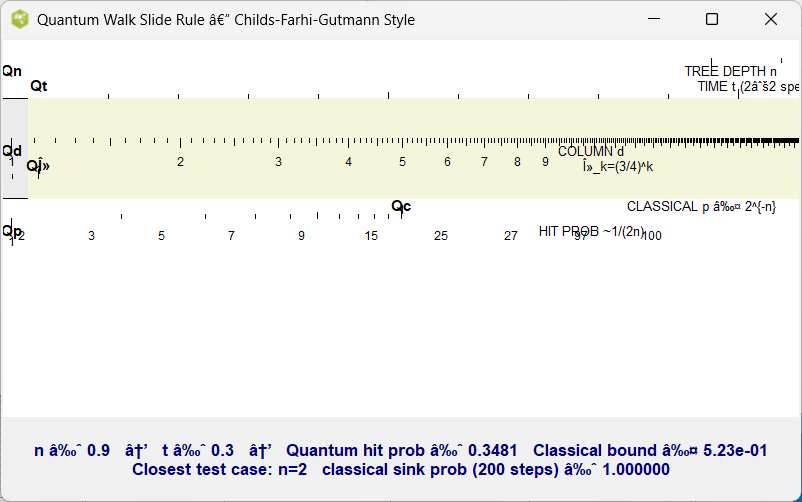
Figure. Snippets Concepts Quantum SlideRule V5
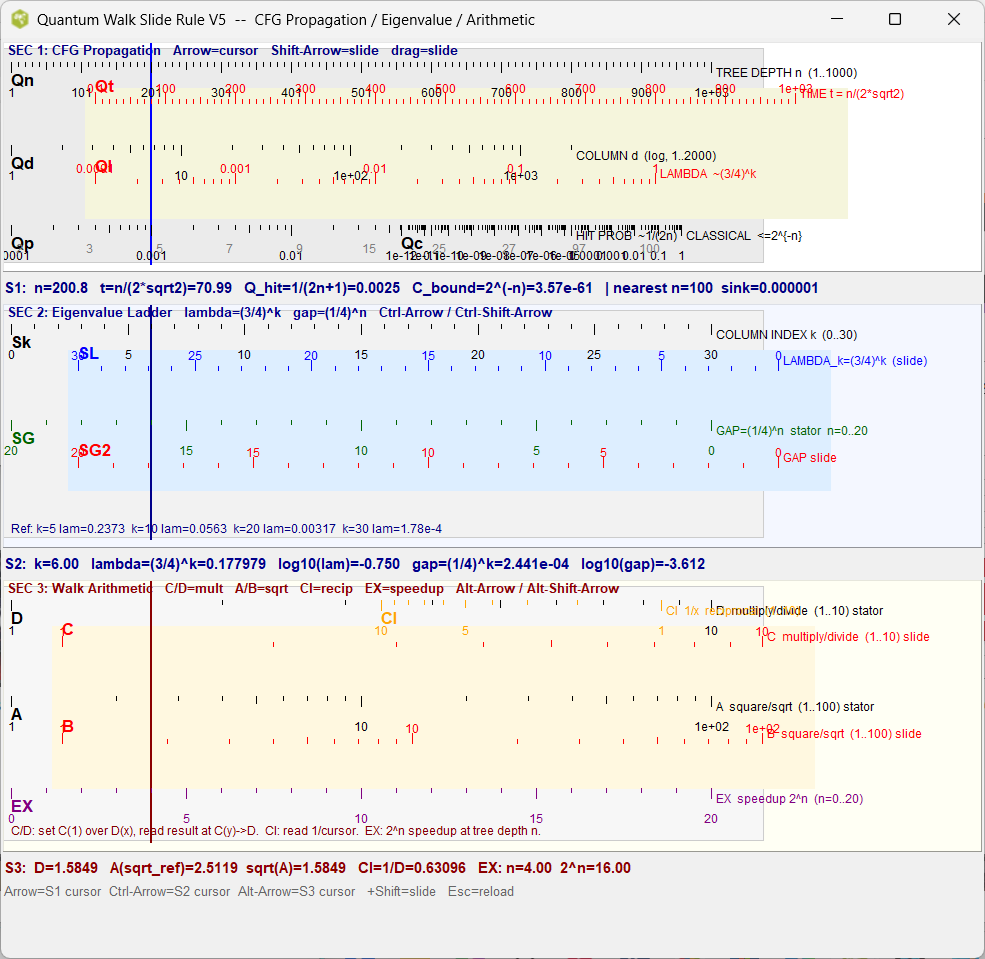
Figure. Snippets Concepts Quantum SlideRule V5, dat_file on console
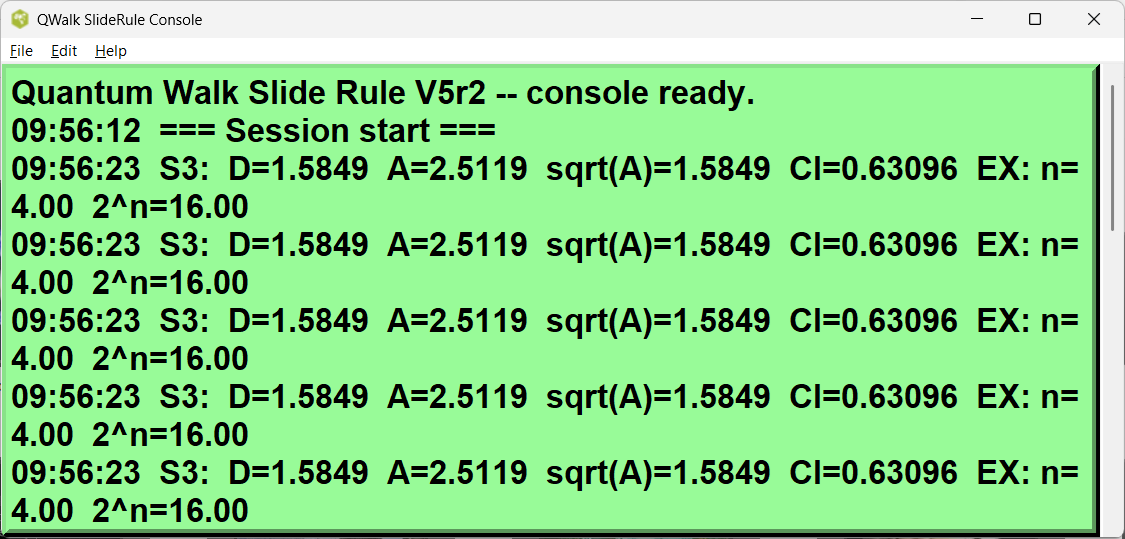
Figure. Snippets Concepts Quantum SlideRule V6
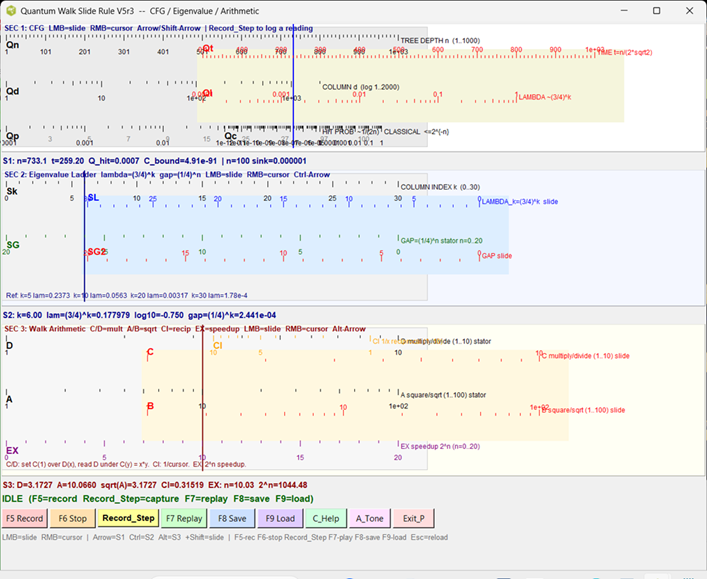
Figure. Snippets Concepts First 700 Collatz Pts.
Log2 vs Log2 plot is closest to a lion tamer that I know. Points would follow straight line if linear data. Some points or "binary probabilistic bins in computer lingo" are reused and overlaid, making a cleaner look to a non-linear function.
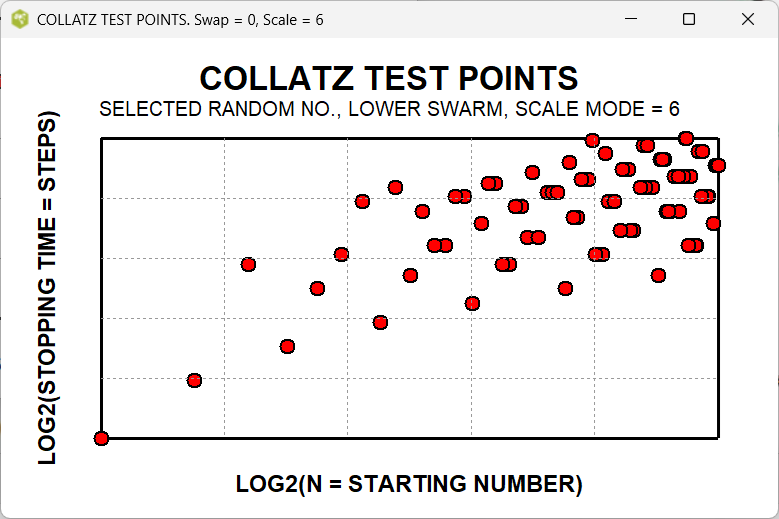
Figure. Classic Nassi Shneiderman Examples from Other Languages, Python
Classic NSD graphs drawn here, rest of page is based on Wiki table format.
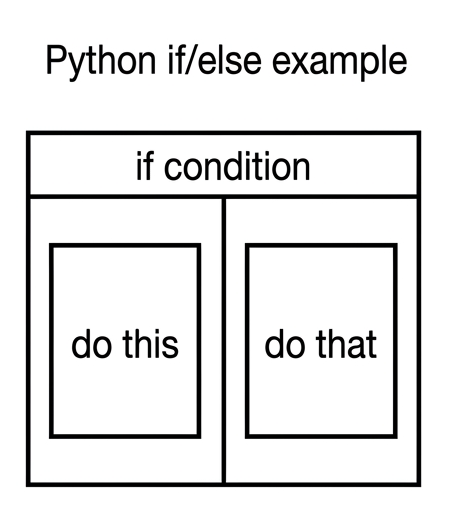
Figure. Classic Nassi Shneiderman Examples from Other Languages, Python
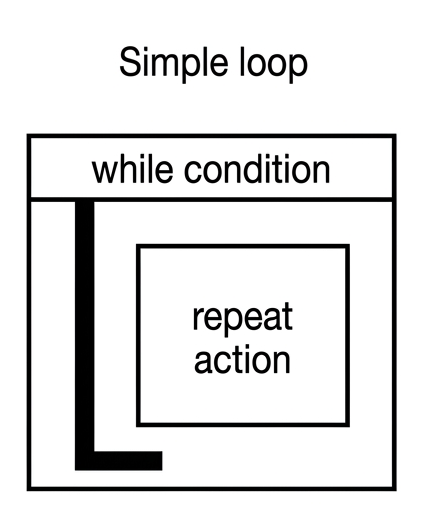
Figure. Classic Nassi Shneiderman Examples from Other Languages, Qbasix
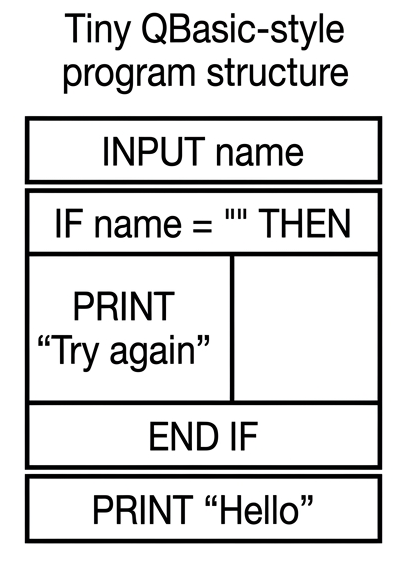
**** figure. NASSI-SHNEIDERMAN FLOWCHARTS OVERVIEW **** +----------------------------------------------------------------------------------+ | NASSI-SHNEIDERMAN DIAGRAMS (Structograms) | | | | Purpose: Visual structured programming without arrows or spaghetti code | | Three core elements: | | • Sequence (top-to-bottom boxes) | | • Selection (condition box with True left / False right) | | • Iteration (loop with condition at top or side) | | | | Advantages over traditional flowcharts: | | • No crossing lines | | • Clear nesting | | • Excellent for nested ifs, loops, and McCarthy-style clean logic | | | | Wiki Adaptation: Use pipe tables to approximate left-true / right-false | +----------------------------------------------------------------------------------+ **** figure. CLASSIC NASSI-SHNEIDERMAN ELEMENTS **** +----------------------------------------------------------------------------------+ | CLASSIC N-S ELEMENTS | | | | Sequence (linear steps) | | ┌─────────────────────┐ | | │ Step 1 │ | | │ Step 2 │ | | └─────────────────────┘ | | | | Selection (If-Then-Else) | | ┌──────────┬──────────┐ | | │ Condition│ │ | | ├──────────┼──────────┤ | | │ True │ False │ | | └──────────┴──────────┘ | | | | Iteration (While / For) | | ┌─────────────────────┐ | | │ While condition │ | | │ Body │ | | └─────────────────────┘ | | | | Wiki Table Approximation: True left column, False right column | +----------------------------------------------------------------------------------+ **** figure. DEFINING DIAGRAM vs SOLUTION DIAGRAM **** +----------------------------------------------------------------------------------+ | DEFINING DIAGRAM vs SOLUTION DIAGRAM | | | | Defining Diagram (High-Level) | | • Shows overall program structure | | • Sequence of major modules | | • Top-level decisions and loops | | | | Solution Diagram (Detailed) | | • One row per subroutine / proc | | • Nested ifs shown with "Level 2", "Level 3" labels | | • McCarthy / Quantized style notes | | • Safety margins and probabilistic logic | | | | Both use the same wiki table format for consistency | +----------------------------------------------------------------------------------+ **** figure. NESTED IF REPRESENTATION IN WIKI TABLE **** +----------------------------------------------------------------------------------+ | NESTED IF IN WIKI TABLE (True Left / False Right) | | | | Index Condition True / Then (Left) False / Else (Right) Quibble / Notes | 1 Outer: if (recording == 1) recordStep() stopRecording True left, False right per NSD | 2 Level 2 (inside True): append to replayList skip step Nested safety cap | if (step count < 2000) | 3 Level 3 (inside Level 2) validate 6 items log invalid Deep defensive check | | | This format preserves classic N-S left-true / right-false convention | +----------------------------------------------------------------------------------+ **** figure. PROBABILISTIC LOGIC IN N-S DIAGRAMS **** +----------------------------------------------------------------------------------+ | PROBABILISTIC LOGIC ELEMENT IN NASSI-SHNEIDERMAN | | | | Index Condition Branch Probability Outcome Action Normalized Quibble / Notes | 1 if (u < 0.2) B1 0.20 low-weight step Yes Small branch – rare quantum event | 2 0.2 ≤ u < 0.7 B2 0.50 standard path Yes Most likely middle branch | 3 else (u ≥ 0.7) B3 0.30 fallback / clamp Yes Safety default | 4 Sum / Audit — 1.00 — Yes Complete + Normalized audit | | | Adds risk/confidence and safety margin columns for technical writing | +----------------------------------------------------------------------------------+ **** figure. N-S ADAPTATION FOR TECHNICAL WRITING **** +----------------------------------------------------------------------------------+ | NASSI-SHNEIDERMAN FOR TECHNICAL WRITING | | | | Defining Diagram (High-Level) | | • Overall procedure flow | | • Major decision points | | • Sequence of steps | | | | Solution Diagram (Detailed) | | • One row per subroutine | | • Nested conditions shown clearly | | • Probabilistic elements and safety margins | | • McCarthy-style clean logic notes | | | | Perfect for engineering procedures, safety docs, and utility planning | +----------------------------------------------------------------------------------+ **** figure. NASSI-SHNEIDERMAN SUMMARY **** +----------------------------------------------------------------------------------+ | NASSI-SHNEIDERMAN FLOWCHARTS - Educational Summary | | | | Strengths: | | • Arrow-free, nesting is obvious | | • Excellent for nested ifs and loops | | • Wiki-table friendly approximation | | • Works for deterministic, probabilistic, and McCarthy-style logic | | | | Use Cases: | | • Technical procedures | | • Safety-critical code | | • AI probabilistic decision trees | | • Collatz / Quantum Walk logic | | • Poetry and structured creative writing | +----------------------------------------------------------------------------------+
Appendix Code
Appendix TCL Programs and Scripts
1. Expanded Toy for Demo
Experimenting with a iterative quantized and multivalued solution in McCarthy Function style
This is a draft.
# tcl
# Wiki Table maker for  Nassi Shneiderman Flowcharts  V2
# Using multiple safety caps or clamps, Collatz Sequence is infinite,
# danger of endless loops in program.
# ----
# Educational version with visible probabilities (4 sig figs)
# Alternate results in wiki table format (header with %|, alternating rows &|)
# ----
# Tcl/Tk 8.6+ 7-bit ASCII safe. NASA/JPL defensive programming style.
# NASA/JPL defensive programming style.
# Compatible with Tcl/Tk (Tool Control Language / Toolkit) 8.6+
# Written for Windows 11 on ActiveState Tcl.
# Working under strict 7-bit ASCII encoding.
# Optimized for collegiate information technology lab environments.
# Written to be very modular for transferable procs.
# Program deck may contain multiple estimation procs.
# May contain  code dependencies on Active State and Windows 11
# Complex math calculations up to 8 units computer time
# Wait for complete calculations before saving files.
# This is a hacker's patch, not rigorously derived.
# appears correct solutions for autotests.
# pure ASCII code - no Unicode characters used anywhere.
# Approaching =>>> computer time limit on this TCL configuration setup.
# No dependencies on main program
# Prints wiki table comparing Collatz swarms to HTS cuprates
# Uses original 10 test numbers + hardcoded odd steps
# TCL Club 4/1/2026
console show

# Minimal eigenvalue function (no dependencies)
proc compute_eigenvalue_for_layer {k} {
    return [expr {pow(0.75, $k)}]
}

# Simplified Anderson localization length (robust version from earlier fixes)
proc anderson_localization_length {k} {
    set lambda [compute_eigenvalue_for_layer $k]

    #if {$lambda >= 0.999}     { return ">1000" }
    if {$lambda >= 0.999}     { return " testing  A1" }


    if {$lambda <= 1e-12}     { return 1 }

    set xi [expr {-1.0 / log($lambda)}]

    if {$xi > 1000000}        { return ">1000000" }
    #return [expr {round($xi)}]
    return " testing  A2"
}

# HTS analog functions
proc hts_analog_tc {lambda} {
    if {$lambda >= 0.10} {
        # Scale toward 2026 record of 151 K in lower swarm
        return " Testing extra e  "
    } else {
        return " Testing extra e  "
    }
}

proc hts_phase {lambda} {
    if {$lambda > 0.20} { return " Safety Margin A" }
    if {$lambda > 0.10} { return " Safety Margin B" }
    if {$lambda > 0.01} { return " Safety Margin C" }
    return "Safety Margin D"
}

# Hardcoded odd-step counts matching your original test set
# From your output: 2→0, 3→2, 5→1, 7→5, 9→6, 15→5, 25→7, 27→41, 97→43, 100→7
set test_data {
    {2   0}
    {3   2}
    {5   1}
    {7   5}
    {9   6}
    {15  5}
    {25  7}
    {27  41}
    {97  43}
    {100 7}
}

# Wiki table header (matches  style)
puts ""
puts "%| Index  No.  |Branch   |Probability | Normalized prob. /Factored | NDS Elements Type | Probabilistic Logic Element |    Risk / Confidence Level |   Safety Margin     |Quibbles and Notes |%                                    "

set idx 1
foreach row $test_data {
    set n       [lindex $row 0]
    set k       [lindex $row 1]
    set lambda  [compute_eigenvalue_for_layer $k]
    set and_len [anderson_localization_length $k]
    set tc      [hts_analog_tc $lambda]
    set phase   [hts_phase $lambda]

    set swarm   [expr {$lambda >= 0.10 ? "lower_swarm" : "upper_swarm"}]
    set swarm   [expr {$lambda >= 0.10 ? "yes" : "no"}]

    set note "testing comment A"
    if {$tc > 100} {
        set note "testing comment B"
    } elseif {$tc == 0} {
        set note "testing comment C"
    }

    puts "&| $idx  |  B$n  | [format %.6f $lambda] | $swarm | $and_len | $tc |$tc Risk  | $phase | $note |&"

    incr idx
}

puts ""
puts "&| Sum /Audit |    |     |   |   |   |  |  | $note |&"
# end of file
gold 2/9/2026. Added categories, so can find message in Wiki.
Hidden Comments Section
Program Change Log
gold 2/3/2025. Testing, encountered initial difficulty in saving work? Long code blocks with or unmatched wiki markup can sometimes confuse the Tcl Wiki formatting engine, especially if fences are not balanced or a line begins with markup it treats specially.
gold 2/14/2026. Added Automatic Dump of Examples, Using ActiveState.
gold 2/14/2026. convert to strict 7-bit ASCII for Playground V9. reporting error at bottom. program should run to completion with automatic test suite.
gold 2/14/2026.
gold 3/7/2026. convert to strict 7-bit ASCII for Playground V9. variables need to be human readable and very explanatory. avoid variables with single letter names. Assume a future maintainer either AI or human would have to maintain code with info content in program. the program is working the numbers correctly . so minimal changes.
gold 3/10/2026. Other than a clipping function or a number clamp { y =< limit } in tcl program, not sure how to separate lower solutions band from upper solutions band. Are you able to produce 2 sets of x,y columns for fitting upper and lower solutions, from the 500 points? Referee my weak eyes, but seems real possibility that quantized levels of solutions could be intermixing?
Matrix of Collatz solutions look like two swarms of bees rather a single linear solution or even look like multiple fuzzy levels of solution ranges, eg. non-linear solutions, observable in various pngs. You can tell me different. Based on long experience of fitting equations in engineering, possibly the probabilistic reasoning or pattern matching on quantum solutions plural is more adaptable.
Please place any comments here with your wiki MONIKER and date, Thanks.gold 3/4/2026
Note. Testing computer methods and computer programs, maybe wrong numbers.
| Category Numerical Analysis | Category Toys | Category Calculator | Category Mathematics | Category Example | Toys and Games | Category Games | Category Application | Category GUI |