Street-crossing with Traffic-Lights
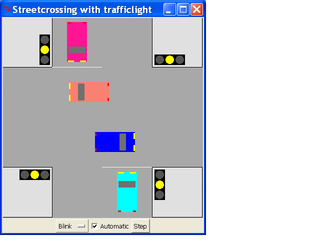
This is a simulation of a streetcrossing with traffic lights for all directions.
 #: Ampel.tcl - HaJo Gurt - 2005-06-25
 #: Street-crossing with traffic-lights
 #
 # See also: [Traffic lights] - https://wiki.tcl-lang.org/8410
 #
 # Todo:
 # * Lights for pedestrians
 # * Buttons for pedestrians
 # * Night-cycle, Detector/Button for cars
 # * Moving Cars, see:
 # ** "Toy cars"             : https://wiki.tcl-lang.org/12266
 # ** "Car Racing in Tcl"    : https://wiki.tcl-lang.org/4364
 # ** "Braitenberg Vehicles" : https://wiki.tcl-lang.org/9047

 #########1#########2#########3#########4#########5#########6#########7#####

  package require Tk

  set Debug -1   ;# -1: Off / 0: Status in Window-Title / 1: Console-Log
  set Title "Streetcrossing with trafficlight"

  proc RotateItem {w tagOrId Ox Oy angle} {
  #: Rotates a canvas item any angle about an arbitrary point
  #: by rotating the coordinates of the object. Works only with polygon and line.

    set angle [expr {$angle * atan(1) * 4 / 180.0}] ;# Radians
    foreach id [$w find withtag $tagOrId] {     ;# Do each component separately
        set xy {}
        foreach {x y} [$w coords $id] {
            # rotates vector (Ox,Oy)->(x,y) by angle clockwise

            set x [expr {$x - $Ox}]             ;# Shift to origin
            set y [expr {$y - $Oy}]

            set xx [expr {$x * cos($angle) - $y * sin($angle)}] ;# Rotate
            set yy [expr {$x * sin($angle) + $y * cos($angle)}]

            set xx [expr {$xx + $Ox}]           ;# Shift back
            set yy [expr {$yy + $Oy}]
            lappend xy $xx $yy
        }
        $w coords $id $xy
    }
  }

  proc MoveItem {w Tag dx dy } {
     $w move $Tag $dx $dy
  }

  proc Animate {} {
  #: Move cars
    MoveItem .c "Car3"  2 0
    MoveItem .c "Car4" -2 0
  }

  proc Car {x y Tag angle c1} {
  #: Draw a car around x,y in color c1
  #: Standard size:  Width: 40, Length 80

    set x1 [expr {$x-20}]; set x2 [expr {$x+20}]
    set y1 [expr {$y-40}]; set y2 [expr {$y+40}]
   #.c create rect $x1 $y1  $x2 $y2  -fill $c1   ;# Outline
    .c create poly $x1 $y1  $x1 $y2  $x2 $y2  $x2 $y1 -tags $Tag  -fill $c1

   # Windshield:
    set x1 [expr {$x-17}]; set x2 [expr {$x+17}]   ;# 15
    set y1 [expr {$y- 9}]; set y2 [expr {$y-22}]   ;# 10,20
    .c create poly $x1 $y1  $x1 $y2  $x2 $y2  $x2 $y1 -tags $Tag  -fill $::Window

   # Headlights:
    set x1 [expr {$x-18}]; set x2 [expr {$x- 6}]
    set y1 [expr {$y-37}]; set y2 [expr {$y-40}]
    .c create poly $x1 $y1  $x1 $y2  $x2 $y2  $x2 $y1 -tags $Tag  -fill yellow
    set x1 [expr {$x+18}]; set x2 [expr {$x+ 6}]
    .c create poly $x1 $y1  $x1 $y2  $x2 $y2  $x2 $y1 -tags $Tag  -fill yellow

   # Taillights:
    set x1 [expr {$x+18}]; set x2 [expr {$x+12}]
    set y1 [expr {$y+37}]; set y2 [expr {$y+40}]
    .c create poly $x1 $y1  $x1 $y2  $x2 $y2  $x2 $y1 -tags $Tag  -fill red
    set x1 [expr {$x-18}]; set x2 [expr {$x-12}]
    .c create poly $x1 $y1  $x1 $y2  $x2 $y2  $x2 $y1 -tags $Tag  -fill red

    RotateItem .c $Tag $x $y $angle
  }

 #########1#########2#########3#########4#########5#########6#########7#####

  proc Ampel {x y r id} {
  #: Draw a traffic-light
  #: Width 20, Height 60, Center at yellow

    switch -- $r {
    "S" {
      set x1 [expr {$x-10}]; set x2 [expr {$x+10}]
      set y1 [expr {$y-30}]; set y2 [expr {$y+30}]
        }
    "N" {
      set x1 [expr {$x+10}]; set x2 [expr {$x-10}]
      set y1 [expr {$y+30}]; set y2 [expr {$y-30}]
        }
    "E" {
      set x1 [expr {$x-30}]; set x2 [expr {$x+30}]
      set y1 [expr {$y-10}]; set y2 [expr {$y+10}]
        }
    "W" {
      set x1 [expr {$x+30}]; set x2 [expr {$x-30}]
      set y1 [expr {$y+10}]; set y2 [expr {$y-10}]
        }
    }
    .c create rect $x1 $y1  $x2 $y2  -fill $::Box

    set x1 [expr {$x-9}]; set x2 [expr {$x+9}]
    set y1 [expr {$y-9}]; set y2 [expr {$y+9}]
    .c create oval $x1 $y1  $x2 $y2  -tags [list $id "Y" ]  -fill $::Dark

    switch -- $r {
    "S" {
      set x1 [expr {$x- 9}]; set x2 [expr {$x+ 9}]
      set y1 [expr {$y-11}]; set y2 [expr {$y-29}]
      set x3 [expr {$x- 9}]; set x4 [expr {$x+ 9}]
      set y3 [expr {$y+11}]; set y4 [expr {$y+29}]
        }
    "N" {
      set x1 [expr {$x- 9}]; set x2 [expr {$x+ 9}]
      set y1 [expr {$y+11}]; set y2 [expr {$y+29}]
      set x3 [expr {$x- 9}]; set x4 [expr {$x+ 9}]
      set y3 [expr {$y-11}]; set y4 [expr {$y-29}]
        }
    "E" {
      set x1 [expr {$x-29}]; set x2 [expr {$x-11}]
      set y1 [expr {$y- 9}]; set y2 [expr {$y+ 9}]
      set x3 [expr {$x+29}]; set x4 [expr {$x+11}]
      set y3 [expr {$y+ 9}]; set y4 [expr {$y- 9}]
        }
    "W" {
      set x1 [expr {$x+29}]; set x2 [expr {$x+11}]
      set y1 [expr {$y+ 9}]; set y2 [expr {$y- 9}]
      set x3 [expr {$x-29}]; set x4 [expr {$x-11}]
      set y3 [expr {$y+ 9}]; set y4 [expr {$y- 9}]
        }
    }
    .c create oval $x1 $y1  $x2 $y2  -tags [list $id "R" ]  -fill $::Dark
    .c create oval $x3 $y3  $x4 $y4  -tags [list $id "G" ]  -fill $::Dark
  }

 #########1#########2#########3#########4#########5#########6#########7#####

  proc every {ms body} {
  #: Repeating timer
    eval $body; after $ms [info level 0]
  }

  proc Check {} {
  #: Check if delay for next step is over
   #puts "$::Auto $::Time $::Mode"  ;# Debug

    if {$::Auto == 0} { return }

    incr ::Time -1
    if {$::Debug>=0} { wm title . "$::Mode - Phase: $::Phase  Time: $::Time"
    } else           { wm title . $::Title }

    if {$::Time <= 0} { Step }
  }

  proc Step {} {
  #: Go to next step of currently running TL-cycle
    if {$::Debug>=1} {puts "- $::Mode $::Select" }
    set ::Time 0
    switch -- $::Mode {
      "Slow"  { Mode1; return }
      "Fast"  { Mode2; return }
      default { Blink }
    }
  }

 #########1#########2#########3#########4#########5#########6#########7#####

  proc Cmd { {A A1} {L "-"} } {
  #: Process commands for a single traffic-light
    if {$::Debug>=1} { puts "$::Mode - #$::Phase T$::Time - Cmd: $A $L" }

    foreach C $L {
      set X "$A && $C"
      if {$C eq "-"} { .c itemconfig $A -fill $::Dark   }
      if {$C eq "R"} { .c itemconfig $X -fill $::Red    }
      if {$C eq "Y"} { .c itemconfig $X -fill $::Yellow }
      if {$C eq "G"} { .c itemconfig $X -fill $::Green  }
    }
  }

  proc Blink {} {
  #: "Mode0" : Flashing yellow for all directions
    incr ::Phase
    if {$::Phase > 0} {set ::Phase -1}

    .c itemconfig { A1 || A2 || A3 || A4 }  -fill $::Dark
    if {$::Phase < 0 } {
      .c itemconfig "Y"  -fill $::Yellow   ;# all yellow lights on
      set ::Time 2
    } else {
      set ::Time 1
      set ::Mode $::Select  ;# safe for switching modes
    }
  }

  proc Mode1 {} {
  #: "Slow" mode: discreet states, same timing for all directions
    global Phase Time  Mode Select
    incr   Phase
    if {$Phase >= 8} { set Phase 0; set Mode $Select }  ;# safe time to switch modes
    set P [ expr {$Phase%8} ]
   #wm title . "$Phase : $P"   ;# Debug
    if {$::Debug>=1} { puts "Mode1: $P" }

    if {$P==1} { set Time  1; Cmd A1 "- R"  ; Cmd A3 "- R"  ; Cmd A2 "- R"  ; Cmd A4 "- R"   } ;#
    if {$P==2} { set Time  3; Cmd A1 "- R"  ; Cmd A3 "- R"  ; Cmd A2 "- R Y"; Cmd A4 "- R Y" }
    if {$P==3} { set Time 10; Cmd A1 "- R"  ; Cmd A3 "- R"  ; Cmd A2 "- G"  ; Cmd A4 "- G"   }
    if {$P==4} { set Time  3; Cmd A1 "- R"  ; Cmd A3 "- R"  ; Cmd A2 "- Y"  ; Cmd A4 "- Y"   }

    if {$P==5} { set Time  1; Cmd A1 "- R"  ; Cmd A3 "- R"  ; Cmd A2 "- R"  ; Cmd A4 "- R"   } ;#
    if {$P==6} { set Time  3; Cmd A1 "- R Y"; Cmd A3 "- R Y"; Cmd A2 "- R"  ; Cmd A4 "- R"   }
    if {$P==7} { set Time 10; Cmd A1 "- G"  ; Cmd A3 "- G"  ; Cmd A2 "- R"  ; Cmd A4 "- R"   }
    if {$P==0} { set Time  3; Cmd A1 "- Y"  ; Cmd A3 "- Y"  ; Cmd A2 "- R"  ; Cmd A4 "- R"   }

    if {$::Debug>=0} { wm title . "$::Mode : Phase: $::Phase  Time: $::Time" }
  }

  proc Mode2 {} {  ;#
  #: "Fast" mode: overlapping R/Y-phases, shorter green for minor street
    global Phase Time  Mode Select
    incr Phase
    if {$Phase >= 6} { set Phase 0; set Mode $Select } ;# safe time to switch modes
    set P [ expr {$Phase%6} ]
    if {$::Debug>=1} { puts "Mode2: $P" }

    if {$P==1} { set Time  2; Cmd A1 "- R"  ; Cmd A3 "- R"  ; Cmd A2 "- R Y"; Cmd A4 "- R Y" }
    if {$P==2} { set Time 10; Cmd A1 "- R"  ; Cmd A3 "- R"  ; Cmd A2 "- G"  ; Cmd A4 "- G"   } ;# E-W long
    if {$P==3} { set Time  3; Cmd A1 "- R"  ; Cmd A3 "- R"  ; Cmd A2 "- Y"  ; Cmd A4 "- Y"   }

    if {$P==4} { set Time  2; Cmd A1 "- R Y"; Cmd A3 "- R Y"; Cmd A2 "- R"  ; Cmd A4 "- R"   }
    if {$P==5} { set Time  6; Cmd A1 "- G"  ; Cmd A3 "- G"  ; Cmd A2 "- R"  ; Cmd A4 "- R"   } ;# N-S short
    if {$P==0} { set Time  3; Cmd A1 "- Y"  ; Cmd A3 "- Y"  ; Cmd A2 "- R"  ; Cmd A4 "- R"   }

    if {$::Debug>=0} { wm title . "$::Mode : Phase: $::Phase  Time: $::Time" }
  }

 #########1#########2#########3#########4#########5#########6#########7#####

  wm title . $Title
  if {$::Debug>=1} { catch {console show} }

  set canvas_width  400
  set canvas_height 400

  set a   0
  set b 100
  set c 300
  set d 400

  set Street grey66
  set Paint  grey99
  set Corner grey88
  set Box    black
  set Dark   grey33
  set Red    red
  set Yellow yellow    ;# yellow2 gold
  set Green  green3    ;# green3  "lime green"
  set Window grey44

  set Auto  1
  set Phase 0
  set Time  0
  set Mode  "Blink"

  canvas .c -width $canvas_width -height $canvas_height  -bg $Street

 # Corners:
  .c create rect $a $a  $b $b  -fill $Corner
  .c create rect $c $a  $d $b  -fill $Corner
  .c create rect $a $c  $b $d  -fill $Corner
  .c create rect $c $c  $d $d  -fill $Corner

 # Decorations:
  .c create line $b              $b  [expr {$b+100}] $b  -fill $Paint  ;# N
  .c create line [expr {$c-100}] $c  $c              $c  -fill $Paint  ;# S
 #.c create line $c              $b  $c [expr {$b+100}]  -fill $Paint  ;# E
 #.c create line $b [expr {$c-100}]  $b              $c  -fill $Paint  ;# W
 #.c create line $a [expr {$c-100}]  $d [expr {$c-100}]  -fill $Paint  -dash {6 4}  ;# E-W

 # Traffic-lights:
  Ampel [expr {$c+15}] [expr {$c+35}]  S A1   ;# South
  Ampel [expr {$c+35}] [expr {$b-15}]  E A2   ;# East
  Ampel [expr {$b-15}] [expr {$b-35}]  N A3   ;# North
  Ampel [expr {$b-35}] [expr {$c+15}]  W A4   ;# West

 # Cars:
  Car [expr {$c-50}] [expr {$c+50}] "Car1"   0 cyan      ;# S
  Car [expr {$b+50}] [expr {$b-50}] "Car2" 180 deeppink  ;# N
  Car [expr {$b-50}] [expr {$c-50}] "Car3"  90 blue      ;# W
  Car [expr {$c+50}] [expr {$b+50}] "Car4" 270 salmon    ;# E

  frame .f
  pack  .c .f
  tk_optionMenu .opt Select "Blink" "Slow" "Fast"
  checkbutton   .cA -text "Automatic" -command {Step} -variable Auto
  button        .bS -text "Step"      -command {Step}
  pack          .opt .cA .bS  -in .f  -side left

  every  500 Check
  every   20 Animate
I added a timer for automatic operation, as well as a new mode. Now there are three modes: flashing yellow for all directions (e.g. out-of-order or nighttime), and two different red/red+yellow/green/yellow (e.g. german style) modes named "slow" and "fast". Switching between these modes only happens after a complete cycle, e.g. when all lights are red. (E.g. when selecting a new mode, you have to wait until it happens) The "slow" mode has even timing for all directions, the "fast" mode has shorter green-time for the minor street (north-south on this crossing).
I had some trouble processing multiple tags, so this is likely not the most elegant solution. Same for the way of rotating the picture of the trafficlight. The routine from Canvas Rotation would have been nice (but a bit of overkill for this program), but it does not support rect and oval (yet). RS: As rect and oval items are determined only by two diagonal bbox corners, they can't really be rotated. But it's possible to convert a rect to a polygon (trivially), and for ovals see Regular polygons.
HJG Ok, simple cars and simple animation added, but yet unrelated to the trafficlights.
I had the idea of using the Braitenberg Vehicles to populate the streets. They would just need central object-sensors to avoid collision with other cars, and "heat-sensors" at the right to sense the red trafficlights. But it looks like the object-detection is not good enough - the car moves forward too long, until it runs over the object in front, e.g. a car that is waiting at a red light.
gold added pix