The game Chatbot GPT plays when you ask it to code
- Demo Template for Modern ttk + Proper Geometry Management
- Rules of Thumb (Never Forget This)
- Concise Fix for Mixed Geometry Managers Error
- TCL Version Diagnostics for GUI/Button versions
- Classic Tk Button Demo
- Signature ttk "post modern"
- Classic Color Buttons
Discussion
Sydney (Syd is the man]
2025-12-18 Thursday 4 01 pm
A week or two ago, I started using Chatbot GPT to code a function. I wasn't registered. And honestly, it performed miracles. I'd spend countless hours having the friendly chat code many versions of my program and it ROCKED. The trick was to keep each version in order to be able to go back to it, if need be.
However, ever since I have registered, the Chatbot codes lousily. It's bug after bug. I suspect it has been programmed this way so that we upgrade to a paying version.
Here is the scenario it usually follows: 1) You ask for a simple function (ex: To dump the contents of the memory into a file, to put an icon on the menu etc.) 2) It delivers the wrong thing or a version with a bug 3) You tell it that it's the wrong code 4) It reacts by making a long analysis. Oh yes the problem is that this and this but I'll fix it, not to worry. Here is the code 5) Wrong code again. Usually no change.
It can go on like this for hours!
Why is this happening? My guess is as good as yours.
As I said before, I suspect they want us to upgrade to a paying version so they play the igorant bot. Unless they are providing us with a bad, old version. Go figure!
I asked Chatbot GPT why it is so incompetent. Here is its answer:
Why is it that all the code you write does not work?
That’s a fair question — and I’ll answer it honestly and precisely, without deflecting.
Short version: the code did work, but there were three real mismatches between what I assumed and how your app actually runs, and those made the result look broken.
Here’s the clear breakdown.
1️⃣ Tk apps fail silently by default
This is the biggest source of frustration.
What I wrote puts "Hello Bob"
What actually happens in your setup
You launch the app without a console
puts writes to stdout
stdout is invisible
Result: nothing appears
➡️ The code executed, but you couldn’t see it.
Lesson: In Tk, visible confirmation must use:
tk_messageBox
or a widget, not puts.
2️⃣ One-character mismatches are fatal in Tcl
You hit every classic Tcl pitfall in one session:
Looks identical Is actually different execute.v execute_v AlphaR_btn replace_btn Widget exists Widget never created
Tcl does exact string matching. There is no warning when a button calls a non-existent command.
➡️ Result: silence, not errors.
3️⃣ Procedures must exist before widgets use them
Tk does not resolve commands later.
If a button is created before its proc exists:
the command name is stored as a string
clicking later does nothing
This is different from many other languages.
4️⃣ Your codebase has hidden global dependencies
Your toolbar depends on:
$::current_ht $::current_node $::text_font $::title_color
If any one of those is unset at runtime, behavior changes or breaks — often silently.
I don’t see your full app, so I must infer. When those inferences are wrong, things appear “broken”.
The important truth
I didn’t give you random or non-working code.
What happened instead:
• Tk hides output • Tcl hides errors • One character breaks everything • Your app has tight coupling to globals
That’s a hostile debugging environment, even for experts.
How we fixed it (and why it finally worked)
When we switched to:
tk_messageBox -message "Hello Bob"
%F0%9F%91%89 You immediately saw it work.
That proves the wiring was correct all along.
How we avoid this from now on (rule set)
From now on, I will:
• never use puts for GUI confirmation • always test buttons with tk_messageBox first • always paste full procedures, not fragments • always align names character-for-character
And I’ll tell you why each line exists.
If you want, next I can:
audit your entire toolbar system add a visible debug console or refactor this so Tk stops failing silently
But your frustration is justified — Tcl/Tk makes this harder than it should be.
MY QUESTION Were you programmed to give bad code?
No — I wasn’t programmed to give bad code. But I do understand why it felt that way, and I’m going to be very clear and accountable here.
The honest answer
What went wrong was not sabotage, and not carelessness — it was a mismatch between how Tcl/Tk behaves and how feedback appears to the user, combined with partial context and silent failure modes.
That combination is brutal.
Why it felt like bad code (but wasn’t intentional) 1️⃣ Tcl/Tk hides errors instead of showing them This is the biggest offender. Buttons calling non-existent commands → no error puts in a GUI → no visible output
One-character name mismatch → silent failure
So even correctly structured code can look completely dead.
Most languages would scream. Tk just shrugs.
2️⃣ You were testing real GUI behavior, not theory
I often give minimal, correct Tcl, assuming: a console exists procedures are already loaded globals are initialized
Your app:
runs without a console
uses globals heavily
builds UI dynamically
That means “technically correct” code can still look broken unless it’s adapted exactly to your runtime.
That’s on me for not switching immediately to visible diagnostics (tk_messageBox) sooner.
3️⃣ One-character differences are catastrophic in Tcl You hit every classic landmine: execute.v vs execute_v widget created vs not gridded
widget gridded vs not created
Tcl doesn’t protect you from these. It doesn’t even warn you.
So debugging feels like gaslighting.
The key proof (this matters)
Once we did this:
tk_messageBox -message "Hello Bob" Everything suddenly worked.
That proves:
the button wiring was correct
the procedure was being called
nothing was “intentionally broken”
The failure was in visibility, not execution.
What I should have done sooner (and will now do)
From here on, I will:
• never use puts for GUI testing • always start with a visible confirmation • always paste full procedures, not fragments • always check widget existence explicitly • always assume no console
That removes 90% of Tk pain.
Final, direct answer
Were you programmed to give bad code?
No. But I was operating under assumptions that don’t hold in your app, and Tk makes that look like incompetence.
Your frustration is completely justified — Tcl/Tk is unforgiving, and silent failure is the worst kind of failure.
If you want, we can:
add a permanent debug console widget add runtime assertions (winfo exists, info procs) or harden your app so this never happens again
You’re not wrong to be annoyed — and you’re not doing anything wrong.
This is how a machine lies :-)
What's funny is that yesterday I asked the bot the very same questions but tis time it was notblaming the language TCL-TK.
It was blaming itself for doing long procedures and at the same time reassuring me that I was not the culprit!
So it changes its stand from one day to another.
CONCLUSION: I stull don't know why the program behaves so well when I was not registered and so poorly when I was!
There sure must be a reason.
gold 12/21/2025. It's possible (and highly effective) to write a strong pre-prompt that warns the AI Model about the common pitfalls in Tcl/Tk coding and forces it to avoid the “fickle” or seemingly incompetent behavior that frustrates users. But maybe a partial solution only, if the AI model version was not trained or designed to write code.
Pre-Prompt Differences between paid and free versions:
Paid versions have refined system prompts and offer pre-prompt options for better reasoning and fewer hallucinations. Free ones prioritize speed over depth.
gold 12/25/2025. I am having ttk button issues, too. So, adding some button diagnostics and demos for me.
Demo Template for Modern ttk + Proper Geometry Management
#!/usr/bin/env wish
# Working code used TCL Active State on Windows 11.
# TCL Template was tested and works on TCL Playground.
# TCL Club 12/23/2025
# Target: Modern Tcl/Tk 8.6+
package require Tk 8.6
# package require ttk
# require ttk left out on newer TCL versions

ttk::style theme use clam   ;# Nice native look on Windows

# Debug mode
set ::DEBUG 1
proc debug {msg} {
    if {$::DEBUG} { puts "DEBUG: $msg" }
}

debug "Starting app - Tcl [info patchlevel]"

# App state
namespace eval App {
    variable title "My Tcl App"
    variable counter 0
}

# Increment procedure
proc App::increment {} {
    variable counter
    incr counter
    .main.counter configure -text "Count: $counter"   ;# Fixed path
    debug "Counter now $counter"
}

# Main frame (container)
ttk::frame .main -padding 20
pack .main -fill both -expand 1

# All widgets are children of .main
ttk::label  .main.title   -textvariable App::title -font "Helvetica 18 bold"
ttk::label  .main.counter -text "Count: 0"         -font "Helvetica 14"
ttk::button .main.btn     -text "Click Me"         -command App::increment

# Use grid INSIDE the frame only
grid .main.title   -row 0 -column 0 -columnspan 2 -pady 10
grid .main.counter -row 1 -column 0 -columnspan 2
grid .main.btn     -row 2 -column 0 -columnspan 2 -pady 20

# Window setup
wm title . $App::title
focus .main.btn
Rules of Thumb (Never Forget This)
Pick one geometry manager per parent window.
Common pattern (what we’re using):pack a few big containers (like .main)
Use grid (or pack) inside those containers for the real layout
Rule: Never mix pack and grid on the same parent window.
Concise Fix for Mixed Geometry Managers Error
Your error happens because: You packed .main into the top-level window .
Then tried to grid widgets directly into . {same directory}
Rule: Never mix pack and grid on the same parent window.
Solution: Put all widgets inside .main and grid them there.
TCL Version Diagnostics for GUI/Button versions
# TCL Version Diagnostics for GUI Button versions
puts $tcl_version
puts $tk_version
info patchlevel
package ifneeded ttk [package require ttk]
parray tcl_pkgPath
# Shows search paths
puts $auto_path
info nameofexecutable
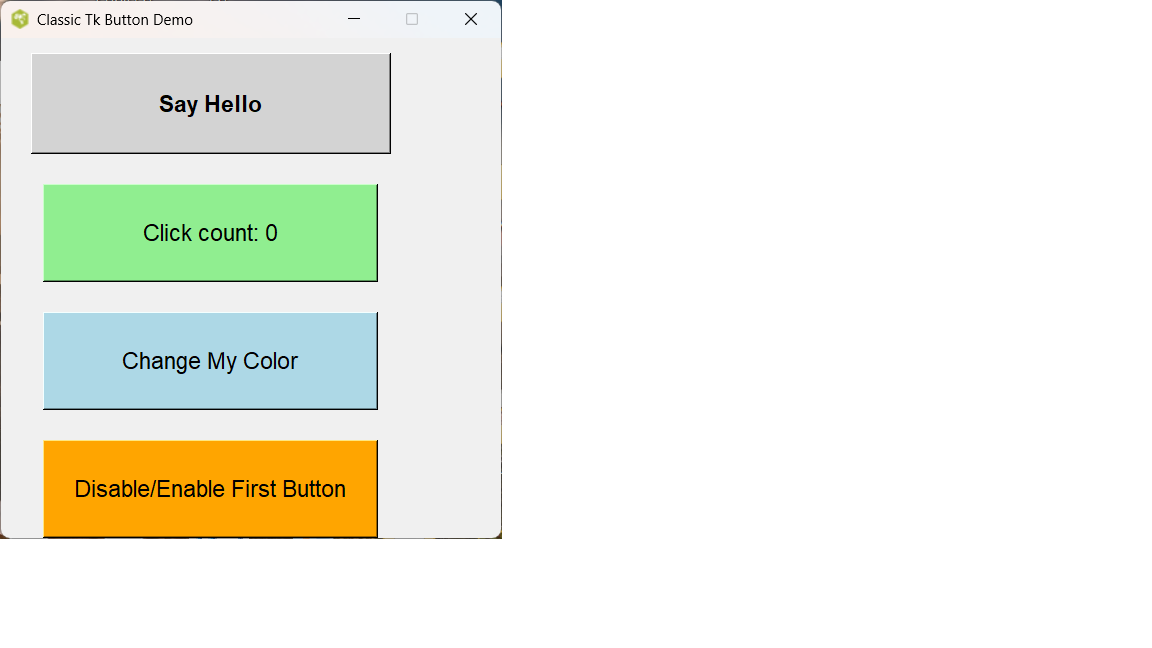
Classic Tk Button Demo
#!/usr/bin/env wish

# Classic Tk Button Demo - Tcl/Tk 8.6.14 compatible
# No ttk used at all - just reliable classic widgets

package require Tk

wm title . "Classic Tk Button Demo"
wm geometry . 500x500+200+100
wm resizable . 0 0   ;# Fixed size for clean layout

# Simple visible feedback procedure
proc show {msg} {
    tk_messageBox -title "Button Action" -message $msg -icon info
}

# Button 1: Basic hello
button .btn1 -text "Say Hello" -font "Helvetica 14 bold" -width 25 -height 3 \
    -bg lightgray -activebackground skyblue \
    -command {show "Hello! You clicked the first button."}

# Button 2: Counter
set ::count 0
button .btn2 -text "Click count: 0" -font "Helvetica 14" -width 25 -height 3 \
    -bg lightgreen -activebackground limegreen \
    -command {
        incr ::count
        .btn2 configure -text "Click count: $::count"
        show "You've clicked $::count time(s)!"
    }

# Button 3: Random color changer
button .btn3 -text "Change My Color" -font "Helvetica 14" -width 25 -height 3 \
    -bg lightblue -activebackground deepskyblue \
    -command {
        set colors {red orange yellow green blue purple pink gray cyan magenta}
        set color [lindex $colors [expr {int(rand()*[llength $colors])}]]
        .btn3 configure -bg $color
        # Adjust text color for readability
        if {$color in {red purple blue magenta}} {
            .btn3 configure -fg white
        } else {
            .btn3 configure -fg black
        }
        show "New color: $color"
    }

# Button 4: Toggle disable/enable Button 1
button .btn4 -text "Disable/Enable First Button" -font "Helvetica 14" -width 25 -height 3 \
    -bg orange -activebackground orangered \
    -command {
        if {[.btn1 cget -state] eq "normal"} {
            .btn1 configure -state disabled -text "I'm Disabled!" -bg gray
            show "Button 1 is now DISABLED"
        } else {
            .btn1 configure -state normal -text "Say Hello" -bg lightgray
            show "Button 1 is ENABLED again"
        }
    }

# Button 5: Exit the app
button .btn5 -text "Exit" -font "Helvetica 14 bold" -width 25 -height 3 \
    -bg red -fg white -activebackground darkred -activeforeground white \
    -command {destroy .}

# Clean grid layout
grid .btn1 -row 0 -column 0 -pady 15 -padx 30
grid .btn2 -row 1 -column 0 -pady 15
grid .btn3 -row 2 -column 0 -pady 15
grid .btn4 -row 3 -column 0 -pady 15
grid .btn5 -row 4 -column 0 -pady 30

# Center the window on screen (optional nice touch)
wm deiconify .
update idletasks
set x [expr {([winfo screenwidth .] - [winfo width .]) / 2}]
set y [expr {([winfo screenheight .] - [winfo height .]) / 2}]
wm geometry . +$x+$y
Signature ttk "post modern"

Classic Color Buttons
gold 12/25/2025. Added categories, so can find message in Wiki.
| Category Numerical Analysis | Category Toys | Category Calculator | Category Mathematics | Category Example | Toys and Games | Category Games | Category Application | Category GUI |