ZigZag
Zigzag. Question raised comp.lang.tcl <[email protected]> (see e.g. <http://groups.google.com/group/comp.lang.tcl/browse_thread/thread/e590fe10db828f62/6a7df3f81052114b#6a7df3f81052114b >:
Edit a canvas multi-line with mouse clicks. Clicking somewhere near a segment adds a vertex at this point. Clicking and dragging a vertex modifies its coordinates.
This is more intended as a simple example, so I wanted to keep it minimal (thus no deleting).
The idea was to use the canvas data structures as "model".
There are surely many possible improvements: feel free to munge this page accordingly (it's a wiki, after all :-).
I'd be especially interested in style improvements and in whatever makes this snippet shorter and clearer (I'm not a very seasoned Tcler, mind you).
Screenshot:
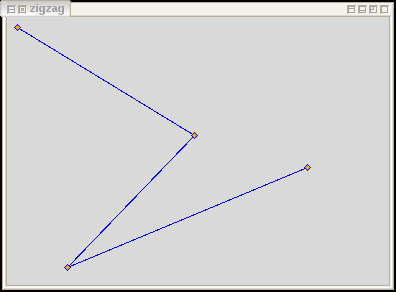
 #!/usr/bin/wish8.5
 # This code is in the public domain. Use, enjoy.

 pack [canvas .c]

 # Draw a decoration on a vertex
 # All of them have the tag "deco"
 proc dot {x y} {
   .c create polygon [expr {$x + 3}] $y $x [expr {$y - 3}] \
       [expr {$x - 3}] $y $x [expr {$y + 3}] \
       -fill orange -outline blue -tags deco
 }


 # Find point on segment (p--q) nearest to (xp,yp).
 # Return (xxp yyp, d) where (xxp, yyp) are the coords of this
 # nearest point and d is the distance to the segment.
 proc prox-seg {px py qx qy rx ry} {
   set ux [expr { $qx - $px }]
   set uy [expr { $qy - $py }]
   set vx [expr { $rx - $px }]
   set vy [expr { $ry - $py }]
   set u [expr { hypot($ux, $uy) }]
   set v [expr { hypot($vx, $vy) }]
   # c is the relative position of this point on the segment
   # (0 --> p, 1 --> q, i.e. c < 0  or c > 1 means point is
   # outisde the segment)
   set c [expr {($ux * $vx + $uy * $vy) / ($u * $u)}]
   # if we clamp it to [0,1] we'll never lie outside the segment:
   set c  [expr {$c<0 ? 0 : $c>1 ? 1 : $c}]
   set wx [expr { $ux * $c }]
   set wy [expr { $uy * $c }]
   set d  [expr { hypot($vx - $wx, $vy - $wy) }]
   return [list [expr {$px + $wx}] [expr {$py + $wy}] $c $d]
 }

 # Find the point on (multi-)line nearest to given x y
 # Return coords of point, segment number (0..n-1), relative pos
 # whithin that segment and distance to that segment
 # Note that this gets inaccurate when the nearest point is near
 # the beginning or end of the line: we don't mind, because we
 # just trigger "near" the line
 proc prox-line {line x y} {
   set nseg -1
   foreach {qx qy} [.c coords $line] {
     if {[info locals px] != ""} { # else we are first time here
       # Current segment is p--q
       set thisseg [prox-seg $px $py $qx $qy $x $y]
       set dist [lindex $thisseg 3]
       if { [info locals mindist] == "" ||
            ( $dist < $mindist && [lindex $thisseg 2] >=0 && [lindex $thisseg 2] <=1 ) } {
         set minseg  $thisseg
         set mindist $dist
         set minnseg $nseg
       }
     }
     set px $qx
     set py $qy
     incr nseg
   }
   return [list [lindex $minseg 0] [lindex $minseg 1] $minnseg [lindex $minseg 2] [lindex $minseg 3]]
 }

 # return no [0..n] of line's vertex next to x y
 proc findvertex {line x y} {
   set n 0
   foreach {vx vy} [.c coords $line] {
     set d [expr {hypot($x - $vx, $y - $vy)}]
     if {[info locals dmin] == "" || $d  < $dmin} {
       set dmin $d
       set nmin $n
     }
     incr n
   }
   return $nmin
 }

 # Add a vertex to zigzag nearest to x y
 proc zig {wx wy} {
   # NOTE receives window coords -- thanks [MLai]!
   set x [.c canvasx $wx]
   set y [.c canvasy $wy]
   global zigzag
   set pos [prox-line $zigzag $x $y]
   .c insert $zigzag [expr {2 * (1 + [lindex $pos 2])}] [list $x $y]
   dot $x $y
   drag-start $x $y
 }

 # Dragging vertices (ripped off Tk demo). Three procs manage the dragging
 proc drag-start {wx wy} {
   # NOTE receives window coords -- thanks [MLai]!
   set x [.c canvasx $wx]
   set y [.c canvasy $wy]
   global lastx lasty
   puts [.c find withtag deco]
   # Find out which decoration item(s) to drag
   set deco {}
   foreach it [.c find closest $x $y] {
     puts "$it: [.c gettags $it]"
     if {[lsearch -all -exact -inline [.c gettags $it] deco] ne ""} {lappend deco $it}
   }
   puts $deco
   bind .c <B1-Motion> [list dragging $deco %x %y]
   bind .c <ButtonRelease-1> [list drag-end %x %y]
   set lastx $x
   set lasty $y
 }

 proc dragging {it x y} {
   global lastx lasty zigzag
   .c move $it [expr $x - $lastx]  [expr $y - $lasty]
   set v [expr {2 * [findvertex $zigzag $lastx $lasty]}]
   # insert before v, delete after newly inserted:
   .c insert $zigzag $v [list $x $y]
   .c dchars $zigzag [expr {$v + 2}] [expr {$v + 3}]
   set lastx $x
   set lasty $y
 }

 proc drag-end {x y} {
   bind .c <ButtonRelease-1> {}
   bind .c <B1-Motion> {}
 }

 # Draw initial line, decorate, set up bindings
 set zigzag [.c create line 10 10 60 250 300 150 -fill blue]
 foreach {x y} [.c coords $zigzag] {dot $x $y}
 .c bind $zigzag <ButtonPress-1> [list zig %x %y]
 .c bind deco <ButtonPress-1> [list drag-start %x %y]
See also: Drawing and editing polygons
MLai 2013-10-10
Very useful! I adapt your code in my program and then notice sometimes the dot (polygon) is not right on the line. I add the following lines to your routines to make this "offset" problem go away:
   set x [.c canvasx $x]
   set y [.c canvasy $y]
Not sure if the offset problem is something specific in my application.
tomas 2013-12-25
Thanks for the good catch, MLai!
I corrected it in the code: both zig and drag-start receive mouse coordinates, which are relative to the canvas's viewport origin and not to the canvas's origin: when they are not the same (e.g. when the canvas is scrolled, but perhaps on some platforms), bad things happen.