AI and BWise, an experiment
It's been a long time since I (Theo Verelst) wrote about BWise, but in this time it still interests me, so I thought I'd take some of the AI things I've worked on to bring AI to BWise. I've though of two main ideas, both backed by an Ollama Linux (Fedora 39 in this case) install with some models that run easily on a RTX3060 card.
To get anything done at all, here's a Grok made, debugged by me procedure which calls the AI model, in this case mistral-nemo:12b with the argument desired, which returns the AI's response:
proc ai_query { {prompt} } {
    # Escape special chars for JSON (handles quotes, newlines, etc.)
    set escaped_prompt [string map {\\ \\\\ \" \\\" \n \\n \r \\r \t \\t} $prompt]

    # Build JSON payload
    set json_data "{\"model\":\"mistral-nemo:12b\",\"prompt\":\"$escaped_prompt\",\"stream\":false}"

    # Send POST to Ollama API and parse response with jq
    set cmd [list curl -s -X POST http://localhost:11434/api/generate  -H "Content-Type: application/json"  -d $json_data | jq -r  .response]

    # Execute and return the AI output
 #  puts $cmd
    set response [eval exec $cmd]

    return $response
}
It was fun to see grok simply look up bwise online, decide on how blocks could be made, suggest a stub library (curl and jq) and program a almost working routine. Eval hell got to it though.
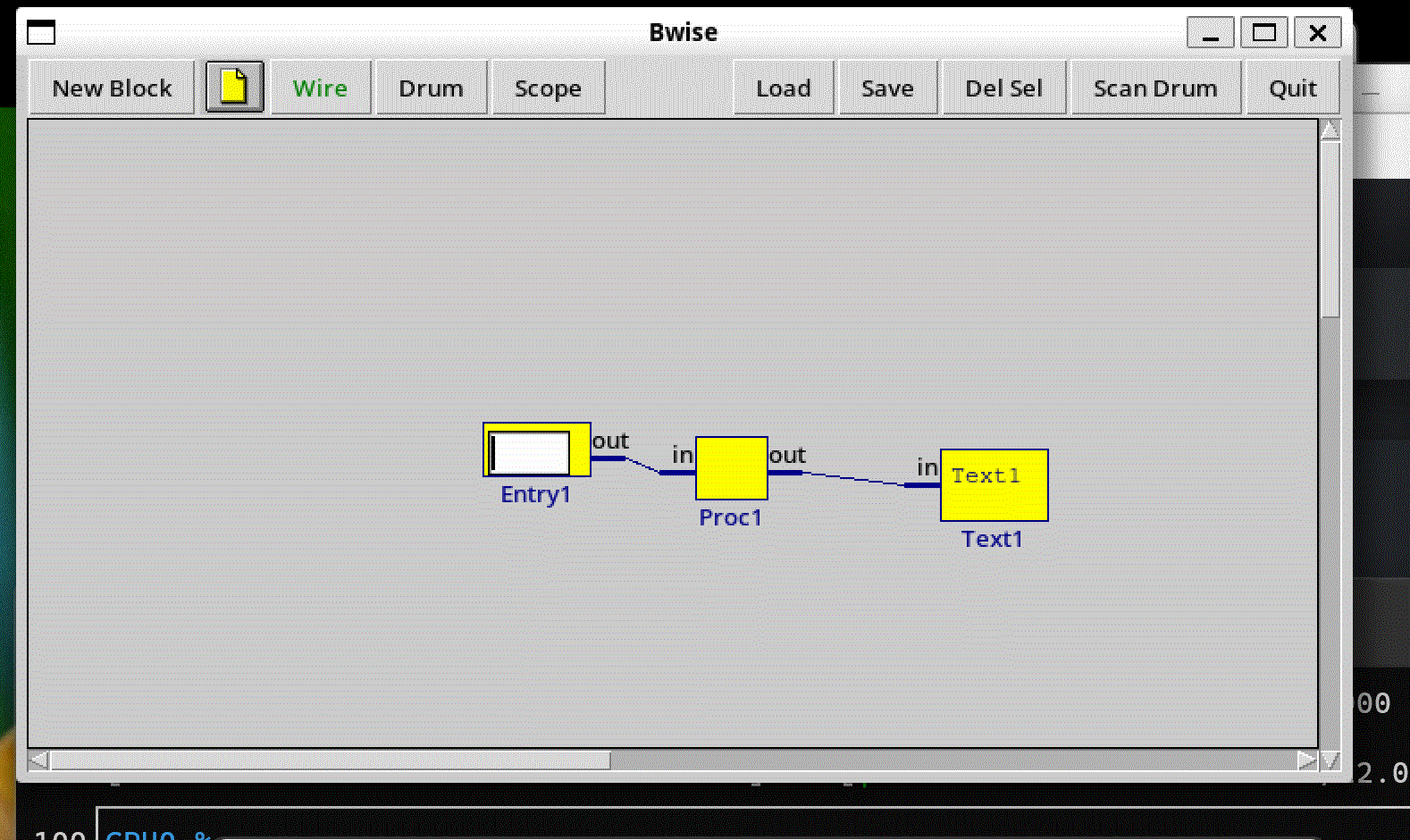
After a day, there's an initial co-pilot ! Here's the code and the test bwise network:
proc get_bwise_context { } {
    set ctx "Current BWise canvas:\n"
    foreach blockid [tag_and {block}] {
        set block [block_name_fromid $blockid]
        append ctx "Block: $block\n"
        append ctx "  Function: $block.bfunc \n"
        # Add pins (example; adjust for your pin naming)
        append ctx "  Inputs: [block_get_pinnames ${block} in]\n"
        append ctx "  Outputs: [block_get_pinnames ${block} out]\n"
    }
    # Add connections (if you have a netlist proc; otherwise iterate tags on canvas)
    append ctx "  Connections: [gen_netlist]\n\n"  ;# Assuming BWise has netsfrom or similar
    return $ctx
}

# Create a frame for the co-pilot (pack it beside your BWise canvas)
#frame .copilot -borderwidth 2 -relief raised
toplevel .copilot -borderwidth 2 -relief raised
#pack .copilot -side right -fill y -padx 10

label .copilot.title -text "BWise Co-Pilot (Mistral-Nemo)"
pack .copilot.title -pady 5

# Query entry
entry .copilot.query -width 50
pack .copilot.query -pady 5

# Submit button
button .copilot.submit -text "Ask AI" -command {
    set user_query [.copilot.query get]
    set context [get_bwise_context]
    set full_prompt "BWise context:\n$context\nUser query: $user_query\nSuggestion:"
    set response [ai_query $full_prompt]
    .copilot.response delete 1.0 end
    .copilot.response insert end $response
}
pack .copilot.submit -pady 5

# Response text widget
text .copilot.response -width 50 -height 15 -wrap word
pack .copilot.response -fill both -expand 1 -pady 5
Example question & answer: "please desribe the bwise network " "Based on the provided BWise context, here's a description of the network:
**Network Name:** Not specified
Blocks:
1. **Entry1**
   - Function: `Entry1.bfunc`
   - Inputs: None
   - Outputs:
     - `out` (connected to Proc1.in)
   - Description: This block is likely an input or sensor block that generates data for the network.
2. **Proc1** (Process Block 1)
   - Function: `Proc1.bfunc`
   - Inputs:
     - `in` (connected to Entry1.out)
   - Outputs:
     - `out` (connected to Text1.in)
   - Description: This block processes the data received from Entry1 and sends the result to Text1.
3. **Text1** (Text Block 1)
   - Function: `Text1.bfunc`
   - Inputs:
     - `in` (connected to Proc1.out)
   - Outputs: None
   - Description: This block is likely a display or output block that receives data from Proc1 and displays or stores it.
Connections:
- A wire (wire0) connects Entry1's output (out) to Proc1's input (in). - Another wire (wire1) connects Proc1's output (out) to Text1's input (in).
In summary, the BWise network is a simple data processing pipeline:
Entry1 → Proc1 → Text1
Data flows from Entry1 to Proc1 for processing, then the result is passed to Text1 for display or storage."