ASCII donut transcribed
Arjen Markus (31 october 2021) I was intrigued by a small Fortran program that presents a doughnut shape in ASCII art. The idea has been implemented in all manner of languages, as a quick search on the internet shows. Rather than transcribing it literally and create yet another ASCII art producing program in Tcl, I thought it would be nice to use the canvas instead.
The transcription was straightforward - just a bit of juggling the size of the rectangles to get a nice display. Perhaps the hardest part was to determine the colours to be used in stead of the characters. I opted for a sequence of red shades and to calculate the RGb values rather than via named colours, it is far easier that way ;).
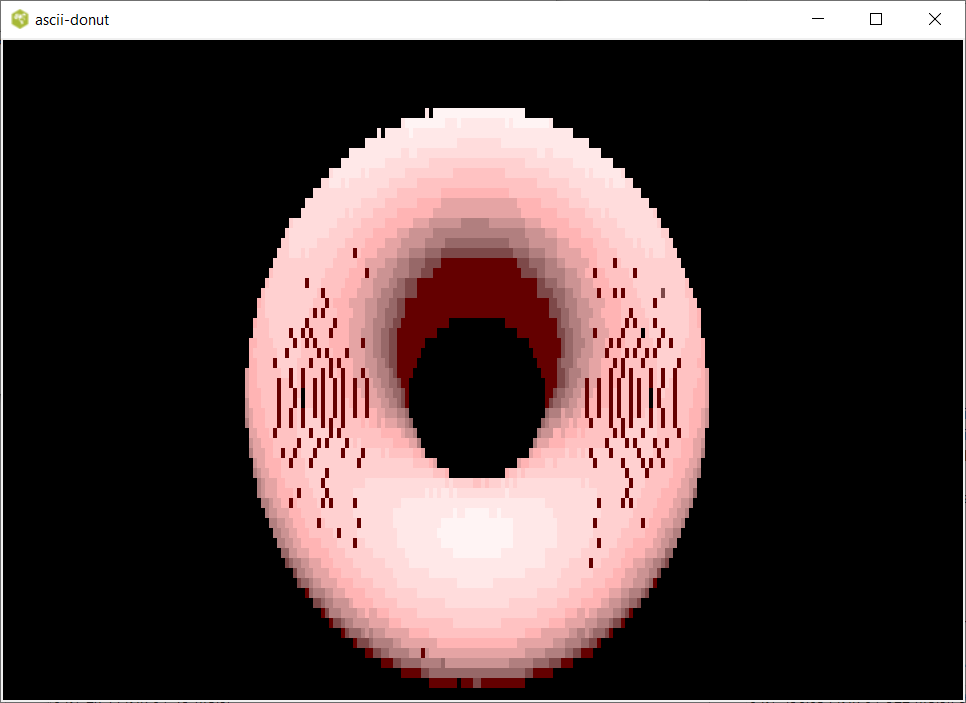
Here is the code, it leaves some holes in the images, because the rectangles do not cover the doughnut shape contiguously, but I think it is a charming aspect.
# ascii-donut.tcl --
#     Transcription of the "ASCII-Donut-Fortran" code to Tcl/Tk
#     The souerce code that I transcribed is at:
#     https://github.com/ShrirajHegde/ASCII-Donut-Fortran/blob/main/donut.f90
#
#     Rather than ASCII art it uses the canvas
#
set scale  3
set width  [expr {80 * $scale}]  ;# 80 * 3 = 240 -> factor 3
set height [expr {22 * $scale}]  ;# 22 * 3 = 66  -> factor 10
pack [canvas .c -width [expr {4 * $width}] -height [expr {10 * $height}] -bg black]

#
# Create the rectangles
#
set wdelta 4
set hdelta 10

for {set h 0} {$h < $height} {incr h} {
    for {set w 0} {$w < $width} {incr w} {
        set x1 [expr {$w  * $wdelta}]
        set x2 [expr {$x1 + $wdelta}]
        set y1 [expr {$h  * $hdelta}]
        set y2 [expr {$y1 + $hdelta}]

        lappend id         [.c create rectangle $x1 $y1 $x2 $y2 -fill black -outline {} -tag ID]
        lappend z_buffer_0 0.0
    }
}

#
# Create the shades for the doughnut
#
for {set i 0} {$i < 12} {incr i} {
    set x1 [expr {50*$i}]
    set x2 [expr {$x1 + 49}]

    set r  [expr {100 + (155 * min($i,6)) / 6}]
    set b  [expr {   int(255 * sqrt($i/12.0))}]
    set g  $b

    lappend colours [format "#%2.2x%2.2x%2.2x" $r $g $b]
}

set speed   0.4
set tau     [expr {3.14159 * 2.0}]
set angle_x 0.0
set angle_y 0.0

console show

while {1} {
    set z_buffer $z_buffer_0

    .c itemconfigure ID -fill black

    set theta 0.0

    while { $theta < $tau } {
        set phi 0.0

        while { $phi < $tau } {

            set sinphi      [expr { sin($phi) }]
            set costheta    [expr { cos($theta) }]
            set cosjthetap2 [expr { $costheta+2.0 }]
            set sinax       [expr { sin($angle_x) }]
            set sintheta    [expr { sin($theta) }]
            set cosax       [expr { cos($angle_x) }]
            set cosphi      [expr { cos($phi) }]
            set cosay       [expr { cos($angle_y) }]
            set sinay       [expr { sin($angle_y) }]
            set mess        [expr { 1.00 / ($sinphi*$cosjthetap2*$sinax + $sintheta*$cosax + 5.0) }]
            set t           [expr { $sinphi*$cosjthetap2*$cosax - $sintheta*$sinax }]
            set xcrd        [expr { int(40.0*$scale+$scale*30.0*$mess*($cosphi*$cosjthetap2*$cosay - $t*$sinay)) }]
            set ycrd        [expr { int($scale*12.0+$scale*15.0*$mess*($cosphi*$cosjthetap2*$sinay + $t*$cosay)) }]
            set idx         [expr { $xcrd+$width*$ycrd }]
            set lum         [expr { int(8.0*(($sintheta*$sinax - $sinphi*$costheta*$cosax)*$cosay-$sinphi*$costheta*$sinax - $sintheta*$cosax-$cosphi *$costheta*$sinay)) }]

            if { $height > $ycrd && $ycrd > 0 && $xcrd > 0 && $width > $xcrd && $mess > [lindex $z_buffer $idx] } {
                lset z_buffer $idx $mess

                if { $lum > 0 } {
                    .c itemconfigure $idx -fill [lindex $colours $lum]
                } else {
                    .c itemconfigure $idx -fill [lindex $colours 0]
                }
            }
            set phi [expr { $phi + 0.02 }]
        }
        set theta [expr {$theta + 0.07 }]
    }

    set angle_x [expr { $angle_x+0.04*$speed }]
    set angle_y [expr { $angle_y+0.04*$speed }]

    after 200 {
       set next 1
    }
    vwait next
}