Creating an animated display, part 2
Arjen Markus (23 october 2002) As a sequel to the page Creating an animated display here is a script that incorporates two separate displays working in the same framework. I added a little user-interface to make it work smoother.
Jeff Smith 2019-08-30 : Below is an online demo using CloudTk
 package require Tk

 # animdemo.tcl --
 #   A few simple animated displays
 #
 #
 # Animation --
 #    Namespace to hold all (specific) information
 #
 namespace eval ::Animation:: {
    variable xmouse 0   ;# Make sure they have a value
    variable ymouse 0
 }

 # StoreMousePosition --
 #    Store the coordinates of the mouse pointer for later use
 #
 # Arguments:
 #    xp       X-coordinate of the mouse
 #    yp       Y-coordinate of the mouse
 #
 # Result:
 #    None
 #
 proc ::Animation::StoreMousePosition {xp yp} {
    variable xmouse
    variable ymouse

    set xmouse $xp
    set ymouse $yp
 }

 # drawBall --
 #    Draw a red circle at a certain height above the green ground
 #
 # Arguments:
 #    time     Time parameter, used to calculate the actual height
 #
 # Result:
 #    None
 #
 # Note:
 #    Assume a perfectly elastic collision. The time parameter must
 #    be reduced to the time since the last collision.
 #
 # Technique used: redraw the entire picture
 #
 proc ::Animation::drawBall {time} {
    global accel
    global velo0
    global cnv_height
    global cnv_width

    set period [expr {2.0*$velo0/$accel}]
    set time2  [expr {$time - $period * int($time/$period)}]

    set grass_height 20
    set radius        7
    set ball_height   [expr {$velo0*$time2-0.5*$accel*$time2*$time2}]
    set pix_height [expr {
                  $cnv_height-$grass_height - $radius - $ball_height}]

    set xl     [expr {0.5*$cnv_width-$radius}]
    set xr     [expr {0.5*$cnv_width+$radius}]
    set yb     [expr {int($pix_height)-$radius}]
    set yt     [expr {int($pix_height)+$radius}]

    .cnv delete all
    .cnv create rectangle 0 $cnv_height $cnv_width \
       [expr {$cnv_height-$grass_height}] -fill green -outline green
    .cnv create oval      $xl $yb $xr $yt -fill red -outline black
 }

 # drawCompassNeedles --
 #    Draw a set of compass needles that orient themselves to the
 #    current mouse position
 #
 # Arguments:
 #    time     Time parameter, ignored
 #
 # Result:
 #    None
 #
 # Note:
 #    The mouse position is stored via the binding to the mouse event
 #    motion. We use only this information to create a new display.
 #
 # Technique used: redraw the picture
 proc ::Animation::drawCompassNeedles {time} {
    variable xmouse
    variable ymouse

    set hlength 14
    set hwidth   7

    .cnv delete all

    foreach y {10 50 90 130 170 210 250 290} {
       foreach x {10 50 90 130 170 210 250 290 330 370} {
          set dx    [expr {$xmouse-$x}]
          set dy    [expr {$ymouse-$y}]
          if { $dx != 0 || $dy != 0 } {
             set angle [expr {atan2($dy,$dx)}]
          } else {
             set angle 0
          }
          set cosa  [expr {cos($angle)}]
          set sina  [expr {sin($angle)}]
          set x1    [expr {$x+$hlength*$cosa}]
          set y1    [expr {$y+$hlength*$sina}]
          set x2    [expr {$x+$hwidth*$sina}]
          set y2    [expr {$y-$hwidth*$cosa}]
          set x3    [expr {$x-$hlength*$cosa}]
          set y3    [expr {$y-$hlength*$sina}]
          set x4    [expr {$x-$hwidth*$sina}]
          set y4    [expr {$y+$hwidth*$cosa}]

          .cnv create polygon $x1 $y1 $x2 $y2 $x4 $y4 \
              -fill red  -outline black
          .cnv create polygon $x3 $y3 $x2 $y2 $x4 $y4 \
              -fill blue -outline black
       }
    }
 }

 # nextPicture --
 #    Prepare to call the next picture, stop after some predefined
 #    number of steps.
 #
 # Arguments:
 #    step     Step number (converted to time)
 #
 # Result:
 #    None
 #
 proc nextPicture {step method} {
    global time_delay
    global max_steps
    global stop_anim

    #
    # Draw the picture
    #
    $method [expr {0.1*$step}]

    #
    # Set up the next picture via the [after] command
    #
    if { $step < $max_steps && $stop_anim != 1} {
       incr step
       after $time_delay [list nextPicture $step $method]
    }
 }

 # stopPicture --
 #    Stop the animation
 #
 # Arguments:
 #    None
 #
 # Result:
 #    None
 #
 # Side effect:
 #    Sets the variable "stop_anim" to gracefully stop the animation
 #
 proc stopPicture {} {
    global stop_anim

    set stop_anim 1
 }

 # main --
 #   Set up the canvas, start the loop
 #
 global cnv_width
 global cnv_height
 global velo0
 global accel

 #
 # Canvas size
 #
 set cnv_width   400
 set cnv_height  300

 #
 # Time delay and maximum duration (steps)
 #
 set time_delay  100   ;# Time in ms between pictures
 set max_steps  1000   ;# Maximum number of steps

 #
 # Private variable to stop the animation if wanted
 #
 set stop_anim     0

 #
 # Needed for drawBall
 #
 set velo0        70.0  ;# m/s
 set accel        10.0  ;# m/s2
                        ;# pixels become m that way :)

 #
 # Set up the canvas and the buttons
 #
 canvas .cnv -width $cnv_width -height $cnv_height -background white

 frame  .frm1
 radiobutton .frm1.ball    -text "Bouncing ball" \
    -variable method -value "::Animation::drawBall" \
    -command {stopPicture}
 radiobutton .frm1.compass -text "Compass needles (following mouse)" \
    -variable method -value "::Animation::drawCompassNeedles" \
    -command {stopPicture}
 pack .frm1.ball .frm1.compass -side left

 frame  .frm2
 button .frm2.start   -text "Start" \
    -command {set stop_anim 0; nextPicture 0 $method}
 button .frm2.stop    -text "Stop"  -command {stopPicture}
 pack .frm2.start .frm2.stop -side left

 pack   .frm2 -side bottom -fill x
 pack   .frm1 -side bottom -fill x
 pack   .cnv -fill both


 bind   .cnv <Motion> {::Animation::StoreMousePosition %x %y}

 set method ::Animation::drawBall

 $method 0

 #
 # If you want the animation to start rightaway ...
 #
 #nextPicture 0 $method
uniquename 2014jan27
For those who do not have the facilities or time to implement the code above, here is an image showing the GUI when either the bouncing-ball or the compass-needles radiobutton is chosen.
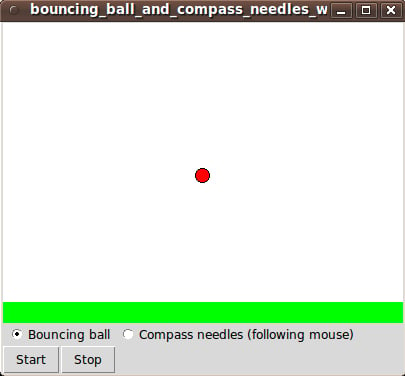
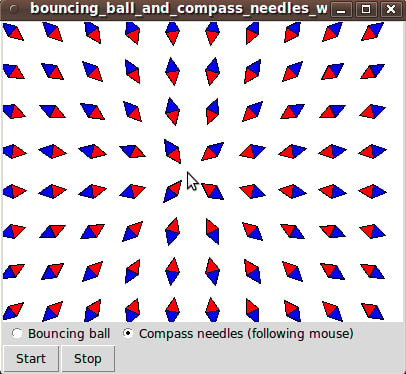
I found that, to make the ball bounce faster (more like a real ball), I had to change the 'time_delay' variable's value from 100 to 10 milliseconds.
It is nice that ALL of those compass needles respond immediately to any movement of the mouse.
I am new to the wiki... so sorry if I have put my comments in the wrong place... First of all, a big thanks to Mr. Arjen Markus for the above code.. I wanted a break exactly like this one..
Also I have gone ahead a made one myself.. with some gravity effect and trails.. here is the code..
(Also sorry for the poor or non-existant commenting....)
 package require Tk

#canvas ...
 namespace eval can {
        variable width           600
         variable height          600
        variable gravity        1
        variable loss                 3
        variable delay                60
 }

#ball........
 namespace eval ball {
         variable vely                 10   ;# Velociy Y Dir
         variable velx                 25   ;# Velociy X Dir
         variable rad                 10   ;# Ball Radius (Smallest)
         variable dRad                 1.05 ;# % increase in ball dia
         variable n_trail         15   ;# Number of trails..

         variable col_id                5    ;# grey index of the last one

         variable px                  ;# Array of X Coordinate of ceneters
         variable py                  ;# Array of Y Coordinate of ceneters

         set px(0) 200
         set py(0) 50

         for {set i 1} {$i<$n_trail} {incr i} {
                 set px($i) -100
                 set py($i) -100
         }

        variable top
        variable bottom
        variable left
        variable right

        set top                 $rad
        set left                 $rad
        set bottom                 [expr {$can::height - $rad} ]
        set right                 [expr {$can::width  - $rad} ]

}

#Push the center of ball to the next one..
#Add the new x, y  to the first one..
proc ball::push {x y} {

        variable px
        variable py
        variable n_trail

        set n [expr {$n_trail -1}]

        for {set i $n} {$i > -1} {incr i -1} {

                set i_         [expr {$i -1}]
                if { $i != 0 } {
                        set px($i) $px($i_)
                        set py($i) $py($i_)
                } else {
                        set px($i) $x
                        set py($i) $y
                }

        }
}


proc drawBall {} {

        #Effect of Gravity
        incr ball::vely $can::gravity

        #Exiting condition
        if {($ball::vely == 0) && ( [expr {$ball::bottom - $ball::py(0)}] < 20 ) } {destroy .}

        #Add Velocity
        set px_ [expr {$ball::px(0) + $ball::velx}]
        set py_ [expr {$ball::py(0) + $ball::vely}]

        #When bouncing from the bottom, reduce velocity
        if {$py_ > $ball::bottom } {
                set ball::vely [expr {$ball::vely - $can::loss}]
        }

        #When reached the top or bottom, flip the direction of Velocity-Y
        if { ($py_ > $ball::bottom) || ($py_ < $ball::top) } {
                #after 250
                set ball::vely [expr {-1 * $ball::vely}]
                set py_ [expr {$ball::py(0) + $ball::vely}]
        }

        #when reached left or right, flip the direction Velocity-X
        if { ($px_ > $ball::right) || ($px_ < $ball::left) } {
                #after 250
                set ball::velx [expr {-1 * $ball::velx}]
                set px_ [expr {$ball::px(0) + $ball::velx}]
        }

        #Remove All
        .cnv delete all

        #Call Push with new center
        ball::push $px_ $py_

        #Last ball radius
        set r $ball::rad

        #Draw all balls
        for {set i [expr {$ball::n_trail -1}]} {$i > -1} {incr i -1} {

                set x1 [expr {$ball::px($i) - $r}]
                set x2 [expr {$ball::px($i) + $r}]

                set y1 [expr {$ball::py($i) - $r}]
                set y2 [expr {$ball::py($i) + $r}]

                #find the ball rad
                set r [expr {$r * $ball::dRad}]

                #find the Grey Index
                set greyn [expr {$ball::col_id + ( (100 - $ball::col_id)/$ball::n_trail*$i) }]

                #First ball in Red, Other Balls in Grey with calculated index
                if {$i == 0 } {
                        .cnv create oval      $x1 $y1 $x2 $y2 -fill red -outline black
                } else {
                        .cnv create oval      $x1 $y1 $x2 $y2 -fill gray$greyn -outline gray$greyn
                }

        }
}

proc nextPicture {} {
        drawBall
        after $can::delay [list nextPicture]
}

canvas .cnv -width $can::width -height $can::height -background white
pack   .cnv -fill both

drawBall

tkwait visibility .
nextPicture


#try...
Joe Varghese
uniquename 2014jan27
For those who do not have the facilities or time to implement the Varghese code above, here is an image showing the 'fading trail' on the bouncing-ball.
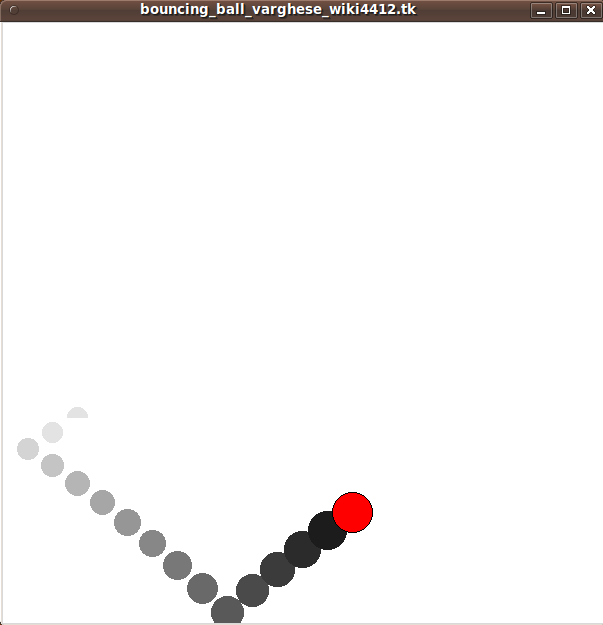
Unlike Arjen's animation, this animation does not continue indefinitely. Varghese has simulated a ball that is losing energy. The ball starts bouncing high up on the walls and finally ends up barely bouncing off the floor --- until the window suddenly closes.