Criss-cross slideshow
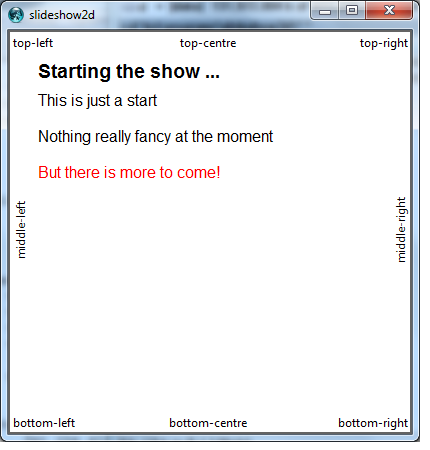
Arjen Markus (17 may 2013) The traditional presentation method is rather linear: just start at the first slide and then scroll down page by page. A more fancy way is to jump around amid a multi-dimensional arrangement of slides. The program below, while not offering all the formatting features of contemporary presentation software (in fact there is only a single formatting option), is an experiment with navigating through a set of slides in a non-linear fashion.
Whether presenting stuff in this way really has added value, I do not know, but it does offer the following navigational possibilities:
- Use the arrow keys, Home/End, PgUp and PgDn to jump to the slide indicated in that direction
- Click on the small titles instead
- Use the Escape key to return to the starting page (or the last page that was registered for that purpose)
It is a rather basic program and the example is mostly empty, but it demonstrates some interesting aspects. For instance, you could set up a single slide show that has one or more sidetracks - for different types of audiences or if you need to elaborate some topic.
Some notes:
- Evaluation of the commands that make up the slide should probably done in the global namespace.
- It would be nice to have a sort of zoom in facility - an overlapping slide for short explanations?
- It would be nice to scroll slowly to the new page, but that is just a fancy feature. It does not add to the usefulness IMO.
# slideshow2d.tcl --
#     Experiment with a slideshow that allows more advanced navigation
#     than just up and down a page
#

namespace eval 2DShow {
    variable window
    variable slide
    variable default
    variable position

    namespace export startingSlide defaultFontColor titleFontColor slide plain show link returnTo
}

# startingSlide --
#     Set the slide to start with
#
# Arguments:
#     key       Key for the starting slide
#
proc ::2DShow::startingSlide {key} {
    variable slide

    set slide(startSlide)  $key
}

# returnTo --
#     Register a slide to return to via Escape
#
# Arguments:
#     key       Key for the starting slide
#
proc ::2DShow::returnTo {key} {
    variable slide

    set slide(returnTo)  $key
}

# defaultFontColor --
#     Set the default font and colour
#
# Arguments:
#     font      Description of the default font
#     color     Colour name
#
proc ::2DShow::defaultFontColor {font color} {
    variable default

    set default(text,font)  $font
    set default(text,color) $color
}

# titleFontColor --
#     Set the font and colour for the title
#
# Arguments:
#     font      Description of the font
#     color     Colour name
#
proc ::2DShow::titleFontColor {font color} {
    variable default

    set default(title,font)  $font
    set default(title,color) $color
}

# slide --
#     Define the contents of a slide
#
# Arguments:
#     key       Keyword identifying the slide
#     title     Title for the slide
#     cmds      Series of commands defining the slide
#
proc ::2DShow::slide {key title cmds} {
    variable slide
    variable default

    set slide($key,title) $title
    set slide($key,cmds)  $cmds

    if { ! [info exists slide(startSlide)] } {
        startingSlide $key
    }
}

# link --
#     Define the link from one slide to the next
#
# Arguments:
#     direction Direction to show the "to" slide at - determines navigation key
#     from      Keyword identifying the "from" slide
#     to        Keyword identifying the "to" slide
#
proc ::2DShow::link {direction from to} {
    variable slide

    set slide($from,$direction) $to
}

# plain --
#     Define plain text
#
# Arguments:
#     text      Text to be shown
#     args      Options (-font, -color)
#
proc ::2DShow::plain {text args} {
    variable slide
    variable default
    variable position
    variable window

    foreach {opt value} [list -font $default(text,font) -color $default(text,color)] {
        set option($opt) $value
    }
    foreach {opt value} $args {
        set option($opt) $value
    }

    set x $position(x)
    set y $position(y)

    foreach line [split $text \n] {
        set line [string trim $line]
        $window create text $x $y -text $line -font $option(-font) -fill $option(-color) -anchor nw
        incr y [font metrics $option(-font) -linespace]
    }

    set position(y) $y
}

# show --
#     Show the indicated slide
#
# Arguments:
#     key       Key to the slide to be shown
#
proc ::2DShow::show {key} {
    variable slide
    variable position
    variable default
    variable window

    set position(x)       30
    set position(y)       30
    set position(left)    5
    set position(top)     5
    set position(right)   [$window cget -width]
    set position(xcentre) [expr {[$window cget -width]/2}]
    set position(bottom)  [$window cget -height]
    set position(ycentre) [expr {[$window cget -height]/2}]

    $window delete all

    $window create text $position(x) $position(y) -text $slide($key,title) \
         -font $default(title,font) -fill $default(title,color) -anchor nw

    incr position(y) [font metrics $default(title,font) -linespace]

    eval $slide($key,cmds)

    foreach link   {nw   n       ne    e       se     s       sw     w}       \
            tlink  {nw   n       ne    s       se     s       sw     n}       \
            angle  {0    0       0     90      0      0       0      90}      \
            x      {left xcentre right right   right  xcentre left   left}    \
            y      {top  top     top   ycentre bottom bottom  bottom ycentre} \
            press1 {Home Up      Prior Right   Next   Down    End    Left}    \
            press2 {7    8       9     6       3        2       1      4}       {

        bind $window <Key-$press1> {}
        bind $window <Key-$press2> {}

        if { [info exists slide($key,$link)] } {
            set forward $slide($key,$link)
            if { [info exists slide($forward,title)] } {
                set item [$window create text $position($x) $position($y) -text $slide($forward,title) \
                              -anchor $tlink -angle $angle]
                $window bind $item <ButtonPress> [list ::2DShow::show $forward]
                bind $window <Key-$press1> [list ::2DShow::show $forward]
                bind $window <Key-$press2> [list ::2DShow::show $forward]
            }
        }
    }

    #
    # "Escape" lets us go back ...
    #
    if { [info exists slide(returnTo)] } {
        bind $window <Key-Escape> [list show $slide(returnTo)]
    } else {
        bind $window <Key-Escape> [list show $slide(startSlide)]
    }
}

# main --
#     Get it all started
#
namespace import ::2DShow::*
set ::2DShow::window .c
pack [canvas $::2DShow::window -width 400 -height 400 -bg white]
focus $::2DShow::window

titleFontColor   "Helvetica 14 bold" black
defaultFontColor "Helvetica 12"      black

#
# Define a simple slide show
#
slide Start "Starting the show ..." {
    plain {
        This is just a start

        Nothing really fancy at the moment
    }
    plain "But there is more to come!" -color red

    plain "For instance: click on \"middle-left\""
}

slide middle-left   middle-left   {plain {Something to return to}; returnTo middle-left}
slide middle-right  middle-right  {}
slide top-left      top-left      {}
slide top-centre    top-centre    {}
slide top-right     top-right     {}
slide bottom-left   bottom-left   {}
slide bottom-centre bottom-centre {}
slide bottom-right  bottom-right  {}

slide explain-middle-left   "Explain middle-left" {
    plain {The previous slide illustrates that
           we can register various slides to
           return to} -color blue
}

link w  Start middle-left
link e  Start middle-right
link nw Start top-left
link n  Start top-centre
link ne Start top-right
link sw Start bottom-left
link s  Start bottom-centre
link se Start bottom-right

link e middle-left explain-middle-left
link w middle-left Start

show "Start"