Demonstration of a PID controller
Arjen Markus (21 may 2019) Using the various packages available in Tcllib and Tklib it is pretty easy to build a simulator like the one shown in the code below. The idea is simple:
- A damped oscillator (a spring with a mass that experiences a resistence against motion) is modelled via a second-order differential equation, a textbook example (see procedure [oscilator])
- The mass, however, also experiences irregular shocks (see the procedure [externalForce]), which causes it to move away from the equilibrium position
- To try and get the mass to stay as close to that equilibrium position a PID controller is used (see the procedure [pidSteering]). It effectively provides a counter force
- The parameters of the PID controller can be changed via the sliders
Of course there are a few tricks involved:
- To avoid very frequent updates of the simulated oscillator, the procedure [showValues] schedules an update and if one was already scheduled, then the previous one is cancelled. That way, the update is performed only when you leave the sliders alone
- To compare the results, both an uncontrolled and the controlled oscillator are simulated, presented as a red and a green line
- To repeat the simulation, the random number generator is restarted with a fixed seed
And because I was too lazy to build a more conventional GUI, I made it such that things start when you change a slider.
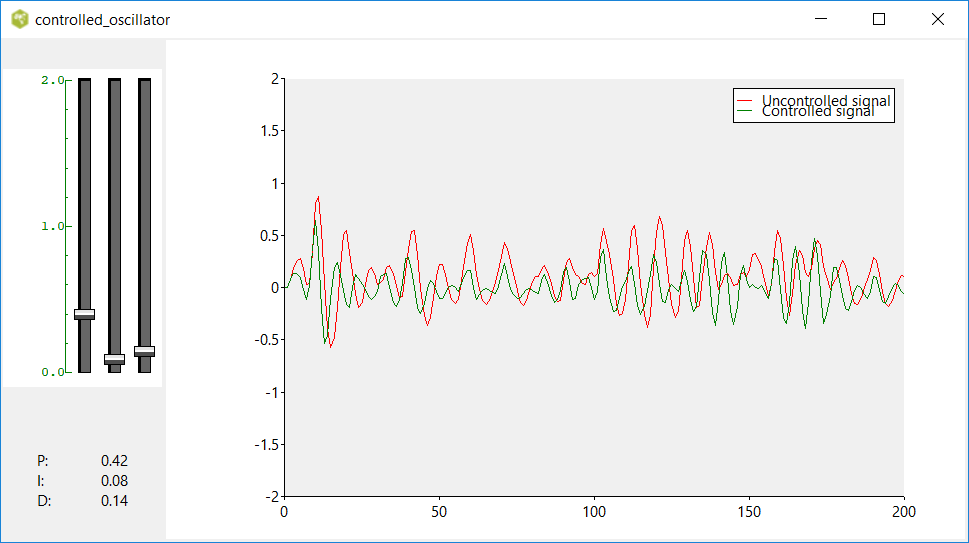
I only hope I have implemented the simulation part correctly ;).
Note 1: It is a self-contained program, there is no attempt to read the VCD files (value change dump) that are typically used in this context.
Note 2: An alternative mode of operation could be to let the simulation continue and update the parameters "on the fly". The type of plot would have to be changed to a stripchart then.
# controlled_oscillator.tcl --
#     Experiment with a simple linear oscillator:
#     - Two degrees of freedom - the spring parameter and the damping coefficient.
#       These are simply set to a fixed value.
#     - The oscillator itself receives a random external force consisting of
#       small peaks
#     - The PID-controller has three parameters, P, I and D that can be
#       changed via sliders in the GUI.
#
#     Note:
#     This could be set up in a more modular way, by using OOP.
#

package require controlwidget
package require Plotchart
package require math::calculus

# integrate --
#     Integrate the equations and display the result
#
# Arguments:
#     None
#
proc integrate {} {
    global springStrength
    global dampingCoeff
    global force
    global integratedX

    global tstart
    global tinterval
    global tduration

    set time   0.0
    set tstep  0.1
    set tcount 0

    set tstart    0.0
    set tinterval 0.3
    set tduration 0.15

    set springStrength 0.5
    set dampingCoeff   0.2
    set force          0.0
    set integratedX    0.0

    #
    # Initial conditions:
    # x, u   - the uncontrolled position and velocity
    # xc, uc - the controlled position and velocity
    #

    set x     0.0
    set u     0.0
    set xc    $x
    set uc    $u

    while { $time < 200.0 } {

        lassign [::math::calculus::rungeKuttaStep $time $tstep [list $x $u $xc $uc] oscillator] x u xc uc

        #puts "$time\t$x\t$u"
        if { $tcount == 0 } {
            $::p plot data1 $time $x
            $::p plot data2 $time $xc
        }
        incr tcount
        if { $tcount == 10 } {
            set tcount 0
        }

        set time        [expr {$time + $tstep}]
        set integratedX [expr {$integratedX + $tstep * $xc}] ;# Do it outside the RK integration step!
    }
}

# oscillator --
#     Calculate the right-hand side of the equations
#
# Arguments:
#     time                 Time in the simulation
#     coords               State variables
#
# Result:
#     Vector representing the right-hand side
#
proc oscillator {time coords} {
    global springStrength
    global dampingCoeff

    lassign $coords x u xc uc

    set f   [externalForce $time]
    set g   [pidSteering $xc $uc]
    set du  [expr {-$springStrength * $x  - $dampingCoeff * $u  + $f}]
    set duc [expr {-$springStrength * $xc - $dampingCoeff * $uc + $f + $g}]
    set dx  $u
    set dxc $uc

    return [list $dx $du $dxc $duc]
}

# externalForce --
#     Calculate the external force as a series of random peaks
#
# Arguments:
#     time                 Time in the simulation
#
# Result:
#     1.0 or 0.0 depending on the time and the random function
#
proc externalForce {time} {
    global tstart
    global tinterval
    global tduration
    global force
    global integratedX

    if { $time >= $tstart + $tinterval } {
        set tstart $time

        set r [expr {rand()}]
        set force [expr {($r > 0.9)? 1.0 : 0.0}]
    } else {
        if { $time > $tstart + $tduration } {
            set force 0.0
        }
    }

    return $force
}

# pidSteering --
#     Calculate the steering force using PID
#
# Arguments:
#     x           X coordinate (excursion from 0)
#     u           Velocity
#
# Result:
#     Steering force
#
proc pidSteering {x u} {
    global integratedX
    global kp
    global ki
    global kd

    set g [expr {- $kp * $x - $ki * $integratedX - $kd * $u }]

    return $g
}

# showValues --
#     Show the chosen values as text and run the simulation if opportune
#
# Arguments:
#     var1               Name of the traced variable/array
#     var2               Name of the element if an array is traced
#     op                 The operation (always write in this case)
#
proc showValues {var1 var2 op} {
    global afterid

    lassign [set $var1] P I D
    set ::slidertext [format "P:\t%.2f\nI:\t%.2f\nD:\t%.2f" $P $I $D]

    if { $afterid != {} } {
        after cancel $afterid
    }
    set afterid [after 100 updateParameters]
}

# updateParameters --
#     Update the parameters and re-run the calculation
#
proc updateParameters {} {
    global kp
    global ki
    global kd

    lassign $::slidervar kp ki kd

    $::p deletedata
    expr {srand(1000)}
    integrate
}

# setupGUI --
#     Set up the GUI, consisting of the controls for the PID parameters
#     and the graph
#
# Arguments:
#     None
#
proc setupGUI {} {
    global afterid
    global slidervar
    global slidertext
    global p

    set afterid {}

    grid [::controlwidget::slider .slider -variable slidervar -from 0.0 -to 2.0 -number 3 -axisformat %.1f -axiscolor green -background white -height 300]  \
         [canvas .c -width 800 -height 500]
    grid [::ttk::label .slidervars -textvariable slidertext] ^


    set p [::Plotchart::createXYPlot .c {0 200 50} {-2.0 2.0 0.5}]
    $p dataconfig data1 -colour red
    $p dataconfig data2 -colour green
    $p legend data1 "Uncontrolled signal"
    $p legend data2 "Controlled signal"

    set slidervar {0.0 0.0 0.0}

    set slidertext "Change\nthe\nsliders"

    trace add variable slidervar write showValues
}

# Start the GUI
#
setupGUI