Inspecting TclOO
Tcl's wonderful introspection capabilities extend to TclOO through a profusion of info object and info class subcommands. Yummy! But so many subcommands are a bit tricky to digest .. here's a tool aspect made to assist looking inside:
proc inspect {obj} {
    set obj [uplevel 1 [list namespace which -command $obj]]
    set isa [lmap type {object class metaclass} {
        if {![info object isa $type $obj]} continue
        set type
    }]
    if {"class" in $isa} {
        lappend info {class superclasses} {class mixins} {class filters}
        lappend info {class methods} {class methods}
        lappend info {class variables} {class variables}
    }
    if {"object" in $isa} {
        lappend info {object class} {object mixins} {object filters}
        lappend info {object methods} {object methods}
        lappend info {object variables} {object variables}
        lappend info {object namespace} {object vars} ;#{object commands}
    }
    set result [dict create isa $isa]
    foreach args $info {
        dict set result $args [info {*}$args $obj]
        foreach opt {-private -all} {
            catch {
                dict set result [list {*}$args $opt] [info {*}$args $obj $opt]
            }
        }
    }
    dict filter $result value {?*}
}

proc pdict {d args} {   ;# analogous to parray
    set maxl [::tcl::mathfunc::max {*}[map {string length} [dict keys $d]]]
    dict for {key value} $d {
        puts stdout [format "%-*s = %s" $maxl $key $value]
    }
}

#extend ::oo::InfoClass {
#    proc commands {o args} {
#        map {::namespace tail} [info commands [info object namespace $o]::*]
#    }
#}
If you have ensemble extend, the info object commands extension might be useful.
Here's what it has to say about our two favourite objects:
% pdict [inspect oo::object]
isa                      = object class
class methods            = destroy
class methods -private   = unknown eval varname variable destroy <cloned>
class methods -all       = destroy
object class             = ::oo::class
object methods -all      = create destroy new
object namespace         = ::oo::Obj1
object commands          = my
object commands -private = my
object commands -all     = my
% pdict [inspect oo::class]
isa                      = object class metaclass
class superclasses       = ::oo::object
class methods            = create new
class methods -private   = create createWithNamespace new
class methods -all       = create destroy new
object class             = ::oo::class
object methods -all      = create destroy
object namespace         = ::oo::Obj2
object commands          = my
object commands -private = my
object commands -all     = my
aspect has dreams of this one day growing into a Smalltalk-esque Object Browser, but this is pretty good from a command line.
EMJ 2016-03-17: and which "map" function are you using here?
2018-05-18: suggested replacement:
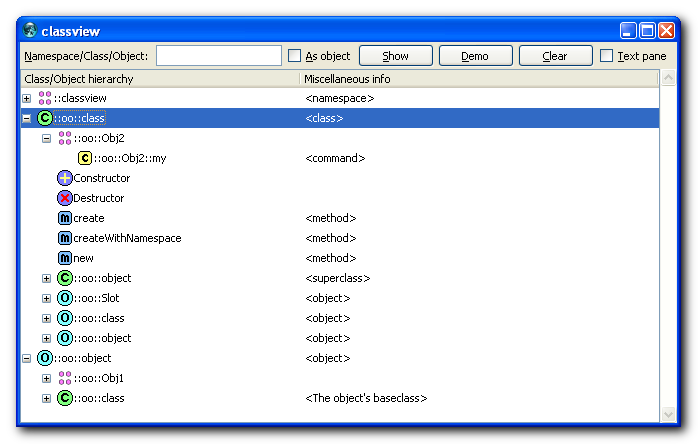
set maxl [::tcl::mathfunc::max {*}[lmap key [dict keys $d] {string length $key}]]Eugene 2016 Apr 14: Just stumbled upon this page today. As I've been working for a while on some kind of Object Browser GUI, I thought it would be nice to share. So, here 's the link to the project page at ChiselApp, and here's a screenshot:
chw 2016-07-04: Eugene, this is very nice and ingeniously handy! Thank you. Couldn't resist to build it into AndroWish and undroidwish.