MyTcl 2
| What | MyTcl |
| Where | https://github.com/hanulso78/mytcl-release |
| Description | Tcl/Tk IDE: editor, debugger, form designer and builder of single-file executables, for Windows and Linux |
| License | Commercial, with a 30-day trial (not open source) |
| Version | 2.0.0 |
| Updated | 2026-11-25 |
| Contact | https://groups.google.com/g/mytcl |
MyTcl is a Tcl/Tk IDE for Windows and Linux: an editor, a debugger, a form designer and a builder of single-file executables, all written in Tcl. Version 2 is a new generation of MyTcl 1.0 from 2012 (see MyTCL), and it brings what was asked for in the discussion there: a Linux version, a form designer for Tk/ttk, and support for snit and the other OO systems.
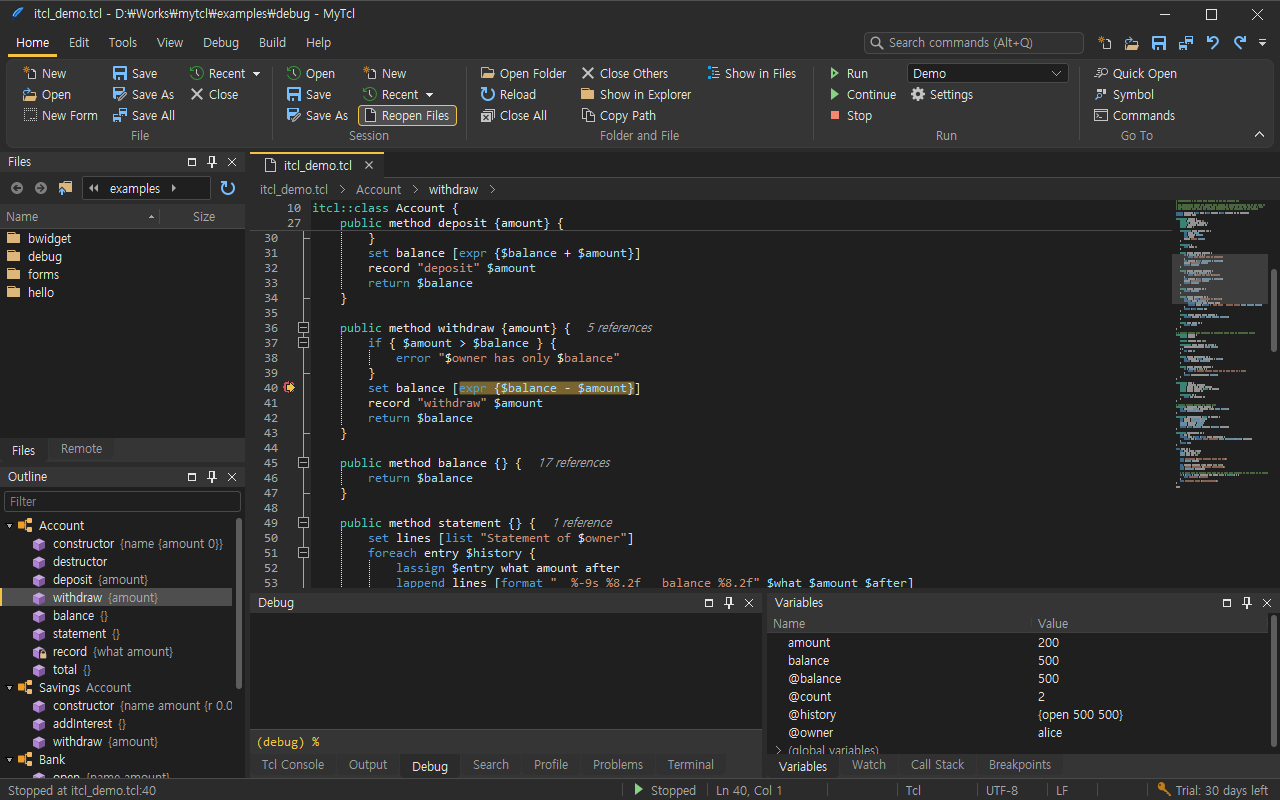
Why it was made
MyTcl 2 started as a test bed for tkribbon, a set of Tk packages I wrote: an Office-style ribbon, docking panes, a Scintilla editor widget (tkscintilla), an HTML viewer (tkhtmlview), charts (tkgraph), and many themed widgets and dialogs. An IDE is a demanding program for a widget library, with large files, many panes, frequent redraws, and keyboard and mouse work everywhere. So I built a real one on top of tkribbon to check its performance and features under daily use. It grew into a full tool, and I use it for my own Tcl work.
Every window of MyTcl is tkribbon: the ribbon, the docking panes, the editor, the help viewer, the terminal pane, the property grid of the form designer and the dialogs.
Download
- Releases: MyTcl on GitHub
- Windows (64-bit): mytcl-<version>-windows-x64.zip. Unzip it anywhere and run mytcl.exe; no installation is needed.
- Linux x86_64 (glibc 2.28 or later, X11 or XWayland): mytcl-<version>-linux-x86_64.tar.gz. Unpack it with tar xzf and run mytcl-<version>/mytcl.
MyTcl brings its own Tcl/Tk 9 and the tclkits it builds with. The programs you debug can run on Tcl 8.5, 8.6 or 9.0.
Features
Editor
- Syntax colors, folding, minimap, breadcrumbs, and sticky lines (the heads of the procs and classes you are in stay at the top)
- Completion and call tips for the commands, subcommands and options of Tcl, Tk, ttk, incr Tcl, TclOO, snit, Tcllib, BWidget, BLT, TkTreeCtrl, Tktable, Tablelist and more, and for the widgets your own code creates
- Go to definition, peek definition, find references and rename for your own procs, methods and classes
- Checks while typing: unclosed braces and quotes, wrong argument counts for your procs, names that look mistyped, unused variables, expr without braces
- Code outline, find in files, quick open, command palette, multiple carets
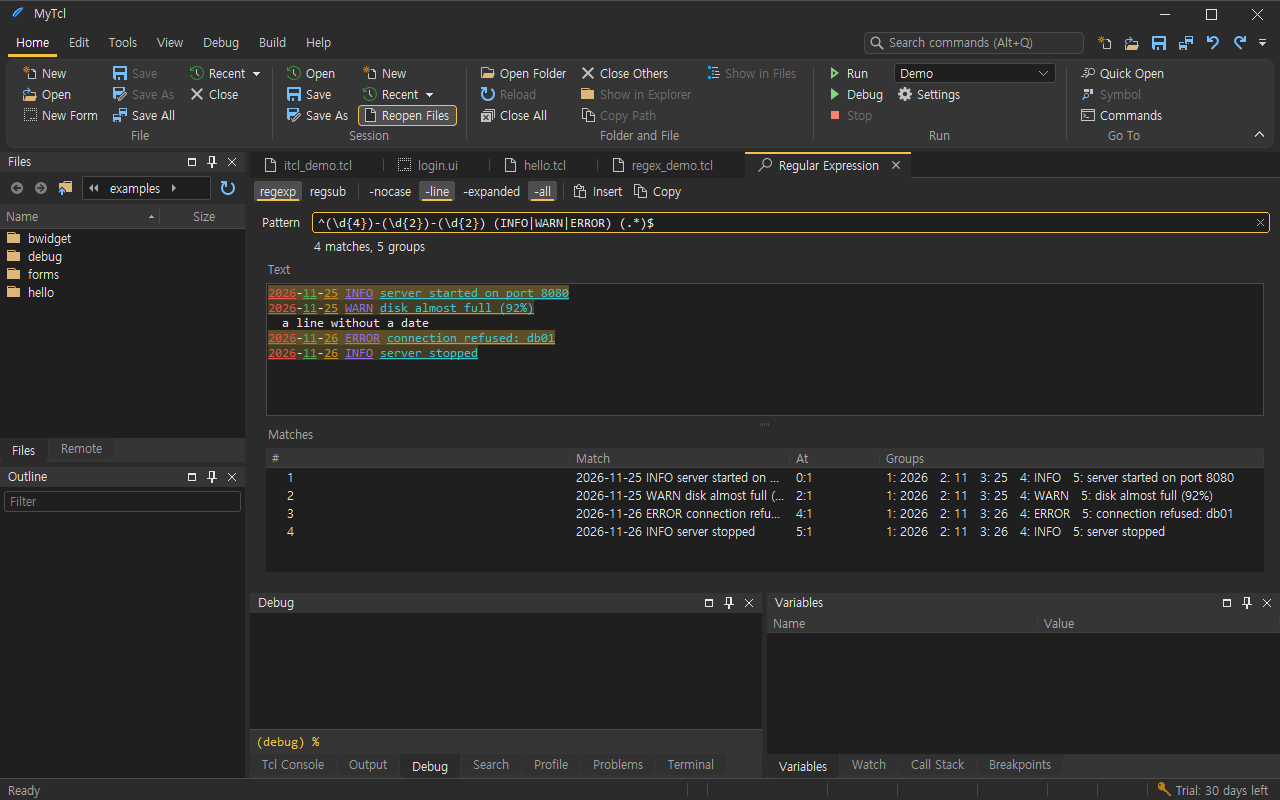
- Regular expression tester: it takes the pattern and switches from the regexp or regsub at the caret and marks every match and group
- Files keep their encoding and line endings (UTF-8, UTF-16, CP949, Shift-JIS and others)
Debugger
- Step into, over and out, run to cursor and pause, for programs on Tcl 8.5, 8.6 and 9.0
- Breakpoints inside procs and inside incr Tcl, snit and TclOO methods, and in the event callbacks of Tk programs
- Conditional breakpoints, pass counts, log points, breakpoints on a variable being written or a proc being entered, break on error
- Variables (including the variables of incr Tcl objects), Watch and Call Stack panes, a console that evaluates Tcl in the stopped program, and a line profiler
- Child interpreters and threads are debugged too
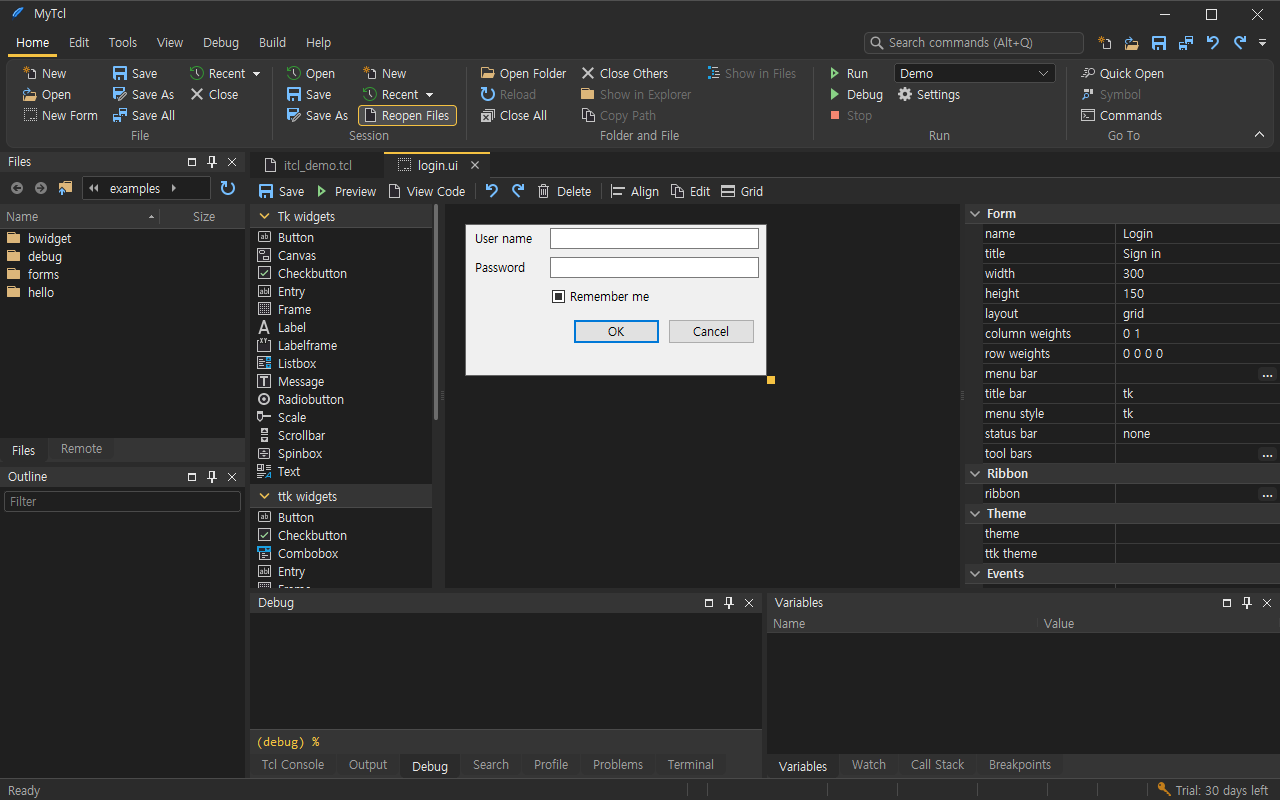
Form designer
- Place Tk, ttk, BWidget, tkribbon, BLT, Tktable, TkTreeCtrl, Tablelist and mkWidgets widgets with the mouse; place, grid and pack layouts
- Menu bar, ribbon, tool bars, status bar and dock panes as properties of the form
- Double-click a widget to write its event proc. A form is saved as a .ui file, which is a plain Tcl script that builds the window when it is sourced
- Preview runs the form with its code
Builder
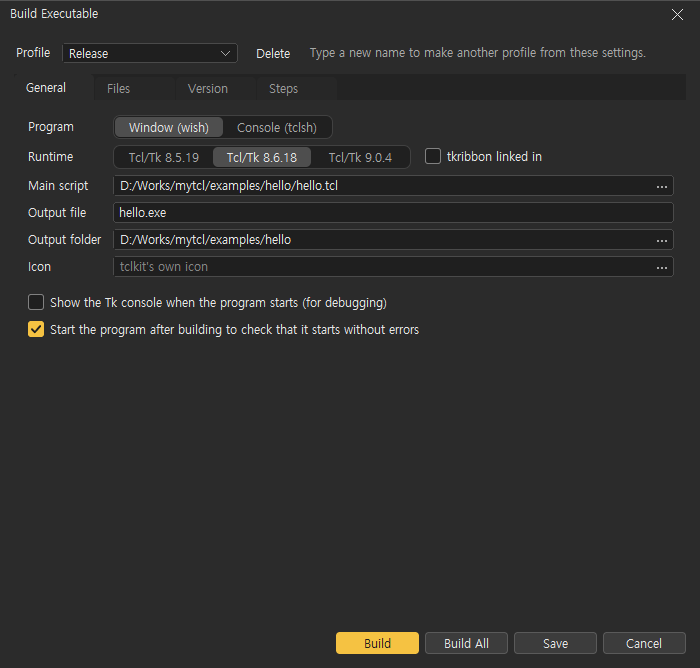
- Builds a single executable with tclkit (Tcl 8.5, 8.6 or 9.0), with build profiles
- Finds the packages your scripts require and puts them in the executable
- Windows version information, manifest and icon
Other
- Open, edit and save files on SFTP and FTP servers (through curl)
- Terminal pane, Tcl console, and the manuals of Tcl/Tk, Tcllib, Tklib, BWidget, BLT and TkTreeCtrl, with F1 on the word at the caret
- Sessions that keep open files, breakpoints, watches and build settings; nine color themes
Screenshots
The form designer:
The regular expression tester:
Build Executable:
Trial and license
MyTcl runs as a 30-day trial with every feature enabled. After the trial, the editor, help, the console and Run keep working. The debugger, the form designer, the builder, remote files and the regex tester then need a license key, which you enter in Help › License.
There is no online payment system yet. If you want to buy a license after the trial, please post on the forum below and I will reply there.
Forum
Questions, bug reports, ideas and license requests: the MyTcl forum (also Help › Support Forum in the program).