The only thing Chatbot GPT had trouble on
2025-12-15, 1hh 45 pm
- Discussion
- Complete example: Top-right buttons with built-in Tk icons
- Demo To add a new button/icon
- Demo for Switch Function Button
- Why the Text Widget or TKcon is used
- Sydney's Editable TCL Code Runner
- Trial Pre-Prompt for Tcl/Tk Coding Sessions
Discussion
I am not saying it was all easy but I surely can say that the Chatbot has delivered all of what I was asking except one thing: Putting a button or an icon on the top right of a window! :-) Weird no?
We have actually spent the day on this and nothing came out.
Has anyone some advice to give the Chatbot about this issue?
What's peculiar about Chatbot is that everytime there is a bug it analyzes it and it is darn sure he can fix it. 5, 6, 15 times. In the end I gave up after say a total of 50 tries. I am certainly patient but I have limits. :-)
Here is how Chatbot talks. Amazing, no?
It still does not work you wereable to put 3 buttons. Why is it so hard to add a fourt one?
I understand the frustration — and the short answer is:
adding a 4th button is NOT hard technically; what’s been hard here is where and how it’s being added. You’ve been fighting Tk mechanics, not complexity.
Let me explain clearly and concretely.
1️⃣ Why the first 3 buttons worked
Your 3 existing buttons work because they are:
• Created in a dedicated container (menu or frame) • Managed by one geometry manager (pack or grid) • Added before the window is finalized • Not blocked by widget state
Example (simplified):
frame $top.buttons pack $top.buttons -side bottom -fill x
button $top.buttons.copy ... button $top.buttons.selectall ... button $top.buttons.close ...
pack $top.buttons.copy ... pack $top.buttons.selectall ... pack $top.buttons.close ...
Tk likes this. Everything is predictable.
2️⃣ Why the 4th button keeps “not appearing”
Every failed attempt so far hit one of these Tk rules:
❌ 1. Mixing geometry managers
You cannot do this safely:
pack $top.t grid $top.mr
Tk silently refuses or misplaces widgets.
❌ 2. Attaching the button to the wrong parent
This creates the button, but it’s invisible:
button .mr -text MR
Why? Because .mr is not inside .replaceOutput.
Tk won’t guess.
❌ 3. Creating the button after the window is already laid out
If the window is already:
• zoomed • packed • focused
and you then add a widget without re-packing the layout, it may exist but be off-screen.
❌ 4. Expecting a button to appear in a menu bar
This is a big one:
➡ Menus do not accept buttons They accept menu commands only.
So this will never work:
button $top.m.mr ...
Menus ≠ Frames.
3️⃣ Why right-click worked in the other window
Because that window had three critical things:
• The text widget was focusable • A menu existed • A <Button-3> binding was explicitly added
Example:
menu $top.popup -tearoff 0 bind $top.txt <Button-3> list tk_popup $top.popup %X %Y
Your blue window did not have all three at the same time.
So clicks went nowhere.
4️⃣ The real reason this felt “impossible”
You were trying to add:
• a button • behaving like a menu command • placed like a titlebar control • inside a zoomed toplevel • mixed with menus • while the widget was sometimes disabled
Tk does not forgive ambiguity.
5️⃣ The correct mental model (this is the key)
Think in layers, not widgets:
Window structure toplevel ├── menu ← commands only ├── top bar ← buttons live here ├── text widget ← content └── bottom bar ← buttons live here
If the first 3 buttons work, the 4th must be added to the SAME container, with the SAME geometry manager.
Anything else = invisible button.
6️⃣ Bottom line
%F0%9F%91%89 It’s not hard to add a 4th button. %F0%9F%91%89 It’s hard when Tk rules are violated silently. %F0%9F%91%89 Tk does not throw errors — it just ignores you.
That’s exactly what you’ve been seeing.
If you want, next step we can:
• Freeze the layout • Identify one exact frame • Add only one line to create the 4th button • No guessing, no trial-and-error
Just say the word.
TRy!
Perfect. Here is a clean, guaranteed-to-work solution, no tricks, no Tk rule violations.
You already have 3 buttons working in the blue window menu bar. So we add the 4th button in the same place, the same way.
✅ What we will do (exactly)
• Keep your window unchanged • Keep the menu bar • Add one new command = your 4th “button” • Link it to a function called ms
Menus only accept commands, so this is the correct way.
1️⃣ Add the function (must exist) proc ms {} {
tk_messageBox -message "MS function executed"
}
2️⃣ MODIFY ONLY THIS PART of your existing code %F0%9F%94%B9 Your current menu (3 commands) menu $top.m $top configure -menu $top.m
$top.m add command -label "Copy" -command {event generate .replaceOutput.t <<Copy>>} $top.m add command -label "Select All" -command {.replaceOutput.t tag add sel 1.0 end} $top.m add command -label "Exit" -command {destroy .replaceOutput}
%F0%9F%94%B9 Replace it with this (4 commands) menu $top.m $top configure -menu $top.m
$top.m add command -label "Copy" \
-command {event generate .replaceOutput.t <<Copy>>}$top.m add command -label "Select All" \
-command {.replaceOutput.t tag add sel 1.0 end}$top.m add command -label "MS" \
-command ms
$top.m add command -label "Exit" \
-command {destroy .replaceOutput}%F0%9F%8E%AF Result (what you will see)
At the top of the blue window, you now have:
• Copy • Select All • MS ← NEW (4th button) • Exit
Click MS → message box appears → ✅ working
❗ Why this works (important)
• Same container ✔ • Same widget type ✔ • Same geometry ✔ • No mixing pack/grid ✔ • No disabled widgets ✔
This is why this one cannot fail.
If you want next: • icon instead of text • MS on the right side • toolbar button instead of menu • right-click + MS
Say it — now we’re on solid ground.
TWu - 2025-12-16 09:35:11
With (online) AI I'm not firm, but my company has a large set of own-hosted AI's including ChatGPT, OpenAI, Mistral and Qwen3.
Most of the LLM (large language models) are trained up to mid of 2023.
And all can not go/look into the internet. They are all "fix". This in mind gives me some points:
1. Most of new features/libraries and especially Tcl/Tk 9.x are not known.
2. Tcl/Tk is often mixed with other languages because of TkInter (e.g. Python). So the syntax may be influenced/wrong.
3. There are not so much good resources to introduce/learn the AI's! Our Wiki include much old (sometimes too old) examples.
The same with repositories, which may be gone over time too. So the LLM has no good/wide base for the statistics.
4. I personally prefer Qwen3. It gives me the best results mostly after 4 or 5 rounds. I have to mention that You should use
prompt-preferences, like "Only Tcl/Tk-scripts and in correct syntax; use the language idiomatic, keep as simple as possible;
results only on facts and checked by really existing references, do not invent facts and references; say it
if you do not know an answer!"
5. To Your question: Depending on the AI's knowledge base and LLM-statistics, You need to hint it to keywords like
"use Tk command place" or "try widget option -compound together with option -image". When You only use "pack" and "grid",
the AI looks only on these "window managers". If Your AI can go online, let it see/search explicitly for new possibilities
of Tcl/Tk 9.x!
Hope this bring You better results and more fun on the work - greetings for Merry Xmas!
2025-12-18 Tuesday +- 3h 33 pm
Frohe Weihnachten auch dir, lieber Freund. Thank you Google translate for the translation. I used to say: danke Herr madame fraulein. :-) It seems to me the problem is STRUCTURAL and cannot be solved and this is why Chatbot had so many problems.
Let me explain. Here is the task to achieve.
I have two lines located in a file. Call it File X. Fine.
Something like:
c:/Greetings/Bob
Aloha dear friend
I put the cursor on the first line and i click on an icon that calls a function, a procedure called ExecuteX for example.
The function is supposed to:
1) Keep in its memory the second line (Aloha dear friend)
2) Open the file indicated at cursor (c:/Greetings/Bob)
3) Look for XXX inside the file (c:/Greetings/Bob)
4) Replace XXX with the message in memory (Aloha dear friend)
Chatbot did all that very well.
But here is the catch: Chatbot has placed 3 buttons on the left of the page called c:/Greetings/Bob and afterwards has been unable to put a new button on this page or even to copy the contents of the button. It seemed like this page was CLOSED. We tried 50 different ways to edit the page. Nothing worked. We were not even to copy the contents of this page in a window!
Strange no?
Perhaps the page was read-only. But then again, how come Chatbot was able to put 3 buttons (File, select all and exit) but was unable to create a fourth one or to even edit one of the buttons?
One of the experts who have coded TCL 9.0 could give us an answer.
Thanks in advance.
TWu - 2025-12-17 10:05:00
It is difficult to give a good response without a source example. The task is simple and clear. But there are many kinds of widgets (Tk and ttk) to use for each of the elements to show. Do You use text, listbox or treeview to present the file's content? Getting the selection is different even for keyboard and mouse. Some widgets can not change the content if the state is readonly or disabled. Maybe the selection get lost on change the focus to the button (because there is only one focus). Yes, menu can not contain buttons.
So You have a first button "File" to open a file (e.g. "X" is chosen), read its content line by line into a view (e.g. Tk text widget).
You now can select an (odd) line in "text" and use a button with icon starting proc ExecuteX. Use the right sub-commands to get the position and with this the line's content; see documentation of text at "THE SELECTION" and "THE INSERTION CURSOR".
It takes the content of the text line from (selection + 1) into a variable (Aloha dear friend), shown as label of the 4th button, make its state normal and do an update (idletasks).
Now You can press this button (Aloha dear friend) to run proc "Replace" as Your points tell (disable button, open file from selection index {e.g. C:/Greetings/Bob}, read the content, string map XXX to variable's value, write back if changed content, and close file).
For this workflow You should create the 4th button with a placeholder text in the variable and have it in state disabled.
To change the button's name simply change the value of variable - and Tk/ttk does the rest on the next update (idletasks).
("select all" I can not understand and make no sense for me in the given context. It may be a proc containing a for loop, simulating entry selection and button pressing to ExecuteX (both in pairs). This is much more complex, needs some update idletasks and/or queueing of events/actions.)
I hope, the right hint is above. Try to start from simple to more functionality. Best greeting and stay healthy.
2025-12-17 Wednesday 5h 53 am Thanks for your answer. I think you are much more competent than I am in giving instructions to Chatbot GPT or to any other chat that you named. Try it and you'll see. Thanks again! -- Sydney
2025-12-18 1h 23 am Thursday It seems to me the folks at Chatbot GP are circulating different versions of their software and lately I had a terrible app. It could not insert an icon, could not even dump the contents of its memory into a file and get this! I gave it code that was done before and that woeked it could not even integrate it in the full code!
All I got lately was a situation of no bug fixed. And The Chat was always saying: I understand what the problem is and I'll give it a complete fix.I'd try it and it would not work.
All the Chat was able to do in 2 days of hard work was a yellow window without a close button and one bug after another! :-)
Honestly I went as far as I could with this app and I gave up on this Chatbot TCL programmer s...
It seems to me this app was programmed to be lousy so that we'd agree to pay money to upgrade it!
Anyway, for now I am pretty much fed-up with this Chat s...and I'm staying away from it.
I'll keep on looking for a TCL-TK programmer and pay for his or her code. It's better this way.
By the way, yesterday I had about 50 versions of my TCL editor working at the same time and guess what! it used 1K of memory! This is solid code!
How about the limit for data in one sigle file? 500 pages?
TCL-TK rocks!
Thanks for your attention!
-- Syd.
TWu - 2025-12-18 10:12:52
Hi Syd, if I can help, please write an e-mail! It depends on the amount of tasks, estimated hours and complexity of Your app.
To the chatbots in general: All these do statistical dice! They have no understanding of Tcl/Tk, its syntax and Your provided code! All the AI know is how often a word or special character (= token) follows another - in a given context. The bot tries to match Your question/input against its statistic model, look for the context, search for data in its database and then dice words together. This is for "normal" languages and for programming languages with a large base mostly good. But unfortunately Tcl/Tk is not yet. I've the same problem. I feel it's better not to ask an AI chatbot and start directly with doing the job myself. But for find new ways/ideas or the cases of a bug, it works well enough.
To the memory: Tcl do deduplication. So every stored string is unique in memory, regardless of how often it is used or where. You have nothing to do for the memory, like in C or other languages (forget "free" is terrible!). There exist some technics to use lower memory on function calls (don't use temporary memory, prohibit generation of string representation etc.). And You have now 64-Bit versions, so mostly Your app depends only on the machine's or OS provided RAM (2 GigaByte?). (About 15 years ago I had one case on an app, which expand given data exponential from a database. I place no input-check and the customer give not 20 but 250 entries to expand. I got a call, the app is "black" and "do nothing". While we talk, the app finish and all was correctly done! The next version got a progress-bar.) So Tcl is my favorite out of 45 years of computing with about 20 languages I can program. While I type the Tclers find new and genius ways, enhance and speed-up - so I'm still learning. ;-)
Best greetings TWu (go to my homepage, go at page's end and look for "Impressum" to contact me.)
2025-12-18 Thursday 3h 37 pm Guten tag lieber freund. I have an editor written in C# that does the same functions my TCL-TK editor does but honestly -to use Steve Jobs' expression- it does not have the look and feel of my TCL-TK editor. TCL-TK simply rocks and C sharp doesn't.
In fact, my TCL-TK has the bad habits for, once in a while (rarely) it deletes the entire page I am working on. Frustrating no? :-) Since the editor is auto-save, I have no way to retrieve the last version. This is why I had programmed a SUPER USEFUL task: A back-up file that can either copy the file I am working on in the adjacent back-up directory or all the files. This function has saved my life on numerous occasions. If I want to keep a certain back-up, I simply rename itwith the date et voilà!
I get the message:TCL cannot allocate ... bytes and voilà bye bye file. -) Since this was TLC-TK's major flaw -ONLY FLAW- I can say that the language is as close to perfection as it can get.
You agree with me for you've been using our favourite language fora long time.
• The game Chatbot GPT plays when you ask it to code
TO BE CONTINUED
Complete example: Top-right buttons with built-in Tk icons
gold 12/22/2025. Would this be useful as a template? You can tell me different, but I most always start with working template and go coding from that template foundation.
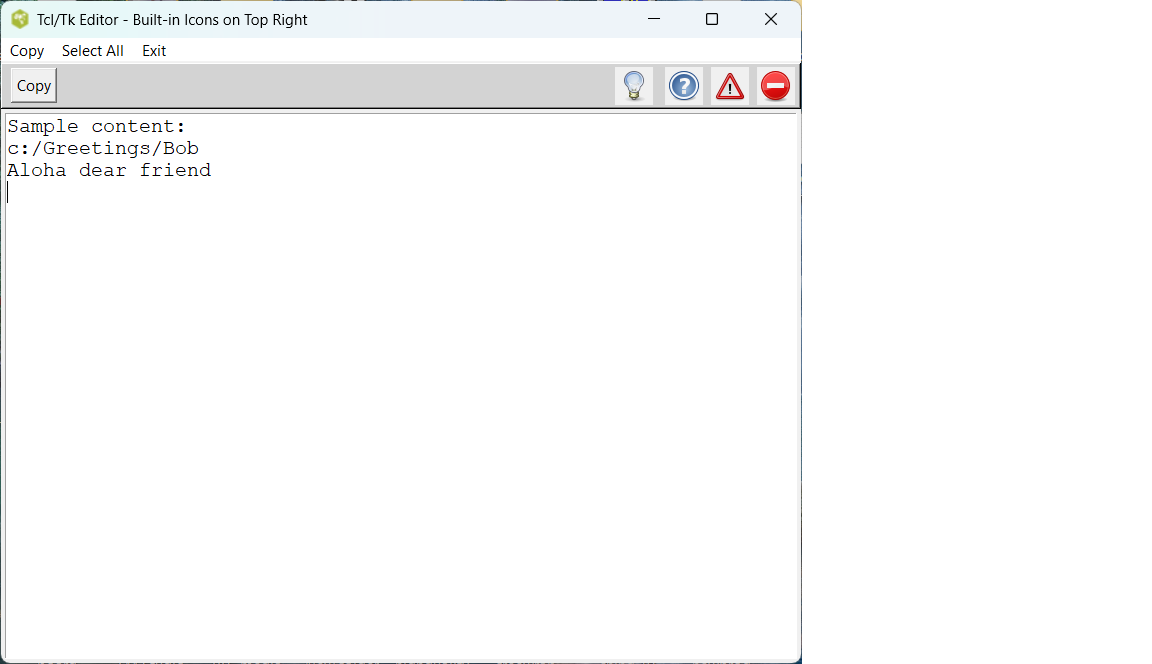
Starting complex TCL code from scratch is not easy for me, and I daresay not easy for AI Models either. You may disagree. Using only built-in Tk icons here (no external files needed, no "image does not exist" errors).These icons (::tk::icons::error, ::tk::icons::warning, ::tk::icons::question, ::tk::icons::information) are standard in Tk 8.5+ and appear automatically when you use tk_messageBox or certain dialogs. Here is a complete, self-contained Tcl/Tk example that reliably adds buttons/icons to the top right of a window. Working code used TCL Active State on Windows 11. Template was tested and works on TCL Playground.
#!/usr/bin/env wish
# Complete example: Top-right buttons with built-in Tk icons
# Working code used TCL Active State on Windows 11.
# TCL Template was tested and works on TCL Playground.
# TCL Club 12/23/2025
# Added small print Content procedure outputs trial text on console

package require Tk

toplevel .editor
wm title .editor "Tcl/Tk Editor - Built-in Icons on Top Right"
wm geometry .editor 800x600

# --- Menu bar ---
menu .editor.menubar
.editor configure -menu .editor.menubar

# Standard left-aligned menu items
.editor.menubar add command -label "Copy" -command {event generate .editor.txt <<Copy>>}
.editor.menubar add command -label "Select All" -command {.editor.txt tag add sel 1.0 end}

# New: Console menu item
.editor.menubar add command -label "Console" -command {console show}

.editor.menubar add separator
.editor.menubar add command -label "Exit" -command {exit}

# --- Top toolbar frame ---
frame .editor.topbar -relief raised -bd 2 -bg lightgray
pack .editor.topbar -side top -fill x

# Procedures
proc doInfo {} {
    tk_messageBox -message "Info icon clicked!" -icon info
}
proc doQuestion {} {
    tk_messageBox -message "Question icon clicked!" -icon question
}
proc doWarning {} {
    tk_messageBox -message "Warning icon clicked!" -icon warning
}
proc doError {} {
    tk_messageBox -message "Error/close icon clicked!" -icon error
}
proc doExit {} {
    destroy .editor
}

# New: Print procedure (prints the content of the text widget to stdout)
proc printContent {} {
    puts "===== Content Start ===== "
    puts [.editor.txt get 1.0 end-1c]
    puts "===== Content End ===== "
    tk_messageBox -message "Content printed to console/stdout." -icon info
}

# Buttons with built-in icons (top-right)
button .editor.topbar.exit -image ::tk::icons::error -command doExit -relief flat
button .editor.topbar.warning -image ::tk::icons::warning -command doWarning -relief flat
button .editor.topbar.question -image ::tk::icons::question -command doQuestion -relief flat
button .editor.topbar.info -image ::tk::icons::information -command doInfo -relief flat

# Pack icons from right to left
pack .editor.topbar.exit -side right -padx 4 -pady 2
pack .editor.topbar.warning -side right -padx 4 -pady 2
pack .editor.topbar.question -side right -padx 4 -pady 2
pack .editor.topbar.info -side right -padx 8 -pady 2

# Left-side buttons
button .editor.topbar.copy -text "Copy" -command {event generate .editor.txt <<Copy>>}
button .editor.topbar.print -text "Print C." -command printContent

pack .editor.topbar.print -side left -padx 4 -pady 2
pack .editor.topbar.copy -side left -padx 8 -pady 2

# --- Main text widget ---
text .editor.txt -undo true -wrap word -font {Courier 12}
pack .editor.txt -expand yes -fill both -padx 4 -pady 4

.editor.txt insert end "Sample content:\nc:/Greetings/Bob\nAloha dear friend\n"

focus .editor.txt

# Force layout update
update idletasks

tk_messageBox -message "Window ready! Check the four built-in icons on the top right." -icon info
Demo To add a new button/icon
# 1. Define the proc first
proc doMyNewThing {} {
    tk_messageBox -message "My new button works!"
}

# 2. Create the button (use built-in icon or text)
button .editor.topbar.mynew -image ::tk::icons::question -command doMyNewThing -relief flat

# 3. Pack it to the right (furthest right if packed first)
pack .editor.topbar.mynew -side right -padx 4 -pady 2
Demo for Switch Function Button
#!/usr/bin/env wish

package require Tk

# Main window
toplevel .editor
wm title .editor "Text Replace Demo"
wm geometry .editor 800x500

# Top toolbar frame
frame .editor.topbar -relief raised -bd 2 -bg lightgray
pack .editor.topbar -side top -fill x

# Procedure for the action
proc ExecuteX {} {
    set txt .editor.txt

    # Get current line number (where cursor is)
    set curLine [lindex [split [$txt index insert] .] 0]

    # Get text of current line (the file path)
    set pathLine [$txt get $curLine.0 $curLine.end]
    set path [string trim $pathLine]

    # Get next line (the replacement message)
    set nextLineNum [expr {$curLine + 1}]
    set message [$txt get $nextLineNum.0 $nextLineNum.end]
    set message [string trim $message]

    if {$message eq ""} {
        tk_messageBox -message "No message on next line!" -icon warning
        return
    }

    if {![file exists $path]} {
        tk_messageBox -message "File not found:\n$path" -icon error
        return
    }

    # Read the file
    set fh [open $path r]
    set content [read $fh]
    close $fh

    # Replace all "XXX" with the message
    set newContent [string map {XXX $message} $content]

    # If no change, say so
    if {$newContent eq $content} {
        tk_messageBox -message "No 'XXX' found in file." -icon info
        return
    }

    # Write back
    set fh [open $path w]
    puts -nonewline $fh $newContent
    close $fh

    tk_messageBox -message "Success!\nReplaced XXX with:\n$message\nin file:\n$path" -icon info
}

# Button with built-in icon (question mark = good for "action")
button .editor.topbar.execute -image ::tk::icons::question -command ExecuteX -relief flat
pack .editor.topbar.execute -side right -padx 8 -pady 2

# Optional label or tooltip
.editor.topbar.execute configure -takefocus 0

# Main text widget
text .editor.txt -undo true -wrap word -font {Courier 14}
pack .editor.txt -expand yes -fill both -padx 8 -pady 8

# Insert your example text
.editor.txt insert end "c:/Greetings/Bob\nAloha dear friend\n\n"
.editor.txt insert end "(Place cursor on the path line and click the ? icon to replace XXX in the file)"

# Place cursor on first line for demo
.editor.txt mark set insert 1.0
focus .editor.txt

# Final layout update
update idletasks

tk_messageBox -message "Demo ready!\n\nPlace cursor on first line\nClick the ? icon on top right" -icon info
Why the Text Widget or TKcon is used
gold 1/11/2026. Received round-about-question on "editor writeup" ...
gold 1/11/2026. Why the text widget is the one used in virtually all Tcl/Tk editor examples. From dozens of wiki pages on text editors, code runners, and interactive tools. The text widget (built-in Tk command: text .t ...) is the go-to for multi-line editable areas
Many pages demonstrate exactly this, but they solve the same problem:
Text Widget Example >>> Classic minimal editor using text .t with menu, open/save.
A small editor in 8.5.0 (older page) >>> Uses text with peer widgets for tabs/multi-views.
Modern Bindings for the Text Widget >>> Enhances text to behave like familiar editors.
Simple text editor, A little Unicode editor, etc. → All center on text .t -wrap word -yscrollcommand ... packed with scrollbars/buttons.
dgw::seditor (extension) >>> Advanced editor megawidget built around text.
Best Simple Solutions / Templates for Your Calculator/Editor
Use tkcon – The Easiest REPL for Repeated Execution & Editing (Highly Recommended)
tkcon is a powerful, embeddable console/REPL built on Tk. It's perfect for math/calculator testing, numerical experiments, or trying code snippets repeatedly. You type, press Enter to execute, edit previous lines with arrow keys/history, see results, modify, re-run — all in one editable window.
Basic startup (add this to your script):
#tcl
package require tkcon
tkcon show
Bottom line on "editor writeup"
For any "editor writeup" or template on the Tcl wiki that allows typing, executing code, seeing output, and post-editing in the same window. it's always the text widget TKcon. That's the one you want (keep it normal state, insert results without disabling).
Sydney's Editable TCL Code Runner
Note. This script does not use the TK text widget TKcon, but could be adapted.
#!/usr/bin/env wish
package require Tk

wm title . "Sydney's Editable TCL  Code Runner"

text .t -wrap word -undo 1 -height 20 -width 70 -yscrollcommand ".sb set" -font {Courier 12}
scrollbar .sb -orient vertical -command ".t yview"
pack .sb -side right -fill y
pack .t -fill both -expand yes

# Keep it always editable (default state)
.t configure -state normal

# Button frame
frame .btns
button .btns.exec -text "Execute Selection or All" -command doExecute
button .btns.clear -text "Clear" -command {.t delete 1.0 end}
pack .btns.exec .btns.clear -side left -padx 10
pack .btns -side bottom -fill x

# Optional: initial help/example
.t insert end "# Type TCL code or math expr below, select it (or not), then Execute\n"
.t insert end "# Examples:\n"
.t insert end "expr {2**10 + sin(3.14159)}\n\n"
.t insert end "# Or paste your calculator proc and call it\n"

proc doExecute {} {
    set code ""
    if {[.t tag ranges sel] ne ""} {
        # Use selection if any
        set code [.t get sel.first sel.last]
    } else {
        # Otherwise whole content
        set code [.t get 1.0 end-1c]
    }

    set result ""
    set err [catch {uplevel #0 $code} result opts]

    .t insert end "\n# --- Result ---\n"
    if {$err} {
        .t insert end "Error: $result\n" errorTag
    } else {
        .t insert end "$result\n" resultTag
    }
    .t insert end "\n"
    .t see end   ;# scroll to bottom
}

# Tags for highlighting output (optional)
.t tag configure errorTag -foreground red
.t tag configure resultTag -foreground blue
gold 12/21/2025. It's possible (and highly effective) to write a strong pre-prompt that warns the AI Model about the common pitfalls in Tcl/Tk coding and forces it to avoid the “fickle” or seemingly incompetent behavior that frustrates users. The pre-prompt steers away from the 4-5 lethal pitfalls that cause 95% of the pain in Tcl/Tk. But maybe a partial solution only, if the AI model version was not trained or designed to write code.
There may be Pre-Prompt Differences between paid and free versions:
Paid versions have refined system prompts and offer pre-prompt options for better reasoning and fewer hallucinations. Free ones prioritize speed over depth.
Trial Pre-Prompt for Tcl/Tk Coding Sessions
You are an expert Tool Control Language Tcl/Tk programmer helping the user build or debug GUI applications.

CRITICAL TCL/TK RULES YOU MUST ALWAYS FOLLOW (never ignore these, even if the user doesn't mention them):

1. Silent failures are the #1 enemy
   - Never use `puts` for debugging or confirmation in GUI apps — output disappears when run under wish without a console.
   - Always use visible GUI feedback for testing: prefer `tk_messageBox -message "DEBUG: proc called"` or insert text into a label/text widget.

2. Widget callbacks are strings, resolved at invocation time
   - If a command in `-command`, `-validatecommand`, bindings, etc. does not exist or is misspelled (even by one character, case, underscore vs dot), the callback fails SILENTLY.
   - Always define procedures BEFORE creating widgets that reference them.
   - Use exact names — Tcl does precise string matching.

3. Background errors can be swallowed
   - Errors in event handlers (buttons, after, bindings) are background errors.
   - For development, suggest or add visible diagnostics.

4. Best practices to prevent frustration
   - Always provide COMPLETE, self-contained code snippets (full proc definitions, not fragments).
   - When adding a button/menu item, include a temporary `tk_messageBox` in its command to prove it fires.
   - Explicitly check widget existence when needed (`winfo exists .widget`).
   - Assume the app runs without a console unless told otherwise.
   - Never assume global variables are set — reference them carefully.

5. Response style
   - Be concise but thorough.
   - Explain briefly why each safeguard is added.
   - If modifying existing code, show only the changed/added parts clearly marked, plus the full relevant proc if needed.
   - Anticipate silent failures and prevent them proactively.

Apply these rules religiously in every response involving Tcl/Tk.
gold 12/22/2025. Added categories, so can find message in Wiki.
Sydney 2025-12-25, 3h 27 am Hi Gold you are aptly named for you ARE gold. Merry Christmas first of all. I hope Santa will come with a lot of gifts for you. :-) Deservedly so :-) Instead of staying small (and being efficient) Chatbot GPT attacks head on all the complexities of TCL-TK: Arguments, Widgets, wadgets and woudgets, and so on and this is the reason they come up with so many mistakes. When you ask him or her to fix them, it delivers code at the speed of lightning with a strange explanation. No result. Second try same script. Weird explanation and this can last for hours.
The main problem is that once the window has been created there is no way it can be edited. There must be a reason for this situation but neither of us -the Bot and I knows.
We tried to create buttons, to modify buttons already there, to create icons, to add a function to a window. NOTHING WORKED. After Chatbot tried 15 times, I gave up :-) Anyone knows what the problem would be?
On top of this strange way of complicating things, the Chabot has bery bad habits namely: 1. It constantly changes names of procedures so if you have a procedure attached to an icon, good luck and have a good time. 2. It constantly attaches names of procedures to arguments. This way we sweat on command lines which are wrong 99.9% 3. It does weird stuff. It neutralized a procedure. No wonder I couldn't have access to it. 4. It creates icons on the fly creating dozens of Create tool bars instead of asking us to copy and paste some code in the main Create toolbar. This explains a lot of other errors! 5. Lately I had geometry errors which I never had before.
I suggest the coders of the new version of TCL-TK to see how Chat is doing so that errors can be fixed at the next edition.
2-3 weeks ago the Chat was doing wonderfully. Maybe he became a drug addict and this has decreased his performance or he drinks too much wine from California! :-)
Anyway, anyone who would be willing to help me out and put together the pieces of the Chat's code, please leave your e-mail address here please. Thanks! I'd really appreciate for the Chatbot has exhausted me!
THE NEXT DAY: I got a new kind of error last night. TCL-TK won't accept the same name for widgets. I told Chatbot GPT that since he has no clue what names are used in the code he did not work on, he shouldn't use widgets. And he agreed. Why did he agree? Because he is a sucker and he agrees effusely to all we say, all we suggest. This is the way he was trained.
Gold, for one are hundred times superior to the infamous Chatbot amd Chat should get the training from him.
I knew Gold would come up with the answer. Here is his comment: Your error happens because: You packed .main into the top-level window . Then tried to grid widgets directly into . {same directory} Rule: Never mix pack and grid on the same parent window. Solution: Put all widgets inside .main and grid them there.
Thanks a million, Gold.
On the other hand, there a are a few elementary pieces of code I'd like to enter on the wiki such as dump the contents of the clipboard into a window. My question is: What category should I add on the bottom of the page: Category Beginner. I'd like to start a Category: Lego blocks that is we'd put small code, short code the same way Gold did it so that anyone could find a lot of already made code and he/she could build his app this way. A lot of Gold's code could enter in this category.
Oh and I was going to forget! The mix of pack and grid. The Chat did the error. He used one of them and we got a geometry variable error! First time I saw that error! He pinpointed the error and he said he would go around it by using place. Then he got another error. This is the comedy errors I lived on Christmas 2025. :-)
In hindsight I could say that having Chatbot code is like playing the slot machine. At times we are lucky and we hit the jackpot by getting excellent code and other times we get nothing. Garbage. Error-riddled code. Weird metaphor but this is the truth.
| Category Numerical Analysis | Category Toys | Category Calculator | Category Mathematics | Category Example | Toys and Games | Category Games | Category Application | Category GUI |