Displaying tables
Arjen Markus The following script is a result of suggestions by Andreas Kupries and Jeff Hobbs: how to display tabular data.
The ::struct::matrix module in Tcllib makes it very easy to manage data in the form of a table. The Tktable extension is capable of showing data in the form of a table, but it uses a different method for storing the data. Luckily, the ::struct::matrix module has a command to link the matrix to an array (and vice versa).
Note: from my (very) limited experience I conclude that things are not quite perfect yet. But, with just twenty lines of code, one can achieve a beautiful demonstration of the ideas!
Some imperfections:
- The order for creating the array and linking it to a matrix is fixed.
- Updates to the matrix (via the matrix's methods) are not always reflected in the table. Changes in the table (via the widget) are.
   # Demonstrate the combination of ::struct::matrix and Tktable
   #
   package require struct
   package require Tktable

   #
   # Create a matrix called "simpleTable"
   #
   ::struct::matrix simpleTable

   #
   # The matrix must have some columns before it will accept rows
   #
   simpleTable add columns 4
   simpleTable add row {A1 A2 A3 A4}
   simpleTable add row {B1 B2 B3 B4}
   simpleTable add row {C1 C2 C3 C4}

   #
   # A small glitch in the default formatter makes it necessary to
   # force a new line
   #
   simpleTable format 2chan
   puts ""

   #
   # Note: the array table_data must be defined before the link
   # with the matrix!
   #
   table .table -variable table_data -width 4 -height 3
   pack .table -fill both

   simpleTable link -transpose table_data

   simpleTable set cell 2 2 XX

   puts "Elements: [array get table_data]"
RS likes to depend on nothing (and has no Tcllib or Tktable on the iPaq, for instance). Here's a minimal solution to display a table (list of lists) in a grid of labels:
 package require Tk
 proc table {w content args} {
     frame $w -bg black
     set r 0
     foreach row $content {
         set fields {}
         set c 0
         foreach col $row {
             lappend fields [label $w.$r/$c -text $col]
             incr c
         }
         eval grid $fields -sticky news -padx 1 -pady 1
         incr r
     }
     set w
 }

#--- Test:
 table .t {
    {Row Head1 Head2}
    {1   foo   42}
    {2   bar   1234}
    {3   grill testing}
 }
 pack .t

#--- Changing the contents, given row and column number:
 after 2000 .t.3/2 config -text Coucou
Only after writing this, and reading the printout over a cup of coffee, I noticed that I had evidently reused the pattern of A little calculator... The more I code, the harder is code re-use, because it's hard to remember where it was, and what it was called... somehow, idea reuse is simpler, and more fun, too.
LV Techniques for making code reuse easier
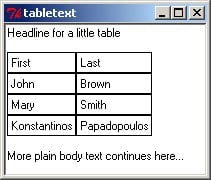
RS 2006-04-07 - Here's an example of embedding such a table in a text widget (I gave the labels the additional options -anchor w -bg white):
 pack [text .t]
 .t insert end "Headline for a little table\n\n"
 set content {
     {First Last}
     {John Brown}
     {Mary Smith}
     {Konstantinos Papadopoulos}
 }
 .t window create end -window [table .t.x $content]
 .t insert end \n\n
 .t insert end "More plain body text continues here..."
AM Alternatively, you can of course just Draw a table on a canvas, if you merely want to show it (and print it ...)
KPV See also Simple Tktable.
PS - 2025-09-22 11:49:59
Poor man's no extension scrollable mousewheel table:
wm title . table
wm geometry . "1220x600"

option add *font {{Liberation Sans} 11}

text .textarea -yscrollcommand ".yscroll set"
scrollbar .yscroll -command ".textarea yview"

frame .iframe
for {set row 0} {$row <20} {incr row} {
  for {set col 0} {$col <7} {incr col} {
    set cell .iframe.$row$col
    if {$col == 6} {set w 25} else {set w 20}
    text $cell -width $w -height 20 -relief flat
    bind $cell <MouseWheel> {event generate .textarea <MouseWheel> -delta %D -x %X -y %Y}
    $cell insert end "$row - $col"
    grid $cell -row $row -column $col
  }
}

.textarea window create end -window .iframe
pack .yscroll -side right -fill y
pack .textarea -expand yes -fill both -side left
PS - 2025-09-28 12:38:35
PS table: mousewheel needs Tcl/Tk 9.0.2, width and height of cells depend on font size. Cells may be wrapped, for example. Resizing rows may be helpful.
wm title . table
wm geometry . "1220x600"

option add *font {{Liberation Sans} 11}

text .textarea -yscrollcommand ".yscroll set"
scrollbar .yscroll -command ".textarea yview"

frame .iframe
panedwindow .iframe.rows -orient vertical

for {set row 0} {$row <20} {incr row} {
  frame .rowframe$row
  for {set col 0} {$col <7} {incr col} {
    set cell .rowframe$row.$row$col
    if {$col == 6} {set w 25} else {set w 20}
    text $cell -width $w -height 20 -relief flat -wrap "word"
    bind $cell <MouseWheel> {event generate .textarea <MouseWheel> -delta %D -x %X -y %Y}
    $cell insert end "$row - $col"
    pack $cell -side left -fill both -expand true
  }
  pack .rowframe$row
  .iframe.rows add .rowframe$row
}
pack .iframe.rows

.textarea window create end -window .iframe
pack .yscroll -side right -fill y
pack .textarea -expand yes -fill both -side left
GS - 2025-10-01 Does it exist a Tcl package to display tables in ASCII (or Unicode ?) on console mode ?
saito - 2025-10-03 Do you mean simple/plain text tables? How about very simple approach?
foreach row $data {
  puts [join $row " | "]
}
georgtree - 2025-10-03 00:46:33
Yes, the part of tcllib https://core.tcl-lang.org/tcllib/doc/tcllib-2-0/embedded/md/tcllib/files/modules/report/report.md
georgtree - 2025-10-03 00:49:15
Also you can try this package https://github.com/nico-robert/zesty
saito - 2025-10-03 This is a nice package! Can the output be used as pure Ascii/Unicode like GS asked for above? If so, it would make it more usable.