Mathematical notebook revisited
Arjen Markus (19 december 2011) I am fascinated by mathematics in general and geometry in particular. So, this weekend I extended my old mathematical notebook with the specific purpose of visualising classical geometrical constructions. For this I needed an extended version - which you will find below (some convenience procedures and a different user-interface).
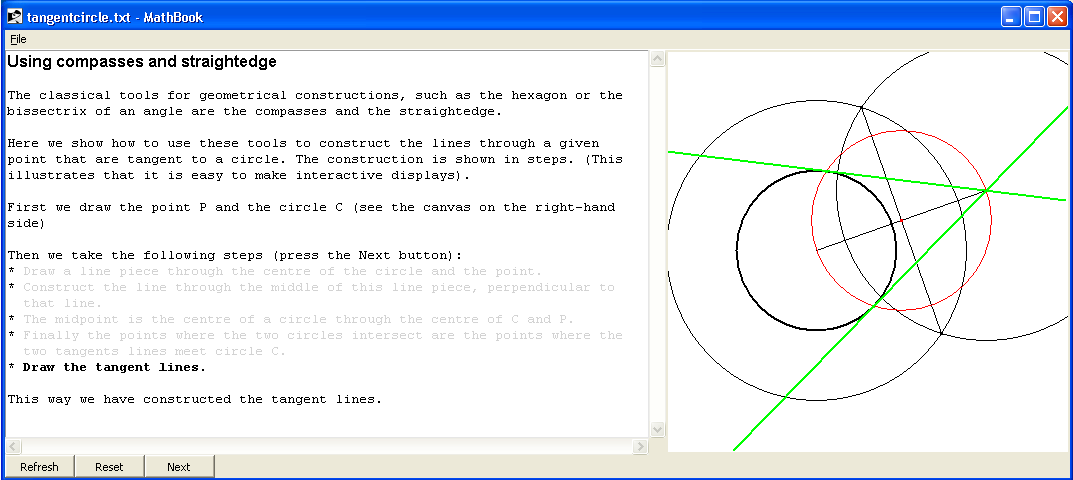
The idea is to use the flexibility of the text widget to allow for an interactive display of the construction: via tags the example below highlights the steps in the construction of lines tangent to a circles. All in the classical tradition of the ancient Greek.
I use the tag mechanism of the canvas to delete those items I do not need anymore - right now: just used by the "Reset" button.
(Note: it is not perfect yet - opening a second file for instance does not refresh the text widget properly)
Example: Tangent lines to a circle
Here is a screenshot:
# Classical construction:
#     Tangent lines to a circle
#
<h1>Using compasses and straightedge</h1>
<p>
The classical tools for geometrical constructions, such as the hexagon
or the bissectrix of an angle are the compasses and the straightedge.
<p>
Here we show how to use these tools to construct the lines through a
given point that are tangent to a circle. The construction is shown in
steps.
(This illustrates that it is easy to make interactive displays).
<p>
First we draw the point P and the circle C (see the canvas on the
right-hand side)
<p>
Then we take the following steps (press the Next button):
<ul>
<tag>step1
<li>
Draw a line piece through the centre of the circle and the point.
<tag>step2
<li>
Construct the line through the middle of this line piece, perpendicular
to that line.
<tag>step3
<li>
The midpoint is the centre of a circle through the centre of C and P.
<tag>step4
<li>
Finally the points where the two circles intersect are the points where
the two tangents lines meet circle C.
<tag>step5
<li>
Draw the tangent lines.
</ul>
<tag>normal
This way we have constructed the tangent lines.

@init {
    proc resetTags {} {
        variable TXT
        variable fontNormal
        $TXT tag configure step1 -foreground lightgrey -font $fontNormal
        $TXT tag configure step2 -foreground lightgrey -font $fontNormal
        $TXT tag configure step3 -foreground lightgrey -font $fontNormal
        $TXT tag configure step4 -foreground lightgrey -font $fontNormal
        $TXT tag configure step5 -foreground lightgrey -font $fontNormal
    }
    resetTags

    proc showStep {step} {
        variable CNV
        variable xcentre
        variable ycentre
        variable radius
        variable xpoint
        variable ypoint
        variable xp      ;# Midpoint between point P and centre of circle C
        variable yp
        variable radiusM ;# Radius of the circle through P and centre
        variable tangentPoints

        switch $step {
            "0" {
                $CNV delete steps
            }
            "1" {
                #
                # Step: line piece connecting point and centre
                #
                set id [polyline [list $xcentre $ycentre $xpoint $ypoint]]
                $CNV itemconfigure $id -tag steps
            }
            "2" {
                #
                # Midpoint of the line piece
                #
                set id1 [circle $xcentre $ycentre 1.5]
                set id2 [circle $xpoint  $ypoint  1.5]
                $CNV itemconfigure $id1 -tag steps
                $CNV itemconfigure $id2 -tag steps
                #
                # Compute the two intersection points
                # and draw them, as well as the line piece between them
                #
                set points [circleIntersection [list $xcentre $ycentre 1.5] \
                                               [list $xpoint  $ypoint  1.5]]

                set id [polyline $points]
                $CNV itemconfigure $id -tag steps

                set xp [expr {([lindex $points 0] + [lindex $points 2]) / 2.0}]
                set yp [expr {([lindex $points 1] + [lindex $points 3]) / 2.0}]

                set id1 [point [lindex $points 0] [lindex $points 1] black]
                set id2 [point [lindex $points 2] [lindex $points 3] black]
                set id3 [point $xp $yp red]

                $CNV itemconfigure $id1 -tag steps
                $CNV itemconfigure $id2 -tag steps
                $CNV itemconfigure $id3 -tag steps
            }
            "3" {
                #
                # Step: circle through centre and point
                #
                set radiusM [expr {hypot($xcentre-$xp,$ycentre-$yp)}]

                set id [circle $xp $yp $radiusM red]
                $CNV itemconfigure $id -tag steps
            }
            "4" {
                #
                # Step: intersection points of the two circles
                #
                set tangentPoints [circleIntersection [list $xcentre $ycentre $radius] \
                                                      [list $xp      $yp      $radiusM]]
                set id1 [point [lindex $tangentPoints 0] [lindex $tangentPoints 1] green]
                set id2 [point [lindex $tangentPoints 2] [lindex $tangentPoints 3] green]
                $CNV itemconfigure $id1 -tag steps
                $CNV itemconfigure $id2 -tag steps
            }
            "5" {
                #
                # Step: draw the tangent lines
                #
                set id1 [infiniteLine [lindex $tangentPoints 0] [lindex $tangentPoints 1] $xpoint $ypoint green]
                set id2 [infiniteLine [lindex $tangentPoints 2] [lindex $tangentPoints 3] $xpoint $ypoint green]
                $CNV itemconfigure $id1 -tag steps -width 2
                $CNV itemconfigure $id2 -tag steps -width 2
            }

        }
    }
}

@canvasright 400 400 {
    variable state
    variable xcentre
    variable ycentre
    variable xpoint
    variable ypoint
    variable radius
    variable CNV

    set state 0

    scale {-2.5 -2.0 1.5 2.0}

    set xcentre -1.0
    set ycentre  0.0
    set xpoint   0.7
    set ypoint   0.6
    set radius   0.8

    set id [circle $xcentre $ycentre $radius black] ;# Circle C
    $CNV itemconfigure $id -width 2
    point  $xpoint  $ypoint  black         ;# Point P

    set state 0
}
@button Reset {
    resetTags
    $CNV delete steps
    set state 0
}
@button Next {
    variable state

    resetTags

    incr state
    $TXT tag configure step$state -foreground black -font $fontBold
    showStep $state
}
Example: The witch of Agnesi
Here is a second example, as it presents an animated construction, you will have to run it yourself to see it.
# witch_agnesi.txt --
#     Construct the curve known as the witch of Agnesi
#

<h1>Witch of Agnesi</h1>
<p>
With compasses and straightedge you can construct all manner of curves,
though sometimes the process is more mechanical than mathematical.
<p>
Here is an example: the witch of Agnesi is constructed by drawing
a line through a fixed point on a circle and using the intersection
through that circle and a tangent line to define a new point.
<p>
The process is illustrated in the figure on the right. Press the
"Go" button to see how it works.
<p>
The curve has the parametric form:
<pre>
     x = 2 a cot t
     y = a (1-cos(2t))
</pre>
where "a" is the radius of the circle (cf. mathworld.wolfram.com/WitchofAgnesi.html).

@init {
    proc intersectionCircleLine {circle line} {
        foreach {xc yc radius} $circle {break}
        foreach {x1 y1 x2 y2}  $line   {break}

        set dx     [expr {$x2 - $x1}]
        set dy     [expr {$y2 - $y1}]
        set length [expr {hypot($dx,$dy)}]
        set xn     [expr {-$dy/$length}]
        set yn     [expr {$dx/$length}]

        set mu     [expr {($x1-$xc)*$xn + ($y1-$yc)*$yn}]

        set xmid   [expr {$xc + $mu * $xn}]
        set ymid   [expr {$yc + $mu * $yn}]

        set dist   [expr {sqrt($radius**2 - ($xmid-$xc)**2 - ($ymid-$yc)**2)/$length}]

        set xi1    [expr {$xmid + $dx * $dist}]
        set yi1    [expr {$ymid + $dy * $dist}]
        set xi2    [expr {$xmid - $dx * $dist}]
        set yi2    [expr {$ymid - $dy * $dist}]

        return [list $xi1 $yi1 $xi2 $yi2]
    }

    proc drawWitch {x} {
        variable CNV
        variable coords

        $CNV delete line
        $CNV delete witch
        set line [list 0.0 -1.0 $x 1.0]

        set id1 [polyline $line black]
        set id2 [point $x 1.0 red]

        $CNV itemconfigure $id1 -tag line
        $CNV itemconfigure $id2 -tag line

        #
        # Determine the points of intersection and select the
        # right one - the one with y > -1.0
        #
        set intersectionPoints [intersectionCircleLine {0.0 0.0 1.0} $line]

        foreach {xp yp} $intersectionPoints {
            if { $yp > -0.999 } {
                break
            }
        }
        #
        # Draw the auxiliary lines
        #
        set id1 [polyline [list $x  1.0 $x -1.0] red]
        set id2 [polyline [list $xp $yp $x  $yp] red]
        set id3 [point $xp $yp red]
        set id4 [point $x  $yp red]

        $CNV itemconfigure $id1 -tag line
        $CNV itemconfigure $id2 -tag line
        $CNV itemconfigure $id3 -tag line
        $CNV itemconfigure $id4 -tag line

        lappend coords $x $yp
        if { [llength $coords] > 2 } {
            set id [polyline $coords red]
            $CNV itemconfigure $id -tag witch
        }

        #
        # Note: the procedure is defined within the MathData namespace
        #
        if { $x < 4.0 } {
            after 100 [list ::MathData::drawWitch [expr {$x+0.1}]]
        } else {
            $CNV delete line
            $CNV itemconfigure $id -width 2
        }
    }
}

@canvasright 400 400 {
    scale {-4.0 -4.0 4.0 4.0}

    infiniteLine -2.0  1.0 2.0 1.0 black
    circle        0.0  0.0 1.0 black
    point         0.0 -1.0 black

    console show
    puts [intersectionCircleLine {0.0 0.0 1.0} {0.0 0.0 0.0 1.0}]
}

@button Go {
    variable coords

    set coords {}
    drawWitch -4.0
}
Code: Updated mathbook
# mathbook.tcl --
#    Script to show notes on mathematical subjects
#
# TODO:
#    - Implement a number of useful drawing commands
#    - Implement a formula renderer (a basic one _is_ available)
#    - Implement more convenient bindings
#    - Describe the application
#
#    Missing commands:
#    @refresh - define your own refresh method
#    @label   - allow a label (useful for variable text)
#    @button  - allow a pushbutton
#
package require Tcl 8.5
package require Tk

if { [tk windowingsystem] == "x11" } {
   . configure -background #dcdad5
   option add *background #dcdad5
   option add *foreground black
   option add *borderWidth 1 widgetDefault
   option add *activeBorderWidth 1 widgetDefault
   option add *selectBorderWidth 1 widgetDefault
   option add *font -adobe-helvetica-medium-r-normal-*-12-*-*-*-*-*-*

   option add *padX 2
   option add *padY 4

   option add *Listbox.background white
   option add *Listbox.selectBorderWidth 0
   option add *Listbox.selectForeground white
   option add *Listbox.selectBackground #4a6984

   option add *Entry.foreground black
   option add *Entry.background white
   option add *Entry.selectBorderWidth 0
   option add *Entry.selectForeground white
   option add *Entry.selectBackground #4a6984

   option add *Text.background white
   option add *Text.selectBorderWidth 0
   option add *Text.selectForeground white
   option add *Text.selectBackground #4a6984

   option add *Menu.activeBackground #4a6984
   option add *Menu.activeForeground white
   option add *Menu.activeBorderWidth 0
   option add *Menu.highlightThickness 0
   option add *Menu.borderWidth 2

   option add *MenuButton.activeBackground #4a6984
   option add *MenuButton.activeForeground white
   option add *MenuButton.activeBorderWidth 0
   option add *MenuButton.highlightThickness 0
   option add *MenuButton.borderWidth 0

   option add *highlightThickness 0
   option add *troughColor #bdb6ad
}


# MathData --
#    Namespace for the user-defined commands and data
#
namespace eval ::MathData:: {
   variable CNV          ""
   variable TXT          ""

   variable fontNormal   "Courier 10"
   variable fontBold     "Courier 10 bold"
   variable fontItalic   "Courier 10 italic"
}

# scale --
#    Set up the scaling for the given canvas
# Arguments:
#    data            List of data (x, y, x, y ...)
# Result:
#    None
# Side effects:
#    Scaling parameters set
# Note:
#    TODO: Should make sure there is some scaling involved
#          if only using pixels
#
proc ::MathData::scale { data } {
   variable CNV
   variable SCALE

   set width  [$CNV cget -width]
   set height [$CNV cget -height]
   set xmin  1.0e30
   set xmax -1.0e30
   set ymin  1.0e30
   set ymax -1.0e30

   foreach {x y} $data {
      if { $x < $xmin } { set xmin $x }
      if { $x > $xmax } { set xmax $x }
      if { $y < $ymin } { set ymin $y }
      if { $y > $ymax } { set ymax $y }
   }

   if { $xmin == $xmax } { set xmax [expr {$xmax+1.0}] }
   if { $ymin == $ymax } { set ymax [expr {$ymax+1.0}] }

   set SCALE(xscale) [expr {$width/double($xmax-$xmin)}]
   set SCALE(yscale) [expr {$height/double($ymax-$ymin)}]
   set SCALE(xmin)   $xmin
   set SCALE(xmax)   $xmax
   set SCALE(ymin)   $ymin
   set SCALE(ymax)   $ymax
}

# polyline --
#    Draw a line consisting of multiple points
# Arguments:
#    data            List of data (x, y, x, y ...)
#    colour          Colour to use (default: black)
# Result:
#    Canvas ID of the polyline
# Side effects:
#    Line drawn according to current scales
#
proc ::MathData::polyline { data {colour black} } {
   variable CNV
   variable SCALE

   set xscale $SCALE(xscale)
   set yscale $SCALE(yscale)
   set xmin   $SCALE(xmin)
   set xmax   $SCALE(xmax)
   set ymin   $SCALE(ymin)
   set ymax   $SCALE(ymax)

   set pixels {}
   foreach {x y} $data {
      set px [expr {$xscale*($x-$xmin)}]
      set py [expr {$yscale*($ymax-$y)}]
      lappend pixels $px $py
   }

   $CNV create line $pixels -fill $colour
}

# circle --
#    Draw a circle with given centre and radius
# Arguments:
#    xcentre         X-coordinate of the centre
#    ycentre         Y-coordinate of the centre
#    radius          Radius of circle
#    colour          Colour to use (default: black)
#    filled          Filled or not (default: not)
# Result:
#    Canvas ID of the circle
# Side effects:
#    Line drawn according to current scales
#
proc ::MathData::circle { xcentre ycentre radius {colour black} {filled 0} } {
   variable CNV
   variable SCALE

   set xscale $SCALE(xscale)
   set yscale $SCALE(yscale)
   set xmin   $SCALE(xmin)
   set xmax   $SCALE(xmax)
   set ymin   $SCALE(ymin)
   set ymax   $SCALE(ymax)

   set pixels {}
   foreach {x y} [list [expr {$xcentre-$radius}] [expr {$ycentre-$radius}] \
                       [expr {$xcentre+$radius}] [expr {$ycentre+$radius}] ] {
      set px [expr {$xscale*($x-$xmin)}]
      set py [expr {$yscale*($ymax-$y)}]
      lappend pixels $px $py
   }

   $CNV create oval $pixels -fill [expr {$filled? $colour : {}}] -outline $colour
}

# point --
#    Draw a point with given coordinates
# Arguments:
#    xpoint          X-coordinate
#    ypoint          Y-coordinate
#    colour          Colour to use (default: black)
# Result:
#    Canvas ID of the point
# Side effects:
#    Line drawn according to current scales
#
proc ::MathData::point { xpoint ypoint {colour black} } {
   variable CNV
   variable SCALE

   set xscale $SCALE(xscale)
   set yscale $SCALE(yscale)
   set xmin   $SCALE(xmin)
   set xmax   $SCALE(xmax)
   set ymin   $SCALE(ymin)
   set ymax   $SCALE(ymax)

   set pixels {}
   set px [expr {$xscale*($xpoint-$xmin)}]
   set py [expr {$yscale*($ymax-$ypoint)}]
   lappend pixels [expr {$px-1}] [expr {$py-1}] [expr {$px+1}] [expr {$py+1}]

   $CNV create rectangle $pixels -fill $colour -outline $colour
}

# text --
#    Draw a text string at a given position
# Arguments:
#    x               X coordinate
#    y               Y coordinate
#    string          String to show
# Result:
#    Canvas ID of the text object
# Side effects:
#    String drawn
#
proc ::MathData::text { x y string } {
   variable CNV
   variable SCALE

   set xscale $SCALE(xscale)
   set yscale $SCALE(yscale)
   set xmin   $SCALE(xmin)
   set xmax   $SCALE(xmax)
   set ymin   $SCALE(ymin)
   set ymax   $SCALE(ymax)

   set px [expr {$xscale*($x-$xmin)}]
   set py [expr {$yscale*($ymax-$y)}]

   $CNV create text $px $py -text $string -anchor nw
}

# axes --
#    Draw two lines representing the axes
# Arguments:
#    None
# Result:
#    None
# Side effects:
#    Two lines drawn (no labels yet)
#
proc ::MathData::axes { } {
   variable CNV
   variable SCALE

   set width  [$CNV cget -width]
   set height [$CNV cget -height]
   set xscale $SCALE(xscale)
   set yscale $SCALE(yscale)
   set xmin   $SCALE(xmin)
   set xmax   $SCALE(xmax)
   set ymin   $SCALE(ymin)
   set ymax   $SCALE(ymax)

   set px0 [expr {$xscale*(0.0-$xmin)}]
   set py0 [expr {$yscale*($ymax-0.0)}]

   $CNV create line $px0 0    $px0   $height -fill black
   $CNV create line 0    $py0 $width $py0    -fill black
}

# func --
#    Repeatedly run a function and return xy-pairs
# Arguments:
#    funcname       Name of the function (procedure)
#    xmin           Minimum x-value
#    xmax           Maximum x-value
#    nosteps        Number of steps (inbetween; default: 50)
# Result:
#    List of x, y values
#
proc ::MathData::func { funcname xmin xmax { nosteps 50 } } {

   set coords {}
   set xstep  [expr {($xmax-$xmin)/$nosteps}]

   for { set i 0 } { $i <= $nosteps } { incr i } {
      set x [expr {$xmin+$i*$xstep}]
      set y [$funcname $x]
      lappend coords $x $y
   }

   return $coords
}

# circleIntersection --
#    Determine the points where two circles intersect
# Arguments:
#    circle1        X-, Y-coordinate and radius of first circle
#    circle2        X-, Y-coordinate and radius of second circle
# Result:
#    List of x/y coordinates or empty
#
proc ::MathData::circleIntersection { circle1 circle2 } {

   set coords {}

   foreach {x1 y1 r1} $circle1 {break}
   foreach {x2 y2 r2} $circle2 {break}

   #
   # Do we have an intersection?
   #
   set distc [expr {sqrt(($x1-$x2)**2 + ($y1-$y2)**2)}]
   if { $distc**2 <= $r1**2+$r2**2 } {

       set a     [expr {0.5 * ($distc + ($r1**2-$r2**2)/$distc)}]
       set dist  [expr {sqrt($r1**2 - $a**2)}]

       set dx    [expr {$x2-$x1}]
       set dy    [expr {$y2-$y1}]
       set dd    [expr {hypot($dx,$dy)}]

       set xc    [expr {$x1 + $a * $dx/$dd}]
       set yc    [expr {$y1 + $a * $dy/$dd}]

       set xn    [expr {$dist * $dy/$dd}]
       set yn    [expr {-$dist * $dx/$dd}]

       set xp1   [expr {$xc + $xn}]
       set xp2   [expr {$xc - $xn}]
       set yp1   [expr {$yc + $yn}]
       set yp2   [expr {$yc - $yn}]

       set coords [list $xp1 $yp1 $xp2 $yp2]
   }
   return $coords
}

# infiniteLine --
#    Draw a line through two points that extends indefinitely
# Arguments:
#    xp1           X-coordinate first point
#    yp1           Y-coordinate first point
#    xp2           X-coordinate second point
#    yp2           Y-coordinate second point
#    colour        Colour of the line (default: black)
# Result:
#    Canvas ID of the line
#
proc ::MathData::infiniteLine { xp1 yp1 xp2 yp2 {colour black} } {
   variable CNV
   variable SCALE

   set dx [expr {$xp2-$xp1}]
   set dy [expr {$yp2-$yp1}]

   if { abs($dx) > abs($dy) } {
       set xn1    $SCALE(xmin)
       set lambda [expr {($xn1 - $xp1) / $dx}]
       set yn1    [expr {$yp1 + $dy * $lambda}]
       set xn2    $SCALE(xmax)
       set lambda [expr {($xn2 - $xp1) / $dx}]
       set yn2    [expr {$yp1 + $dy * $lambda}]
   } else {
       set yn1    $SCALE(ymin)
       set lambda [expr {($yn1 - $yp1) / $dy}]
       set xn1    [expr {$xp1 + $dx * $lambda}]
       set yn2    $SCALE(ymax)
       set lambda [expr {($yn2 - $yp1) / $dy}]
       set xn2    [expr {$xp1 + $dx * $lambda}]
   }

   polyline [list $xn1 $yn1 $xn2 $yn2] $colour
}

# MathBook --
#    Namespace for the mathbook commands and data
#
namespace eval ::MathBook:: {
   variable count        0
   variable CNV
   variable CNVRIGHT    ""
   variable CNVCODE
   variable TXT
   variable REFRESH
}

# @init --
#    Execute code once (when reading the notebook file)
# Arguments:
#    code            Code to run
# Result:
#    Nothing
#
proc ::MathBook::@init { code } {

   namespace eval ::MathData $code

}

# @canvas --
#    Create a canvas of given size
# Arguments:
#    width            Width in pixels
#    height           Height in pixels
#    code             Code to execute
# Result:
#    Nothing
# Side effect:
#    Canvas created
#
proc ::MathBook::@canvas { width height code } {
   variable CNV
   variable CNVCODE
   variable TXT
   variable count

   incr count

   set CNV             $TXT.cnv$count
   set ::MathData::CNV $CNV

   set CNVCODE($CNV)   $code

   canvas $CNV -width $width -height $height -bg white
   $TXT insert end "\n"
   $TXT window create end -window $CNV
   $TXT insert end "\n"

   namespace eval ::MathData $code

}

# @canvasright --
#    Create a canvas of given size on the right of the text
# Arguments:
#    width            Width in pixels
#    height           Height in pixels
#    code             Code to execute
# Result:
#    Nothing
# Side effect:
#    Canvas created
#
proc ::MathBook::@canvasright { width height code } {
   variable CNV
   variable CNVCODE
   variable CNVRIGHT

   if { $CNVRIGHT eq "" } {
       set CNVRIGHT [canvas .cnv -width $width -height $height -bg white]
       grid configure $CNVRIGHT -row 0 -column 2
   } else {
       $CNVRIGHT configure -width $width -height $height
   }
   set CNV             $CNVRIGHT
   set ::MathData::CNV $CNV

   namespace eval ::MathData $code
}

# @entry --
#    Create an entry widget of given width
# Arguments:
#    name             Name of the associated variable
#    width            Width of the widget (in characters)
# Result:
#    Nothing
# Side effect:
#    Entry created
#
proc ::MathBook::@entry { name width } {
   variable TXT
   variable count

   incr count

   set entry $TXT.entry$count

   entry $entry -textvariable ::MathData::$name -width $width
   $TXT window create end -window $entry

   bind $entry <Return> ::MathBook::Refresh
}

# @label --
#    Create a label widget of given width
# Arguments:
#    name             Name of the associated variable
#    width            Width of the widget (in characters)
# Result:
#    Nothing
# Side effect:
#    Label created
#
proc ::MathBook::@label { name width } {
   variable TXT
   variable count

   incr count

   set label $TXT.label$count

   label $label -textvariable ::MathData::$name -width $width \
                -background white -anchor nw -font $::MathData::fontNormal
   $TXT window create end -window $label
}

# @button --
#    Create a pushbutton
# Arguments:
#    label            Label for the pushbutton
#    code             Code to apply
# Result:
#    Nothing
# Side effect:
#    Button created
#
proc ::MathBook::@button { label code } {
   variable TXT
   variable count
   variable buttoncount

   incr buttoncount

   set button .buttons.button$buttoncount

   button $button -text $label -command "namespace eval ::MathData [list $code]" -width 10
   grid configure $button -column $buttoncount -row 0
}

# @refresh --
#    Define a refresh method - called before the canvas methods
# Arguments:
#    code        Code to be run on refresh
# Result:
#    None
# Side effect:
#    Defines the REFRESH variable
#
proc ::MathBook::@refresh { code } {
   variable REFRESH

   set REFRESH $code
}

# Refresh --
#    Refresh the canvases and labels etc.
# Arguments:
#    None
# Result:
#    None
# Side effect:
#    Canvases refreshed and whatever occurs in the @refresh method
#
proc ::MathBook::Refresh { } {
   variable CNV
   variable CNVCODE
   variable REFRESH
   variable TXT
   variable count

   if { [info exists REFRESH] } {
      namespace eval ::MathData $REFRESH
   }
   foreach {name code} [array get CNVCODE] {
      set ::MathData::CNV $name
      $name delete all
      namespace eval ::MathData $code
   }
}

# initMainWindow --
#    Create the main window
# Arguments:
#    None
# Result:
#    None
# Side effect:
#    Main window created
#
proc ::MathBook::initMainWindow { } {
   variable TXT
   variable count

   set count        0
   set buttoncount -1

   set menu    [menu .mb -type menubar]
   . configure -menu .mb
   .mb add cascade -label File -underline 0 -menu .mb.file
   menu .mb.file -tearoff 0
   .mb.file add command -label Open -command ::MathBook::OpenTextFile
   .mb.file add command -label Exit -command exit

   set tf      .textframe
   set tw      $tf.text
   set buttons .buttons
   set TXT $tw
   set ::MathData::TXT $tw

   frame $tf
   scrollbar $tf.scrollx -orient horiz -command "$tw xview"
   scrollbar $tf.scrolly               -command "$tw yview"
   text      $tw         -yscrollcommand "$tf.scrolly set" \
                         -xscrollcommand "$tf.scrollx set" \
                         -fg black -bg white -font "courier 10" \
                         -wrap word

   grid      $tw         $tf.scrolly
   grid      $tf.scrollx x
   grid      $tw         -sticky news
   grid      $tf.scrolly -sticky ns
   grid      $tf.scrollx -sticky ew

   grid columnconfigure $tf 0 -weight 1
   grid rowconfigure    $tf 0 -weight 1

   frame $buttons
   button $buttons.refresh -text Refresh -command ::MathBook::Refresh -width 10
   grid $tf      -                       -sticky news
   grid $buttons.refresh                 -sticky news
   grid $buttons                         -sticky news

   grid columnconfigure . 0 -weight 1
   grid columnconfigure . 1 -weight 1
   grid rowconfigure    . 0 -weight 1

   $tw tag configure bigbold -font "helvetica 12 bold"
   $tw tag configure normal  -font "courier 10"
   $tw tag configure preform -font "courier 10" -background "lightgrey"
   $tw tag configure indent  -lmargin2 16
}

# fillTextWindow --
#    Fill the text window
# Arguments:
#    filename       Name of the notebook file to use
# Result:
#    None
# Side effect:
#    Text window filled
#
proc ::MathBook::fillTextWindow { filename } {
   variable TXT

   set infile [open $filename "r"]

   set just ""
   set indent ""
   set tag normal

   while { [gets $infile line] >= 0 } {
      set trimmed [string trim $line]

      #
      # Analyse the contents ...
      #
      if { [string first "#" $trimmed] == 0 } {
         continue
      }
      # Ignore empty lines, unless in preformatted text
      if { $trimmed == "" } {
         if { $just != "" } {
            $TXT insert end "\n" $tag
         }
         continue
      }

      if { [string first "@" $trimmed] == 0 } {
         RunWholeCommand $infile $line
         continue
      }

      if { [string first "<h1>" $trimmed] == 0 } {
         set tag bigbold
         set trimmed [string map {<h1> "" </h1> ""} $trimmed]
      }

      if { [string first "<b>" $trimmed] == 0 } {
         set tag [list bold $indent]
         set trimmed [string map {<b> "" </b> ""} $trimmed]
      }

      if { [string first "<i>" $trimmed] == 0 } {
         set tag [list italic $indent]
         set trimmed [string map {<i> "" </i> ""} $trimmed]
      }

      if { [string first "<pre>" $trimmed] == 0 } {
         $TXT insert end "\n"
         set tag  "preform"
         set just "\n"
         continue
      }
      if { [string first "</pre>" $trimmed] == 0 } {
         $TXT insert end "\n"
         set tag  [list normal $indent]
         set just ""
         continue
      }
      if { [string first "<p>" $trimmed] == 0 } {
         $TXT insert end "\n\n"
         continue
      }
      if { [string first "<br>" $trimmed] == 0 } {
         $TXT insert end "\n"
         continue
      }
      if { [string first "<ul>" $trimmed] == 0 } {
         set indent "indent"
         continue
      }
      if { [string first "</ul>" $trimmed] == 0 } {
         $TXT insert end "\n\n"
         set indent ""
         continue
      }
      if { [string first "<li>" $trimmed] == 0 } {
         $TXT insert end "\n* " indent
         continue
      }
      if { [string first "<tag>" $trimmed] == 0 } {
         set tag [list [lindex $tag 0] $indent [string trim [string range $trimmed 5 end]]]
         continue
      }
      if { $just == "" } {
         $TXT insert end "$trimmed " $tag
      } else {
         $TXT insert end "$line\n" $tag
      }
      if { $tag == "bigbold" || $tag == "italic" || $tag == "bold" } {
         set tag "normal"
      }
   }

   close $infile
   $TXT configure -state disabled

   wm title . "$filename - MathBook"
}

# OpenTextFile --
#    Select a text file and display the contents
# Arguments:
#    None
# Result:
#    None
# Side effect:
#    The contents is shown
#
proc ::MathBook::OpenTextFile {} {
    variable TXT
    variable CNVRIGHT

    set types {
        {{Text Files} {*.txt}}
        {{All Files}  *}
    }
    set filename [tk_getOpenFile -filetypes $types -parent . -title "Select mathbook file"]

    if { $filename != "" } {
        $TXT delete 1.0 end
        if { $CNVRIGHT != "" } {
            destroy $CNVRIGHT
        }
        fillTextWindow $filename
    }
}

# RunWholeCommand --
#    Run an embedded command
# Arguments:
#    infile         Handle to the file
#    line           First line of the command
# Result:
#    None
# Side effect:
#    Whatever the command does
#
proc ::MathBook::RunWholeCommand { infile line } {
   variable TXT

   while { ! [info complete $line] } {
      if { [gets $infile nextline] >= 0 } {
         append line "\n$nextline"
      } else {
         break
      }
   }

   eval $line
}

# main --
#    Get the whole thing going
#
::MathBook::initMainWindow
if { [llength $argv] > 0 } {
    ::MathBook::fillTextWindow [lindex $argv 0]
} else {
    $::MathBook::TXT insert end "-- please open a mathbook file --"
   wm title . "MathBook"
}
JM I may have done something wrong, but I am getting this error when opening the sample file...
 wrong # args: should be "linsert list index element ?element ...?"
 wrong # args: should be "linsert list index element ?element ...?"
    while executing
 "linsert $tag 0"
    (procedure "fillTextWindow" line 81)
    invoked from within
 "fillTextWindow $filename"
    (procedure "::MathBook::OpenTextFile" line 13)
    invoked from within
 "::MathBook::OpenTextFile"
arjen - 2011-12-20 03:11:03
The linsert should be an lindex and the given example does not load properly (i.e. no canvas on the right) so that is something I have to look into. Try:
wish mathbook.tcl tangentcircle.txt
instead. I have _not_ seen the error message you report though. Are you using Tcl/Tk 8.4 or 8.5/8.6?
arjen - 2011-12-20 03:13:53
Just answered my own question: you get this error with Tcl/Tk 8.4. I will have corrected this. I will look at the other problem later.
-- Deletion should be done in the right order - that was the mistake. Corrected.
Jorge - 2011-12-20 22:28:13
correct, I just change to 8.6 and works fine (it still throws error messages with 8.4, ** vs pow for example). Thanks, nice job.
arjen - 2011-12-21 02:58:12
Thanks for the compliment. As for ** versus pow(), I have to add a package require Tcl 8.5 in there.